Extract PDF Pages
Pull the exact pages you need out of any PDF and save them as a brand new document in seconds. Smallpdf Pro lets you extract from unlimited files and export the results in multiple formats.
 ISO/IEC 27001
 GDPR
GDPR CCPA
CCPA nFADP
nFADP
- 5MPDFs edited monthly
- 1B+Users worldwide
- 10K+Business teams
- 2013Trusted since
- +40PDF tools
 4.4
4.4 4.6
4.6 4.6
4.6
Get both Smallpdf and Sign.com with one subscription.
Extract Only the PDF Pages You Want

Start Right Now
No downloads, no signups. Just drop your PDFs into the box above, and start your page extraction immediately.
Love PDFs for the First Time
No downloads, no signups. We’ve made it so easy to extract PDF pages, people may get tired of hearing you say ‘I love PDF.’
Work With One or Multiple PDFs
Add as many documents as you want, then separate out the PDF pages you need. Combine pages from multiple docs into a single PDF in a snap.
Page Extraction With VIP Options
Pick your pages to extract, and know you’ve got options—like page rotation, duplicating pages, adding other PDF files, and more.
Export PDF Pages Into Multiple Formats
You’re not limited to PDF. After you extract the pages you’d like, you can choose to export them as PDF, JPG, Word, PowerPoint, and other document file types.
Feel Safe With ISO/IEC 27001
We’re ISO/IEC 27001 certified, and audited annually. So you can trust the safety, security, and integrity of your information.
How To Extract Pages from PDF Online
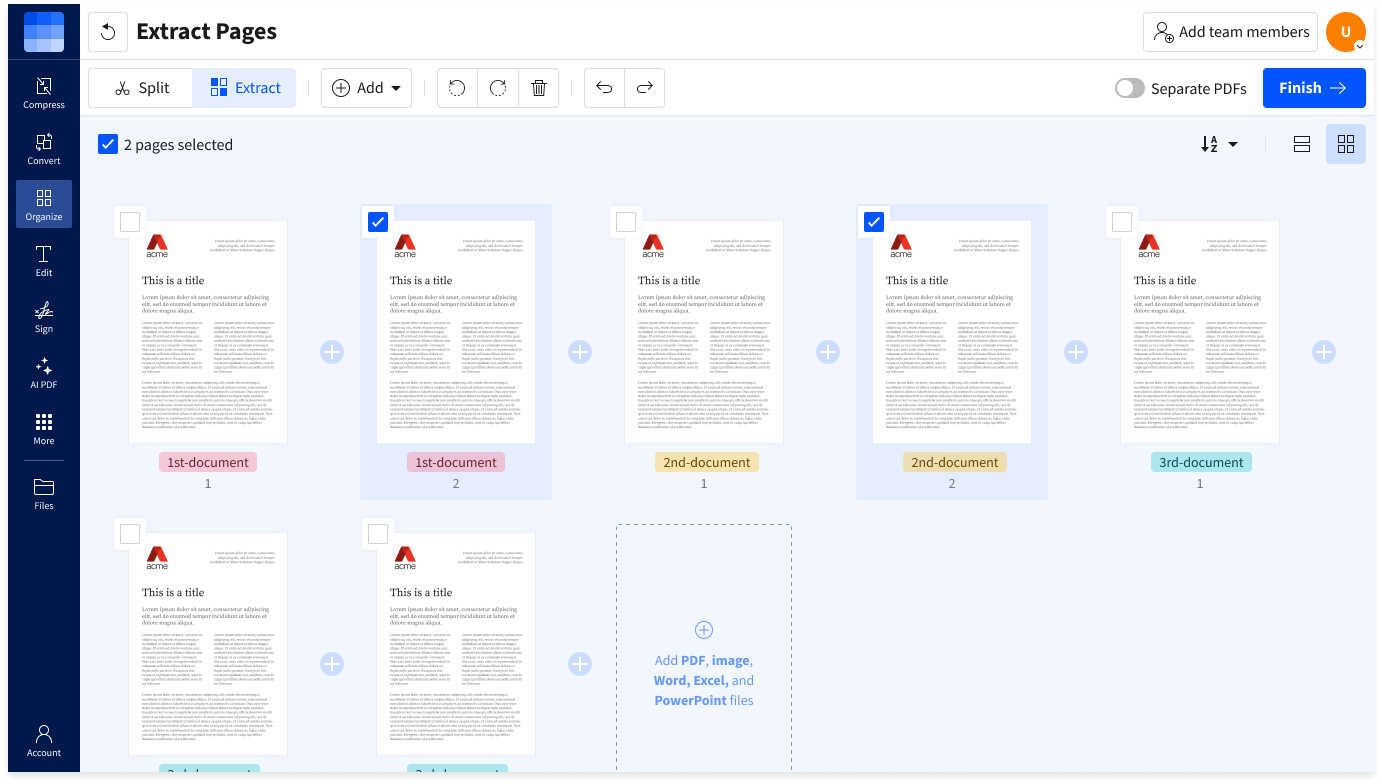
- Import or drag & drop your file to our Extract PDF Pages tool.
- Tick the box for the pages you want to extract.
- Toggle to extract pages as a single PDF or separate PDFs.
- Click “Finish” to extract your PDF pages.
- Download your extracted PDF pages when ready—done!
FAQs About Our PDF Extract Tool
Can I use the Extract PDF pages tool with my whole team?
Of course. We offer Team and Pro plans that unlock unlimited access to all of our tools and features. You’ll also get other benefits, like flexible payment options and priority customer support. If you have additional needs or questions, get in touch with our sales team to create the plan that works for you.
How do I separate pages from a PDF?
With the Smallpdf Extract PDF tool, you can easily separate and extract pages from a PDF. Just upload your documents to get started, click the pages you want to extract, apply other options, then export your selection as a new PDF that includes only the pages you need. You can also export as a JPG, Excel, PowerPoint, or Word doc.
Is my data safe and private when using the Extract PDF tool?
You can count on your data being safely processed and only seen by you. We’re GDPR compliant, with advanced TLS encryption and ISO/IEC certification. With all Smallpdf tools, the entire process is fully encrypted for end-to-end security. So rest assured your documents are for your eyes only.