Merge PDF
Combine multiple PDFs into a single, professionally looking document, then rearrange or remove pages until everything is where it should be. Smallpdf Pro lets you merge as many files as you need on a secure Swiss platform used by over a billion users.
 ISO/IEC 27001
 GDPR
GDPR CCPA
CCPA nFADP
nFADP
- 5MPDFs edited monthly
- 1B+Users worldwide
- 10K+Business teams
- 2013Trusted since
- +40PDF tools
 4.4
4.4 4.6
4.6 4.6
4.6
Get both Smallpdf and Sign.com with one subscription.
A Smarter Way to Merge PDFs Online

Simple Way to Combine PDFs
With our Merge PDF tool, combining multiple files into one document is quick and effortless. Simply upload your PDFs, and our tool takes care of the rest. No hidden steps and no installation needed.
Secure Online PDF Merging
Your PDFs are encrypted using TLS and automatically deleted from our servers after one hour. For more details, check out our privacy policy.
Works on Any Device
Merge multiple PDFs without installing any software. Combine PDF documents seamlessly on Mac, Windows, Linux, or mobile. Prefer offline? Use our Windows app on your computer for fast and efficient merging anytime.
Preview and Organize with Thumbnails
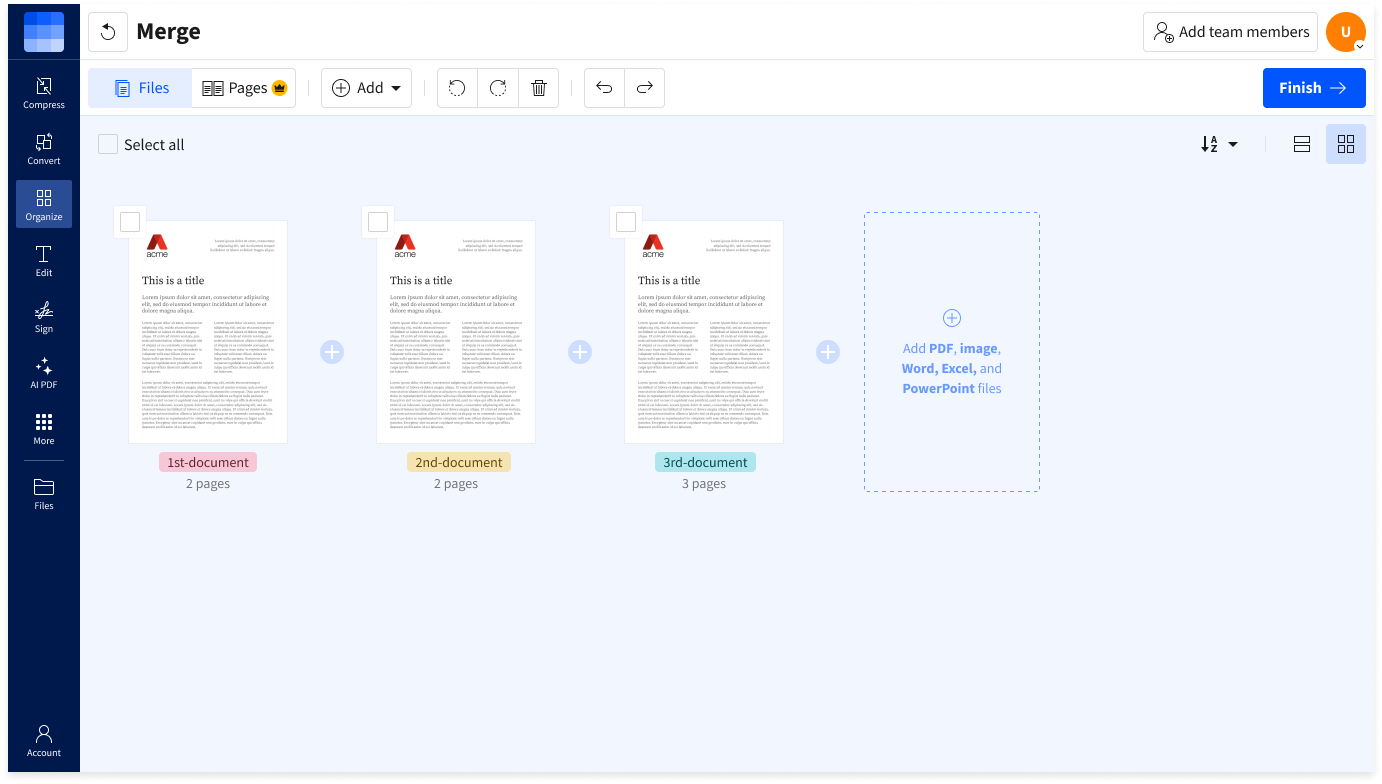
Upload your PDFs, and we’ll show you a preview. Rearrange PDF pages into the desired order, delete what you don’t need, or add more files before merging. It’s quick, simple, and fully customizable to suit your needs.
Reliable PDF Merging
Say goodbye to expensive software—Smallpdf makes combining PDFs simple and secure. Your file is protected with industry-standard TLS encryption, so you can confidently merge PDFs into a single file, knowing your data stays safe and private.
Cloud-Based Processing
Our online PDF merger is cloud-based, saving your device’s resources and giving you the freedom to merge PDFs from anywhere, anytime.
How to Merge PDF Files Online
- Drag & drop your file into our PDF combiner.
- Add extra files if needed: PDFs, images, or other file types.
- Rearrange and rotate the pages as necessary.
- Hit ‘Finish’ to combine your files into a single PDF.
- Download, save to Google Drive, or share your merged file.
Merge PDF FAQs
What file formats are supported for merging?
You can combine PDF documents with other PDFs, Word, Excel, and image files like JPG and PNG.
Is it possible to merge PDF and JPG files together?
Yes! You can combine your PDFs and JPGs into a single file by uploading them to the Merge PDF tool. Just upload all your files, rearrange the pages as needed, and then merge them into a single file.
How can I reduce the size of a merged PDF?
Combine your PDFs, then reduce the file size without losing quality using our Compress PDF tool.
What’s the best way to combine PDF files offline?
Stay productive offline by using the Smallpdf Windows app. It allows you to securely merge, edit, and organize PDFs directly on your PC, even without an internet connection.
Is it possible to combine PDF files directly in Google Drive?
Although Google Drive lacks a built-in merge function, you can use Smallpdf's Merge PDF tool to combine your PDFs and then save them directly to your Google Drive.