How to Convert eBooks to PDF
Convert your eBook files to PDF with Smallpdf and keep your formatting, images, and layout consistent on any device.
More on PDF Converter
More on Edit PDF
Ebook Tool & Guides
Need to convert your eBook files to PDF?
With Smallpdf, you can easily convert EPUB, MOBI, AZW3, FB2, and DOCX eBooks into PDF. Simply upload your file, convert it online, and get a secure, universal PDF you can read, share, or print anywhere.
We’ll cover everything in this guide. Here’s how to start.
Convert eBook to PDF (Quick-Start Guide)
Start here: Use the converter below to upload your eBook file and download it as a PDF.
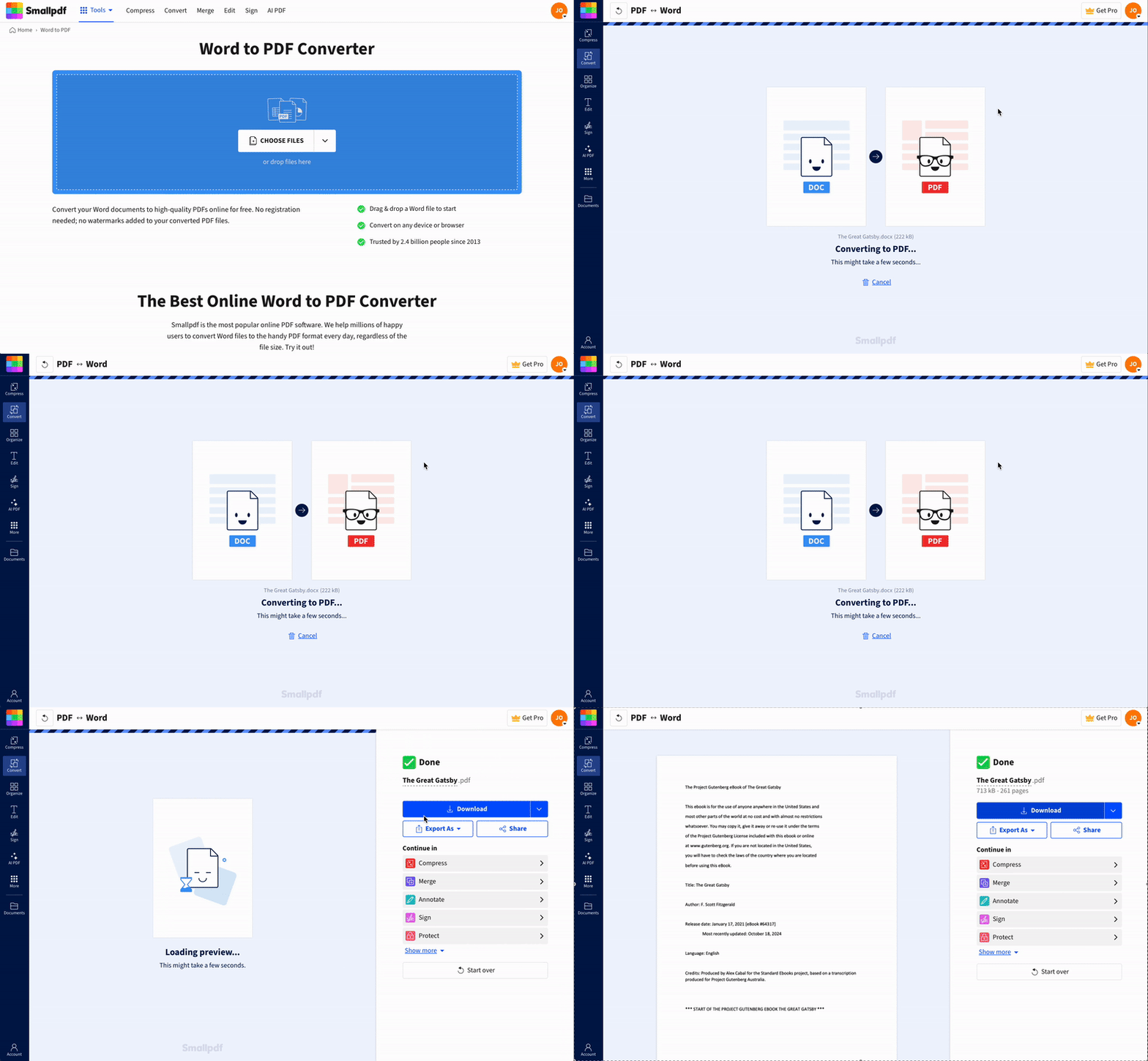
How to Convert eBooks to PDF Online: Step-by-Step Guide
You can convert your eBook files into PDFs using our online converter in a quick, guided process.
Here’s how:
Step 1. Upload Your eBook File
Upload your file from your device, Google Drive, Dropbox, or OneDrive. Drag and drop works as well.
Step 2. Let Smallpdf Convert the File
Your eBook converts automatically, and most files finish within seconds.
Step 3. Download Your PDF
Download your PDF or send it back to cloud storage. If you want to refine the file, move into Edit PDF, Compress PDF, or Merge PDF.
Supported eBook Formats
Our online converter supports these popular eBook formats:
EPUB (the most common open eBook format)
MOBI
AZW and AZW3
FB2
DOCX files containing eBooks
You can also convert multiple eBooks at once using our batch conversion feature. It's a Pro feature, but you can try it for free with a 7-day trial.
Why Convert an eBook to PDF
Converting an eBook to PDF gives you a stable file you can read, share, and print anywhere.
Universal compatibility: PDFs open on phones, tablets, laptops, and e-readers.
Preserved formatting: Fonts, images, and layout stay consistent on every device.
Easy sharing: Send PDFs by email or cloud storage with no format issues.
Print-ready: Pages stay aligned, so chapters and images print cleanly.
Annotation support: Add notes, highlights, and bookmarks across all PDF readers.
3 Alternative Methods to Convert eBooks to PDF
While online conversion is the quickest method, you have other options depending on your needs.
1. Save as PDF from Reading Apps
Many eBook reading apps offer a “Save as PDF” or “Export as PDF” option:
Open your eBook in the reading app
Look for export or sharing options in the menu
Select “Save as PDF” if available
This works best for EPUB and MOBI files already optimized for reading.
2. Print to PDF Option
Due to Digital Rights Management (DRM) protection, not all eBooks are printable. But if your eBook is in a format you can open in a web browser or document viewer, you may be able to use the “Print” option to save this file as a PDF.
Here's how:
Open your eBook in a compatible application.
Access the print dialog by pressing Ctrl+P (on Windows) or Command+P (on Mac).
Look for a printer option labeled “Print to PDF” or “Save as PDF.”
Choose that option, select your destination folder, and save the file.
This method works only with files that do not contain DRM protection.
3. Desktop Software Solutions
Calibre is a free, open-source eBook management program that lets users convert eBooks to various formats, including PDF.
Here's how you can use Calibre to convert eBook to PDF format:
Download and install Calibre.
Open Calibre and add an eBook by clicking on the “Add books” button.
Select your eBook and click on the “Convert books” button.
In the conversion window, select “PDF” as the output format and adjust any settings as needed.
Click “OK” to start the conversion process. Once completed, the PDF file will be saved in your Calibre library.
Desktop software works well for bulk conversions or when you need advanced formatting control, but online tools are faster for individual files.
Troubleshooting Common Conversion Issues
Smallpdf handles most conversions smoothly, but a few issues may appear depending on the source file.
1. The eBook does not upload
Check that the file format is EPUB, MOBI, AZW, AZW3, FB2, or DOCX. If the file size is unusually large, try compressing it first.
2. The PDF exports with missing images
Some eBooks embed images with non-standard encoding. In this case, try re-exporting from a reading app or use the desktop method.
3. The file cannot be converted
This usually indicates DRM protection. DRM blocks copying and conversion, and the file must remain inside its original reading environment.
Legal Considerations When Converting eBooks to PDF
You can convert eBooks you own for personal use. Converting or distributing copyrighted eBooks for others violates copyright laws. DRM-protected files cannot be converted because the protection prevents copying or reformatting the text.
Is Converting eBooks to PDF Safe?
Smallpdf secures every upload with 256-bit SSL encryption. All files delete automatically after one hour, and we never access your documents. Your conversion stays private and fully protected under GDPR-compliant data handling.
Edit and Organize Your PDF eBooks with Smallpdf
Once your eBook becomes a PDF, you can refine it with our built-in features:
Compress: Reduce file size without losing quality.
Merge: Combine multiple books into one file.
Split: Extract specific chapters or sections.
Edit: Add notes and highlights for better reading.
Protect: Add password security to sensitive documents.
These features help you prepare, store, and personalize your digital library in one place.
Start Converting eBooks to PDF Today
Smallpdf turns your eBooks into universal PDFs that read cleanly on any device. Convert your files online, preserve the layout, and continue editing with built-in features.
Start your free trial to access every feature and convert as many eBooks as you need.
Frequently Asked Questions
Can I convert Kindle books to PDF?
You can convert DRM-free Kindle books to PDF, but most purchased Kindle books have DRM protection that prevents conversion for copyright reasons.What eBook formats can I convert to PDF?
Our converter supports EPUB, MOBI, AZW, AZW3, FB2, and DOCX files, with EPUB being the most commonly supported open eBook format.Is it legal to convert eBooks to PDF?
Converting eBooks you own for personal use is generally legal, but distributing converted copyrighted content violates copyright law.Can I convert DRM-protected eBooks?
No, Digital Rights Management (DRM) protection prevents conversion to maintain publisher copyright control.How do I convert multiple eBooks at once?
Use our batch conversion feature by selecting multiple files during upload—perfect for converting your entire library efficiently.Can I convert a physical book to PDF?
You'll need to scan physical books first, then use our image-to-PDF converter to create a searchable PDF document.Convert eBooks to PDF easily using Smallpdf Pro
