- Home
- ›Crop PDF
Crop PDF
Crop PDF pages online for free in seconds. Upload your file, trim unwanted margins on one page or across the whole document, and download your cropped PDF. No software downloads, no account creation required.
- Crop any PDF in seconds—no sign-up required
- Works on Mac, Windows, iOS, Android, and Linux
- Trusted by over 1 billion users since 2013
Crop PDFs for a Cleaner, More Professional Look
Trim unwanted margins or unneeded areas from your document with our free online PDF cropper. Whether you’re preparing a report or optimizing a scanned document, our Crop PDF tool makes it quick and simple.
Precise Cropping in Seconds
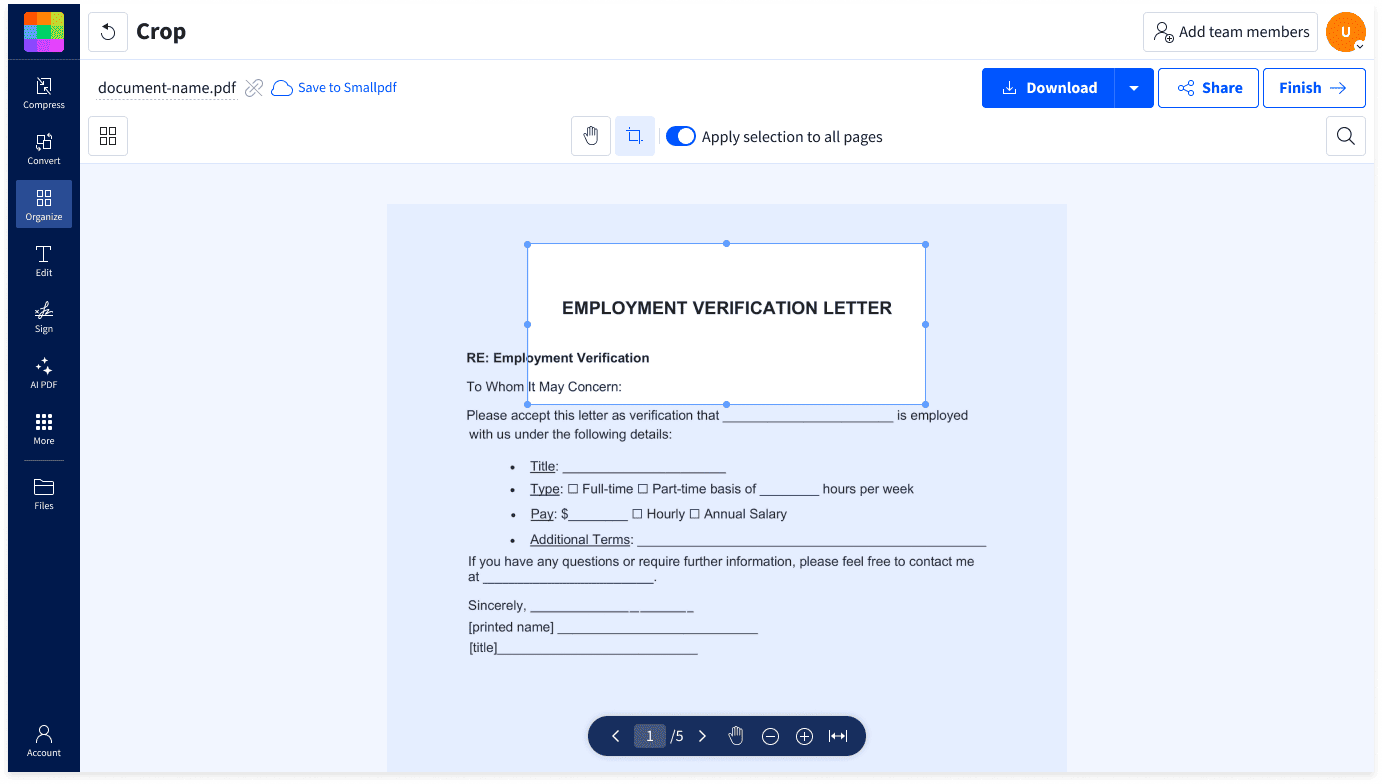
Drag to select the area of your PDF you want to keep, then remove the rest with a simple click. Your changes are fast, clean, and accurate.

Crop One Page, or All at Once
Save time by cropping a single page, or applying the same crop to your entire PDF. Perfect for cleaning up scanned documents or multi-page files fast.

Integrated With Your PDF Workflow
After cropping, move on to editing, signing, compressing, or converting without leaving Smallpdf. Everything stays in one secure, easy-to-use workspace.

How To Crop PDF Pages Online for Free
- Upload your PDF into the Crop PDF tool.
- Toggle to crop one page, or all pages at once.
- Drag to select the area you want to keep.
- Click the check mark to confirm your selection.
- Click ‘Finish’ to download your cropped PDF, or edit further with 40+ tools.
A Quicker Way to Crop PDFs Online

Crop PDFs in Your Browser
Open Crop PDF in your browser, upload your file, and select the area you want to keep. No downloads or complex setup.
Works on Any Device
Use Crop PDF on Mac, Windows, Linux, iOS, or Android. Your trimming tools are always accessible, no matter what device you’re on.
Custom Crop for Any Page
Crop one page or the whole document in a single action. Trim margins or remove white space by simply flipping the toggle, making your selection, and watching unwanted areas disappear.
Perfect for Scanned Documents
Remove scanner shadows, skewed edges, or distracting backgrounds in a snap. Worry less when scanning, knowing it’s easy to clean up afterward.
Professional, Polished Output
Your cropped PDFs retain quality, layout, and formatting. Files are ready to share, present, or archive without extra edits.
Safe From Start to Finish
TLS encryption, GDPR compliance, and ISO/IEC 27001 certification keep your data secure. Files are auto-deleted after one hour for extra peace of mind.
Crop PDF FAQs
Can I crop just one page of a PDF?
Yes! Our online PDF cropper lets you trim a single page or multiple pages at once. Just flip the toggle to pick the option you need.
Will cropping affect my PDF’s quality?
Not at all. Cropping only removes unwanted areas. Your text, images, and formatting stay crisp and looking sharp.
Is the Crop PDF tool free to use?
Yes, you can crop PDFs for free! There are some usage limits for free users, but that doesn’t stop you from trying it out. Upgrading to Pro gives you unlimited cropping, editing, and access to 40+ PDF tools.
Can I crop scanned documents?
Absolutely. It’s one of the main reasons we made this tool. Easily crop out scanner marks, shadows, or unnecessary backgrounds to create cleaner documents.
Is my file secure while using this tool?
Yes. Files are encrypted during processing and automatically deleted after one hour. We’re also GDPR-compliant and ISO/IEC 27001-certified, so you can rest assured that your docs are safe and for your eyes only.