- Home
- ›
- ›Difference Between Digital & Electronic Signatures
Difference Between Digital & Electronic Signatures
Electronically vs digitally signed can look similar, but the security behind them isn’t. Here’s how to pick the right signature for your PDF.
More on Sign PDF
More on Edit PDF
PDF Tips & Resources
If you’re signing contracts, approvals, or HR docs online, you’ll see both terms everywhere. People often use them interchangeably, but they don’t mean the same thing.
Electronic signatures focus on showing intent to sign, while digital signatures add cryptographic proof that helps verify identity and detect changes.
To help you choose quickly, we’ll break down what ‘electronically vs digitally’ really means, when each option fits best, and how to sign and verify PDFs without turning this into a technical rabbit hole.
Electronically vs Digitally: Key Differences
Here’s the practical difference most people care about.
An electronic signature is a broad category. It’s any electronic process that shows you agreed to the document, like typing your name, drawing a signature, or clicking an ‘I agree’ step.
A digital signature is a specific type of electronic signature. It uses cryptography and certificates to protect the document’s integrity, so changes after signing get detected.
A quick way to compare them:
Intent: Electronic signatures capture intent to sign. Digital signatures capture intent and add strong proof.
Tamper detection: A basic electronic signature may not flag edits. Digital signatures are designed to detect unauthorized changes.
Identity checks: Electronic signatures can be lightweight. Digital signatures typically rely on certificate-based identity checks.
Best fit: Electronic signatures work well for everyday agreements. Digital signatures fit high-risk, compliance-heavy documents.
What Counts as an Electronic Signature?
Think of ‘electronic signature’ as the umbrella term.
In the U.S., the ESIGN Act treats an electronic signature as a valid way to sign if the process shows intent and the parties agree to transact electronically.
In practice, electronic signatures often look like this:
A typed name in a signature box
A drawn signature on a trackpad or phone screen
A scanned signature image placed on a PDF
A click-to-consent step paired with a record of the action
Electronic signatures win on speed. If you’re signing a routine approval, a simple electronic signature can be enough, as long as it matches your organization’s requirements and local rules.
What Makes a Signature ‘Digital?’
Digital signatures add cryptography. That’s the real difference.
In plain English, a digital signature creates a math-based fingerprint of the document at the time of signing. If someone edits the PDF later, the fingerprint won’t match, and the signature should show as invalid in signature validation checks.
Digital signatures usually depend on public key cryptography, which uses a private key to sign and a public key to verify. The takeaway is that digital signatures are built to provide:
Authenticity: The signature can be linked to the signer.
Integrity: Edits after signing can be detected.
Non-repudiation: The signer can’t easily deny signing later.
Electronically vs Digitally Under eIDAS in Europe
If you work in the EU, you’ll also see signature levels under eIDAS.
eIDAS defines electronic signatures broadly, then distinguishes between common levels like simple, advanced, and qualified. The higher the level, the stricter the identity and security requirements.
A helpful way to interpret this:
Simple electronic signatures are the everyday sign-on-screen style.
Advanced electronic signatures add stronger controls that link the signer to the signature and help detect changes.
Qualified electronic signatures have specific legal status requirements and typically rely on qualified trust service providers.
If you’re not sure which level your document needs, the safest move is to follow your company policy or local legal guidance for that document type.
Electronic vs Digital Sign: Use Cases
Most signature decisions come down to risk, not preference.
When an Electronic Signature Is Usually Enough
Electronic signatures fit day-to-day agreements where speed matters and the risk is manageable:
Vendor onboarding forms and basic service agreements
Internal approvals and HR acknowledgments
Low-value sales orders and routine client sign-offs
When a Digital Signature Is a Better Match
Use digital signatures when the document has higher stakes or stricter compliance:
Financial agreements and regulated filings
Government-related documentation
Contracts where you need strong tamper evidence and signer verification
Electronic vs Digital Sign: Legal Considerations
Most places treat electronic signatures as legally valid if the process reliably captures intent and keeps a record that can stand up to scrutiny. That’s the common thread across major frameworks like ESIGN (U.S.) and eIDAS (EU).
Two practical tips help in almost every jurisdiction:
Keep a clear record of who signed, what they signed, and when.
Use the right signature strength for the document’s risk level.
If you’re signing something high-value, regulated, or cross-border, it’s smart to confirm the required signature type before you send it out.
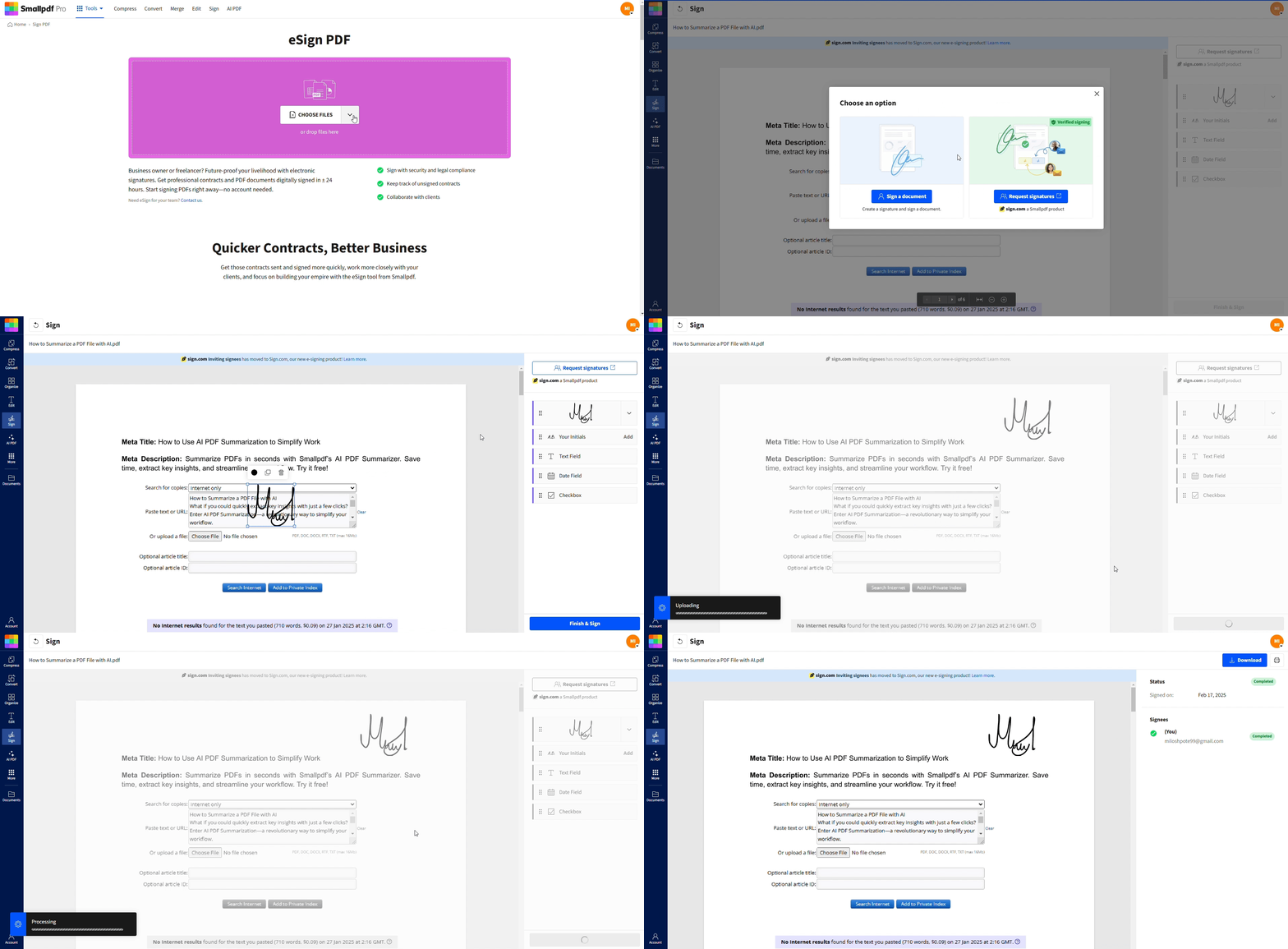
How To Sign a PDF With Smallpdf
If you want a straightforward signing flow for PDFs, you can sign or request signatures with Smallpdf eSign in your browser. You can also upload from Google Drive, Dropbox, or OneDrive when that’s easier than pulling files from your device.
Step 1: Upload Your PDF
Open Smallpdf eSign, then drag and drop your PDF or click “Choose Files.” You’ll see your document load in the editor so you can place fields exactly where they belong.
Step 2: Add Your Signature or Signature Fields
Click where the signature should appear, then add your signature. If someone else needs to sign, add a signature field for them and enter their email in the send flow.
Step 3: Finish and Download
Click “Finish,” then download the signed PDF. Keep the final file together with your agreement history so you have the full paper trail if you need it later.
How To Choose Between Digital and Electronic Signatures
Start with three questions. You’ll get to the right answer quickly.
1. Risk Level
If the document has high financial risk, legal exposure, or strict rules, lean toward a digital signature. If it’s a routine agreement, an electronic signature is often enough.
Examples that usually fit electronic signatures:
Employee onboarding forms
Standard NDAs
Purchase orders and invoices
Internal approvals
Examples that often need digital signatures:
Regulated finance documents
Certain healthcare records
Government or compliance filings
High-liability contracts
2. Regulatory Requirements
The digital and electronic signatures legality, depends on different signature levels. Some industries and countries expect specific signature levels. If you’re signing across borders, check the rules where the signer is located and where the agreement will be enforced.
3. Proof Needs in a Dispute
Ask yourself how you’d prove three things later: Who signed, when they signed, and that the document didn’t change after signing. Digital signatures tend to score higher on integrity proof, especially when paired with strong timestamping and validation.
Real-World Scenarios to Make the Choice Obvious
A simple scenario can do more than a definition.
If you’re hiring a contractor and you need a quick signature before a start date, an electronic signature is usually the practical choice. You want speed, and the agreement is easy to replace if you catch an error.
If you’re signing a loan package with strict banking rules, you may need a digital signature or an EU-qualified process. The stakes are higher, and validation matters long after signing day.
If you’re collecting signatures from a team on an internal policy update, electronic signatures keep the process moving. The main goal is confirmation, not courtroom proof.
If you’re filing official documents with a government portal, check the portal’s rules first. Some accept basic electronic signatures, and others require certificate-backed digital signing.
How to Sign a PDF With Smallpdf eSign
Once you know which signature level you need, the signing steps should feel straightforward.
Smallpdf signing runs in your browser, and we protect file transfers with TLS encryption. We’re also ISO/IEC 27001 certified and GDPR compliant.
You can upload from your device, Google Drive, Dropbox, or OneDrive, then download the signed file back to your device when you’re done.
Step 1: Upload Your Document
Open Smallpdf Sign PDF, then upload your file. You can also upload Word, Excel, PowerPoint, or images, and we’ll convert them to PDF for signing.
Step 2: Add Signature Fields
Place signature fields, initials, and dates where they belong. If you’re sending the document to someone else, add fields for each signer, so nobody has to guess where to sign.
Step 3: Sign or Send to Recipients
Sign the document yourself, or send it to recipients so they can sign from their own device. For multi-signer workflows, an audit-friendly timeline of activity is what keeps the process clear later.
Step 4: Download the Signed PDF
Download the signed PDF and store it where your team normally keeps signed agreements. If you plan to share it, open it once in a standard PDF reader to confirm everything looks right.
If you need Pro features for heavier workflows, Smallpdf offers a 7-day free trial, and you can cancel any time.
Frequently Asked Questions
Is ‘electronically signed’ the same as ‘digitally signed?’
Not always. ‘Electronically signed’ is the broader term. ‘Digitally signed’ typically implies cryptographic protection and certificate-based verification.Which one is more secure?
Digital signatures are generally more secure because they’re designed to detect changes and verify the signer using cryptography.Are electronic signatures legally binding?
In many cases, yes, as long as the process captures intent and meets legal and process requirements in your jurisdiction.Can a PDF be edited after it’s digitally signed?
A PDF can still be edited, but edits often invalidate the digital signature.How do I know which type my company needs?
Start with the document type and risk. Routine approvals often use electronic signatures. Regulated or high-stakes contracts may require digital signatures or higher-assurance signature levels under eIDAS.Can I sign from my phone?
Yes. You can download the Smallpdf mobile app and sign your PDF even faster.Handle signature documents faster with Smallpdf
