- Home
- ›
- ›Official vs Unofficial Transcript: Definitions, Differences, & More
Official vs Unofficial Transcript: Definitions, Differences, & More
Learn when you need an official transcript versus an unofficial one, plus how to request both types and manage your academic records as PDFs.
PDF Tips & Resources
More on Edit PDF
PDF Reading Tools & Guides
Before you send transcripts for school, work, or personal records, it helps to know the difference between official and unofficial versions.
An official transcript is a certified, sealed document sent directly from your school to employers or other institutions.
An unofficial transcript shows the same grades and courses but comes without certification—you can print it yourself from your student portal.
Here are the key differences at a glance:
Certification: Official transcripts have seals and signatures, unofficial ones don’t.
Delivery: Official transcripts are sent directly by your school, but you handle unofficial ones yourself.
Cost: Official transcripts usually cost a fee, unofficial ones are typically free.
Use cases: Official for formal applications, unofficial for personal reference.
Acceptance: Only official transcripts are accepted for admissions and job applications.
In this guide, we’ll break down what sets them apart and walk you through how to manage both types as PDFs using Smallpdf’s easy-to-use tools.
Want to Optimize Your Transcripts With Smallpdf?
What Is an Official Transcript?
Think of an official transcript as your school’s verified record of everything you’ve accomplished. It’s not just a printout—it’s the real thing.
This version is prepared by your registrar and sealed with the school’s stamp of approval. It’s often sent directly to universities, employers, or licensing bodies, because it’s trusted as accurate and untampered.
What makes it official:
Stamped and signed - Comes with the registrar’s signature and the school’s seal or watermark
Handled securely - Delivered in a sealed envelope or sent through a secure digital system like Parchment or the National Student Clearinghouse
Full academic breakdown - Lists all your completed courses, grades, credits, and sometimes your GPA or honors
You don’t usually handle it yourself - If opened or printed outside the system, it’s no longer considered official
When to Use an Official Transcript (and When an Unofficial Is Okay)
You’ll usually need an official transcript when the stakes are high. Think college applications, credit transfers, or showing a future employer that you really did finish your degree.
When you need an official transcript:
College or graduate school admissions
Credit transfer evaluations
Job applications requiring degree verification
Professional licensing applications
Immigration or visa applications
Scholarship applications
When an unofficial transcript works:
Academic advising appointments
Preliminary application screenings
Personal record keeping
Planning course transfers (before applying officially)
Early job application discussions
In most cases, the school or company won’t take one you printed yourself for official purposes. They want it straight from the source—sealed, signed, and untouched.
What Is an Unofficial Transcript?
An unofficial transcript shows the same classes, grades, and credits as the official version—it just doesn’t come with a seal or signature from your school.
You can usually grab it yourself through your student portal. No formal request, no fee. It’s great when you just need to check your progress or share details in a casual setting, like an advising session or an early job application.
Here’s what makes it different:
You download it - Most students print or save it straight from their school’s online system.
No seal or signature - It’s not certified, so it doesn’t carry the same weight in formal situations.
Quick and flexible - It’s often saved as a PDF or printed on plain paper.
Just remember: it’s useful for your own records, but it won’t replace the official version when schools or employers ask for the real thing.
Common Uses for an Unofficial Transcript
Unofficial transcripts are ideal for preliminary applications, academic advising, or keeping personal records up to date. They’re easy to get and are usually free, making them convenient for personal use.
If you’re wondering how to get an unofficial transcript, log in to your school’s student portal and look for the transcript section to download it as a PDF.
Official vs Unofficial Transcript: Key Differences
| Feature | Official Transcript | Unofficial Transcript |
|---|---|---|
| Purpose | Formal applications (college, graduate school, jobs) and credit transfers | Personal use (checking grades, academic advising) |
| Appearance | Sealed envelope or secure digital delivery from the registrar’s office. Includes a seal and signature. | Plain paper, no college seal or registrar’s signature |
| Delivery | Sent directly from the institution to the recipient (mail or secure digital service) | Delivered directly to the student (can be printed, accessed online, or picked up) |
| Cost | Often requires a fee | Usually free |
| Authenticity | Considered authentic and tamper-proof by the recipient | Not considered authentic by third parties |
| How to Get | Request it from the registrar’s office, specify the recipient’s address | Access it through the student portal on the institution’s website |
How to Get Your Transcripts
Getting your transcripts doesn’t have to be complicated. Here’s how to access both types, whether you need them for yourself or for official purposes.
How to Access Your Unofficial Transcript
Log into your school’s student portal using your credentials.
Navigate to the “Academic Records” or “Transcript” section.
Select “View Unofficial Transcript” or similar option.
Choose to view online or download as a PDF.
Save or print the file for your records.
Double-check that all your courses and grades appear correctly.
How to Order an Official Transcript
Visit your school’s registrar website or student portal.
Look for “Request Official Transcript” or “Transcript Services.”
Provide recipient details (name, address, or email for digital delivery).
Select delivery method (mail, secure email, or third-party service).
Pay any required fees (usually $5-15 per transcript).
Allow processing time (typically 3-10 business days).
Handle Transcript PDFs the Easy Way (with Smallpdf)
Managing and submitting transcript files as PDFs is a smart and efficient way to keep your records organized and ready to send. At Smallpdf, we offer tools to help you process transcript files in just a few clicks.
Important: Never alter the content of an official transcript PDF—doing so invalidates its official status.
Compress Your Transcript for Easy Upload
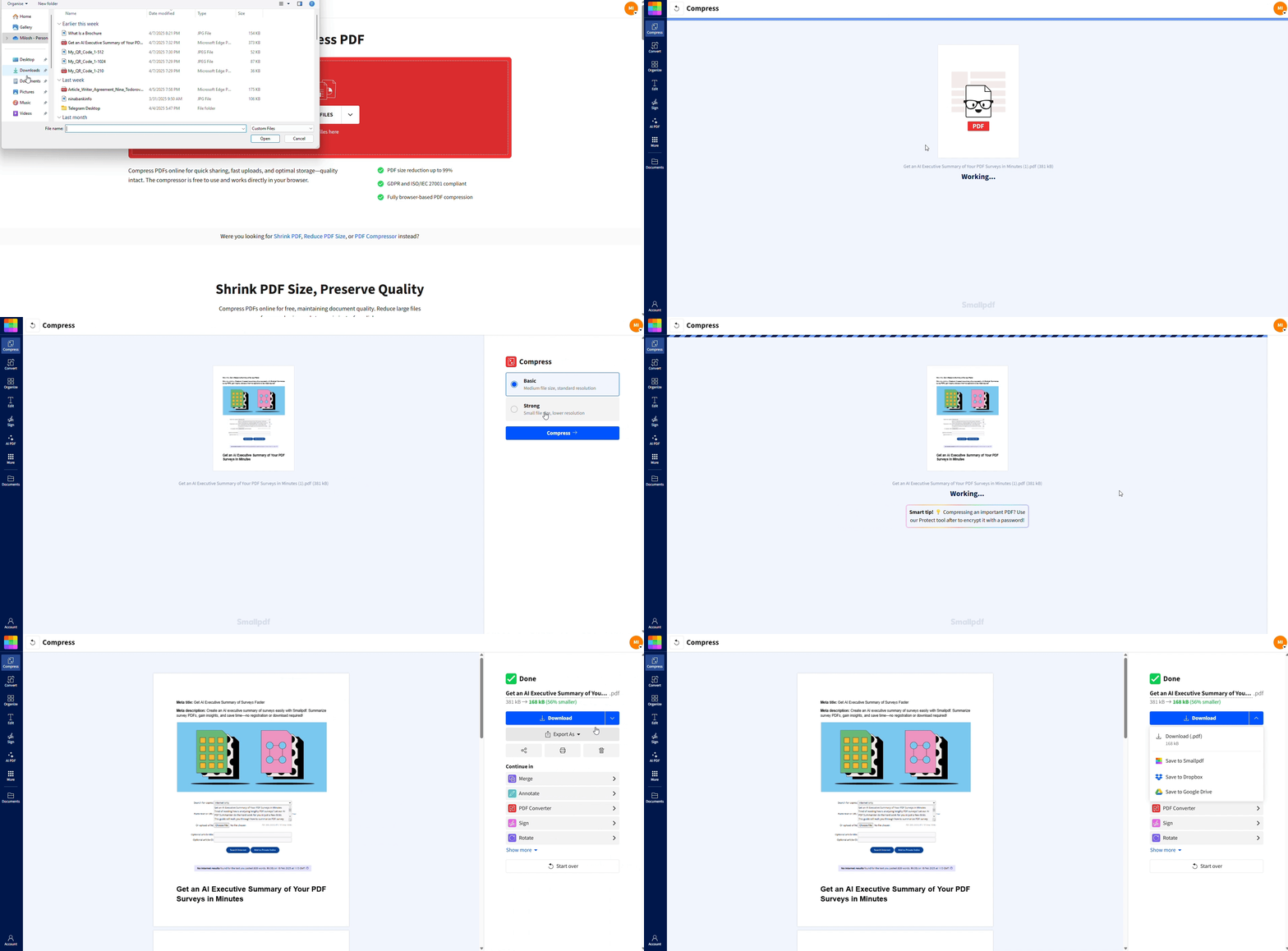
Large files can slow down uploads, especially when submitting to schools or job portals. Compressing your transcript reduces its size without losing quality.
Head over to Compress PDF.
2. Drag and drop your transcript or upload it from your device.
3. Get a smaller, share-ready file in seconds.
Protect Your Transcript with a Password
Keep sensitive academic details private by securing your transcript with a password.
Visit Protect PDF.
2. Upload your transcript, set a strong password, and hit “Encrypt.”
3. Share your secure file confidently.
Convert Your Transcript to PDF
If your transcript is a Word file, image, or another format, convert it to PDF for consistent formatting.
Head to Convert to PDF.
2. Upload your file, and we’ll transform it into a high-quality PDF.
Quick transcript management tips:
Always check if the institution requires an official transcript or if an unofficial one will suffice.
Store digital versions of your transcripts in a secure location for easy access.
Make sure your unofficial transcript is current, especially before advising sessions or applications.
Manage Your Transcripts with Confidence
The difference between official and unofficial transcripts lies in their certification and purpose. While official transcripts are indispensable for formal applications, unofficial transcripts are perfect for personal use.
Need help managing your transcript files? Start your free trial to access all Smallpdf tools.
Frequently Asked Questions
What does “official transcript” mean?
An official transcript is a certified academic record that includes your school’s seal, registrar’s signature, and secure delivery method to verify its authenticity.How does an official transcript differ from a regular transcript?
An official transcript is sealed and certified by your institution, while a regular (unofficial) transcript is a plain copy you can print yourself without certification.What is the purpose of an unofficial transcript?
Unofficial transcripts are used for personal reference, academic advising, preliminary applications, and situations where certification isn’t required.Do jobs want official or unofficial transcripts?
Most employers require official transcripts for degree verification, especially for positions requiring specific educational qualifications.Can I send an unofficial transcript to a college?
Colleges typically require official transcripts for admissions and credit transfers, though unofficial transcripts may work for preliminary evaluations or advising.How long does it take to get an official transcript?
Processing times vary by institution but typically range from 3-10 business days, with digital delivery being faster than mail.Convert, protect, and share transcript PDFs with Smallpdf Pro
