PDF Maker–Make PDF Online in One Click
Free PDF Maker. Upload Word, Excel, PowerPoint, or image files and instantly create high-quality PDFs—no signup, no watermark, no installation.
More on PDF Converter
More on Edit PDF
More on PDF Annotator
Quick Guide to Make PDF Online in One Click
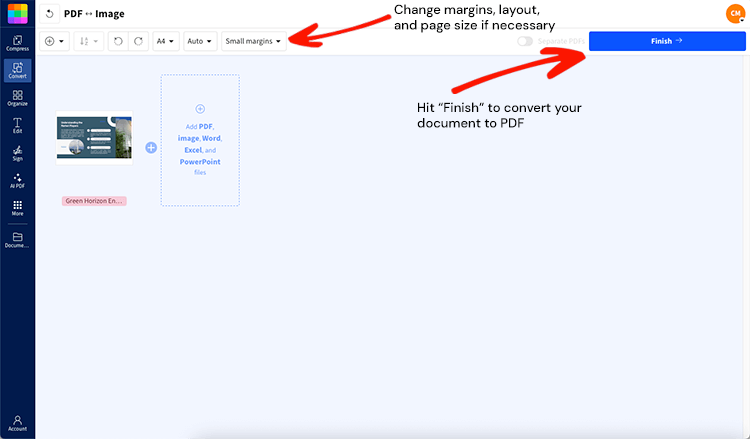
Our online PDF generator works instantly in your browser—just upload, convert, and download. Want more? With a Pro account, you can batch convert files, import directly from Google Drive, OneDrive, or Dropbox, and even make PDFs searchable with OCR. It's all built to help you do more in fewer clicks.
How to Make a PDF Online Step-by-Step
Whether you're working on desktop or mobile, you can easily create a PDF from a file in seconds—no downloads needed.
Drag and drop your file into the PDF Maker—or upload from your device, Google Drive, OneDrive, or Dropbox.
We'll convert it to a high-quality PDF in just a few seconds.
If you're uploading an image or scanned file, keep an eye out for the Smart tip! on the download screen. We'll suggest tools like PDF OCR to make your file searchable or Compress PDF to shrink the size.
Download your new PDF, ready to share, or keep editing.
Convert Office Files and Images to PDF—and Back Again
Need to turn your Word, Excel, or PowerPoint files into polished PDFs? Just upload and convert. They'll be ready to save, share, or edit in seconds with layout preservation and embedded fonts intact.
Supported File Types for PDF Creation
The PDF Converter supports a wide range of formats, including Microsoft Office documents and common image files. You can upload:
DOC / DOCX (Word)
XLS / XLSX (Excel)
PPT / PPTX (PowerPoint)
ODT, ODS, ODP (OpenDocument formats)
JPG, PNG, TIFF, BMP, GIF, HEIC, WEBP (image files)
Pro tip: If you're working with a password-protected Office file, remove the password in Word, Excel, or PowerPoint before uploading. For PDFs, try our Unlock PDF tool to remove protection before converting.
Make Searchable PDFs with OCR
Working with images or scanned documents? Use PDF OCR to create searchable PDFs with selectable text from formats like JPG, PNG, or TIFF. It's ideal for digitizing paper notes, scanning receipts, or turning printed material into editable files.
OCR isn't a magic bullet. Text embedded in images, unusual fonts, or poor scan quality can sometimes lead to minor errors. But in most cases, it's accurate enough to let you copy, search, or highlight text without retyping.
Want to reverse the process? You can convert PDFs back into Word, Excel, or PowerPoint—or extract images to reuse with our PDF to Office and PDF to JPG tools for round-trip conversion.
Do More After You Create Your PDF
There is so much more you can do with Smallpdf. With over 30 tools, you can simplify your document work and get things done faster.
Start with our popular follow-up tools. Or take your PDFs further with AI-powered features.
Popular Follow-up Tools
Batch Convert Multiple Files to PDF
If you have multiple documents in different file formats, you can still use the PDF Converter to turn them into PDFs. You just have to upload and convert one at a time.
Need to move faster? With a Pro account, you can batch-upload as many files as you like—Word, Excel, images, and more—and we'll convert them all in one go. You'll get a neatly packaged ZIP file with all your PDFs ready to download. All uploads and downloads are protected with TLS encryption to keep your documents secure
Pro tip: To save time, organize your files into folders before uploading. It makes batch conversion smoother and keeps your workflow tidy.
Make PDFs Anywhere
Smallpdf gives you the flexibility to convert files wherever you are. Our PDF creation tool is fully browser-based, so you don't need to install anything. It works across:
Windows, macOS, and Linux desktops
All major browsers, including Chrome, Firefox, Safari, and Edge
Mobile devices running iOS or Android
You can upload files from your device or use cloud import from Google Drive, Dropbox, or OneDrive for faster access and storage. Once the conversion is done, you can also save the new PDF back to any of these cloud services—no extra uploads needed.
Scan to PDF on iOS and Android
If you're on mobile, the Smallpdf Mobile App puts your favorite tools in your pocket. You can:
Scan paper documents directly to PDF with our mobile scanning feature
Convert files between formats
Compress large PDFs for sharing
Just note: while the mobile and web apps are super convenient, they still require an internet connection to process files.
No matter where you work, Smallpdf makes sure your tools are right there with you—easy, reliable, and ready when you need them.
Security and Privacy When You Make PDFs Online
Your document security matters to us. When you make PDFs online with Smallpdf, your files are protected with:
TLS encryption for all uploads and downloads
Automatic file deletion after one hour
No watermarks, even on the free version
Password protection options for sensitive documents
HTTPS connections for secure data transmission
We follow strict data retention policies and never store your files longer than necessary for processing.
Start Your Free Trial to Access All Smallpdf Tools
Ready to do more with your PDFs? Try Pro free for 7 days for batch conversions and unlimited access to all our premium features. No commitment required—cancel anytime.
FAQs About Making PDFs Online
Is Smallpdf free to make PDFs online?
Yes, you can make PDFs online free with Smallpdf—no signup required for basic conversions.Will my PDF have a watermark?
No, Smallpdf doesn't add watermarks to your PDFs, even on the free version.Is there a file size limit?
Our file size limit is very generous, and you shouldn’t have any difficulty working with even large PDFs. As a free user, you are limited to only two conversions a day.Are my files secure and how long are they stored?
Your files are encrypted with TLS and automatically deleted from our servers after one hour for maximum security.How do I keep hyperlinks clickable in my PDF?
Yes, hyperlinks remain clickable when you convert documents to PDF with Smallpdf—no extra steps needed.Happy creating, saving, editing, and converting documents, whatever it may be!
Want to Make PDF With Smallpdf?
Speed up your PDF-making flow using Pro features