- Home
- ›
- ›How to Use AI to Automatically Categorize Your PDF Data
How to Use AI to Automatically Categorize Your PDF Data
Transform PDF chaos into organized efficiency with AI tools that help you sort, categorize, and extract insights from documents in seconds.
AI Tools & Guides
More on Edit PDF
More on Word to PDF
Tired of sorting through endless PDFs? Let Smallpdf’s AI simplify your work and organize cluttered data for you in seconds!
With our AI PDF tools, you can simplify this process significantly. You can instantly sort, organize, and extract insights from your PDFs, saving you time and effort with document sorting with AI.
Why AI PDF Categorization and Document Sorting Matter
Smallpdf’s AI PDF helps you to process and manage PDFs with speed, accuracy, and minimal hassle. PDF sorting AI helps you organize similar documents and pull out important details. It makes your work easier so you can focus on what’s important.
Key Benefits of Using AI for PDFs:
Saves time by automating repetitive tasks.
Improves accuracy by reducing human errors.
Enhances organization with features like smart file management and categorization.
Simplifies tasks with intuitive tools like Chat with PDF and AI PDF Summarizer.
Scales effortlessly to handle thousands of documents without slowing down.
To see what types of documents most users process and their frequency, check our PDF statistics for detailed insights.
Now, let’s walk you through exactly how Smallpdf’s AI tools can help you achieve smarter PDF organization.
Try AI PDF Tools
How to Use AI to Categorize PDFs Step-by-Step
Ready to transform your document chaos into organized bliss? Here’s your complete workflow for AI-powered PDF categorization.
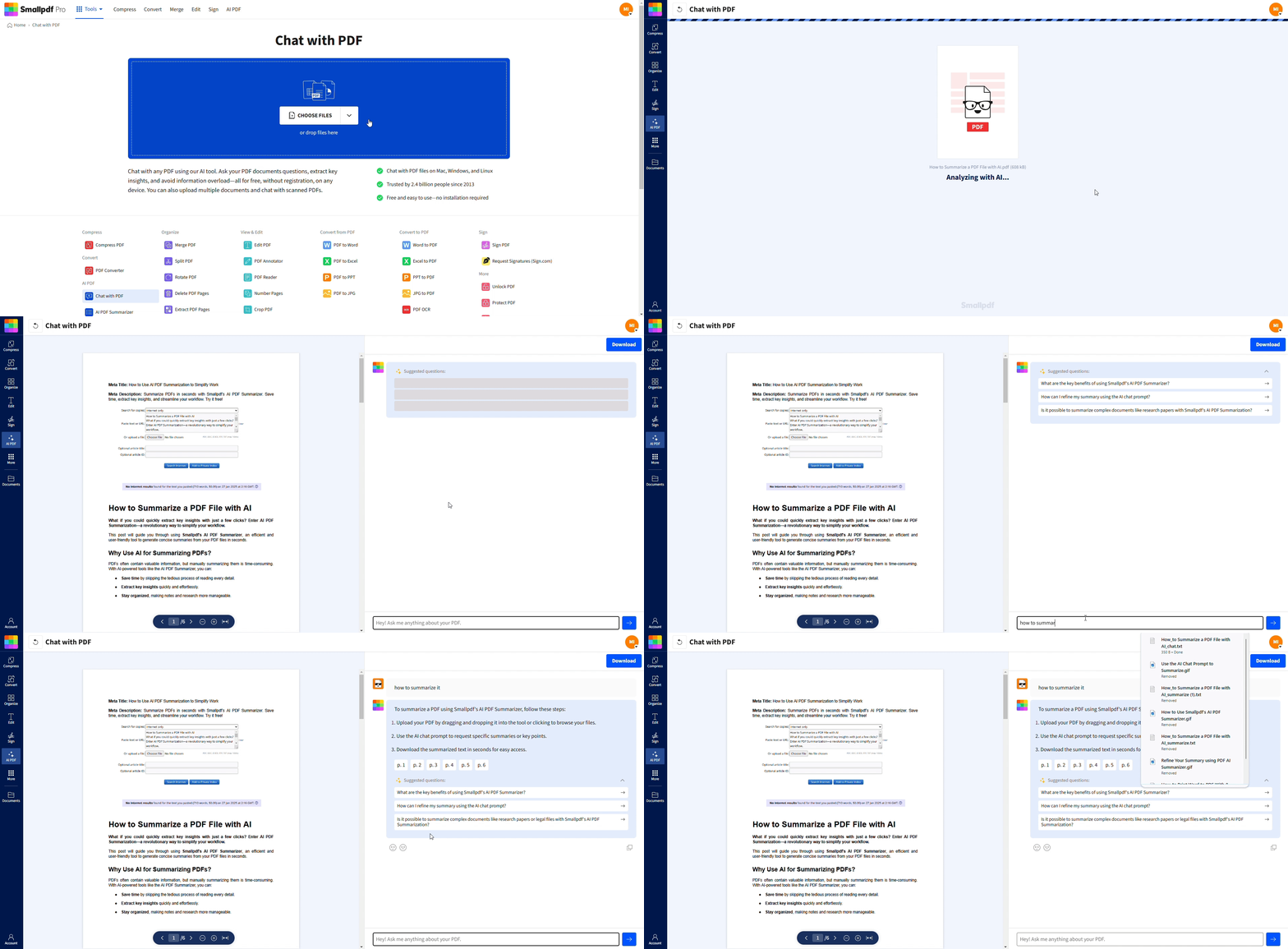
Step 1: Upload and Chat with Your PDF
This feature feels like chatting with a very smart assistant. Once your document is uploaded:
Open the Chat with PDF.
3. Enter any queries or questions you may have about the content. For example, ‘What are the key stats in this report?’ or ‘Summarize the main findings.’
4. The AI system processes your PDF and provides accurate responses. It’s as easy as having a conversation.
Step 2: Extract Key Insights with AI PDF Summarizer
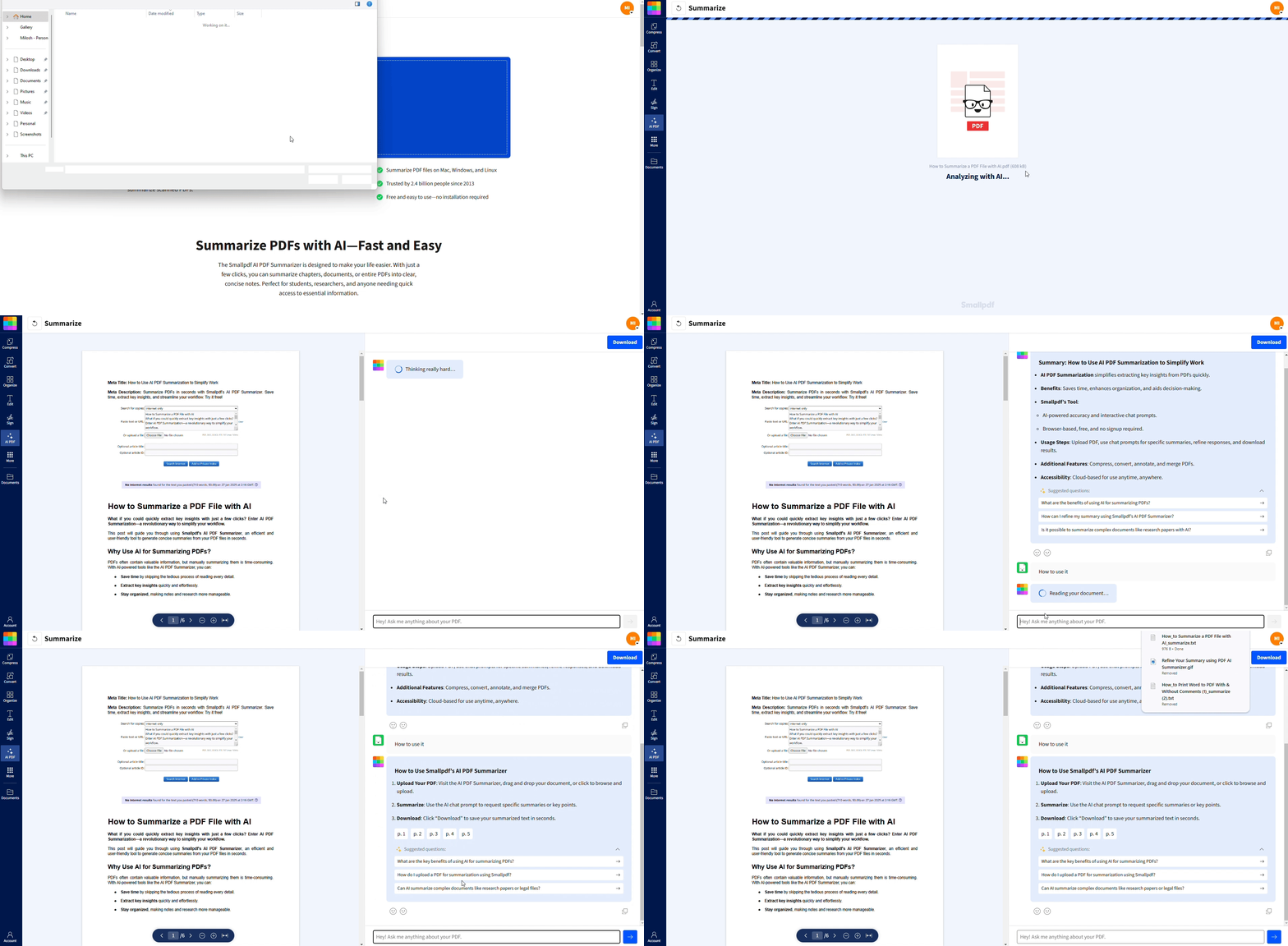
Long PDFs? No problem. Use AI PDF Summarizer to:
Highlight essential points without reading through the entire document.
Get concise summaries to help you focus only on the most critical information.
Identify document types and categories based on content themes.
This feature is perfect for research papers, financial statements, or any document overloaded with data.
Step 3: Copy, Share, and Use Your Results
Every result from the AI tools offers a click-to-copy feature. Whether you’re summarizing data or searching for specific answers, you can effortlessly transfer the output into your reports, emails, or projects—no manual retyping required.
Extracting Data from PDFs with OCR for Scanned Documents
Got scanned documents or image-based PDFs? Our OCR (Optical Character Recognition) technology transforms them into searchable, categorizable text that AI can understand and sort.
When You Need OCR for Document Categorization
OCR becomes essential when dealing with:
Scanned invoices, receipts, and financial documents
Historical records and archived paperwork
Handwritten forms and applications
Photos of documents taken with mobile devices
Faxed documents and photocopies
How Smallpdf’s OCR Works on Scanned Files
Our OCR technology uses advanced image processing to recognize text, tables, and document structure. It enhances image quality, identifies text regions, and converts visual content into machine-readable data.
The process happens automatically—just upload your scanned PDF, and our AI handles the rest. No technical knowledge required.
Tips to Improve OCR Accuracy
For best results with scanned documents:
Use high-resolution scans (300 DPI or higher).
Ensure good lighting when photographing documents.
Keep text horizontal and avoid skewed angles.
Choose clear, high-contrast originals when possible.
Your AI PDF Categorization Workflow End-to-End
Here’s how document processing flows from upload to organized output with Smallpdf’s AI pipeline:
Ingest: Upload PDFs, Images, and Office Files
Start by uploading any document format: PDFs, Word docs, images, or even PowerPoint presentations. Our system automatically detects file types and applies the right processing approach.
Supported formats include PDF, DOCX, PPTX, JPG, PNG, and more.
Understand: Summarize, Translate, and Chat
Once uploaded, AI analyzes your document’s content, structure, and context. You can ask questions, request summaries, or even translate content to understand documents in different languages.
This understanding phase helps determine the best categorization approach for your specific documents.
Organize: Rename and Sort
Once Smallpdf’s AI has helped you understand the content of each PDF, you can use those insights to organize your documents more confidently.
Rename your files with clearer titles, follow any helpful categorization cues you’ve identified during summarizing or Q&A. Then place your PDFs into the folders or filing system that works best for you or your team.
Smallpdf AI Capabilities for PDF Categorization
Our AI combines multiple technologies to deliver comprehensive document understanding and organization.
Chat with PDF for Instant Insights
Ask natural language questions about your documents: “What’s the total amount on this invoice?” or “List all the contract terms mentioned.” Get instant, accurate answers that help you understand and categorize content quickly.
Perfect for quickly identifying document types, extracting key data points, and understanding complex content.
AI PDF Summarizer for Quick Categorization
Generate concise summaries that highlight the most important information in any document. These summaries make it easy to understand content at a glance and assign appropriate categories.
Especially useful for research papers, reports, and lengthy documents where manual review would be time-consuming.
OCR for Scanned and Image-Based PDFs
Convert any visual document into searchable, editable text. Our OCR works with multiple languages and can handle various document layouts, from simple text to complex tables and forms.
Supported languages include English, Spanish, French, German, Italian, Portuguese, and many others.
Real-World AI Document Sorting Use Cases
See how different industries and professionals use AI categorization to streamline their document workflows.
Invoices and Financial Documents
Sort invoices by vendor, date, or amount. Extract key financial data like totals, tax amounts, and payment terms. Perfect for accounting teams managing hundreds of invoices monthly.
Common categories: Paid invoices, pending payments, expense reports, tax documents.
Contracts and Legal Documents
Organize legal documents by contract type, parties involved, or expiration dates. Extract important clauses, terms, and obligations for easy review and compliance tracking.
Common categories: Employment contracts, vendor agreements, NDAs, lease agreements.
Research Papers and Reports
Sort academic and business documents by topic, publication date, or research methodology. Extract abstracts, key findings, and references for literature reviews and research organization.
Common categories: Market research, academic studies, industry reports, white papers.
Document Sorting with AI Beyond PDFs
While PDFs are our specialty, Smallpdf’s AI capabilities extend to various document formats, creating a unified workflow for all your files.
Convert Office Files to PDF for Consistent Processing
Transform Word documents, PowerPoint presentations, and Excel spreadsheets into PDFs for standardized AI processing. This ensures consistent categorization results across all document types.
Our Word to PDF and other conversion tools make this seamless.
Apply OCR to Images and Scans
Turn photos of documents, screenshots, and scanned images into searchable, categorizable content. Perfect for mobile workflows where you photograph documents on the go.
Upload images directly or use our mobile app to capture and process documents instantly.
Best Practices and Common Challenges in AI PDF Categorization
Get the most out of AI document sorting with these proven strategies and solutions to common obstacles.
Use clear file names before uploading. Simple names like 2024_Q1_Invoice_CompanyX.pdf or Contract_VendorA_2025.pdf help you recognize documents at a glance and make AI summaries easier to compare.
Group similar documents before processing. If you’re reviewing invoices, contracts, or reports, keep each batch together. You’ll get more consistent summaries and insights across a set.
Start with a clean, readable PDF. If the document quality is poor, run OCR first so the text is searchable and can be summarized effectively.
Create consistent category rules. Decide upfront how you plan to categorize your files (e.g., by date, project, department, client). Use AI summaries to confirm details and refine those categories.
Let the AI highlight key information you’ll use to sort manually. For example, ask:
‘What is the invoice date?’
‘Who is the contracting party?’
‘List the main topics covered in this report.’
This information can help you file documents accurately.
Common Challenges and How to Handle Them
Mixed-quality scans: Low-resolution scans can make text extraction harder. Re-scan at 300 DPI or use Smallpdf’s OCR to clean it up before summarizing.
Documents with unusual layouts: Tables, columns, or multi-section reports may require multiple questions to the AI to extract all important details.
Inconsistent document types: Sorting becomes harder when different kinds of files look similar. Use the AI to confirm distinguishing details like dates, parties, amounts, or topics.
Ambiguous or incomplete information: If the AI can’t identify key information, follow up with clarifying prompts or review that page manually. This can be especially useful for legal or financial content.
Very large documents: Split them into sections and summarize each part. This gives cleaner insights and helps you categorize long reports more reliably.
Why Choose Smallpdf for AI PDF Categorization
At Smallpdf, we’re dedicated to making document management as simple as possible. Our AI PDF is designed to provide maximum value with minimal effort. Here’s what sets us apart:
Browser-Based Access: No downloads needed. Use it instantly from any device.
Wide Range of Features: From smart AI tools to editing, compression, and conversion services, we cover it all.
User-Friendly Interface: Whether you’re tech-savvy or not, our tools are intuitive and easy to use.
Secure and Reliable: Your data is protected with industry-grade encryption.
Trusted by Millions: Join over 40 million users who rely on Smallpdf for their document needs.
Start Categorizing Your PDFs with AI Today
Ready to transform your document chaos into organized efficiency? Smallpdf’s AI tools make PDF categorization simple, fast, and accurate.
Start your free trial to access all Smallpdf AI tools and experience the difference intelligent document management can make.
Frequently Asked Questions
Can AI automatically sort PDF files into folders?
Yes! Smallpdf’s AI can analyze PDF content and suggest appropriate categories or folders based on document type, content themes, and key information. While the AI provides smart suggestions, you maintain control over the final organization structure.Which AI tools can analyze and categorize PDFs?
Smallpdf offers powerful tools like Chat with PDF and AI PDF Summarizer to help categorize, summarize, and manage your PDFs effortlessly. These tools work together to understand document content and suggest optimal organization strategies.Can AI categorize scanned PDFs and images?
Yes. Smallpdf’s OCR-powered AI can read text from scanned PDFs and images, converting them into searchable, editable files. This makes even old paper documents accessible to AI categorization and organization.How accurate is AI categorization for large document batches?
AI tools like Smallpdf’s are highly accurate, handling large datasets with ease. However, for critical tasks, a quick manual review ensures precision and peace of mind, especially when dealing with sensitive or complex documents.What types of categories can AI create for PDFs?
AI can sort PDFs based on keywords, topics, dates, or file types. For example, it can group invoices, contracts, or presentations into respective categories, or organize documents by department, project, or chronological order.Do I need technical skills to use AI PDF categorization?
Not at all! Smallpdf’s AI tools are designed for everyone, regardless of technical expertise. Simply upload your documents, ask questions in plain English, and let the AI handle the complex processing behind the scenes.Use AI-assisted tools to organize PDF data with Smallpdf
Related Articles
