- Home
- ›
- ›AI Summarizer & Review for Your Legal Documents
AI Summarizer & Review for Your Legal Documents
Summarize long legal PDFs in seconds using AI—perfect for contracts, compliance documents, and reports that you don’t have time to read line by line.
AI Tools & Guides
More on Edit PDF
More on Legal Documents
If you’ve ever tried summarizing a contract or legal report manually, you know it takes time. You highlight sections, skim clauses, reread key terms, and try to capture the meaning without missing anything important.
Summarizing a document with AI is a much faster option. You can upload a legal document, get an instant summary, ask follow-up questions, and review key insights without reading every page.
We’ll walk you through manual vs. AI methods, explain how Smallpdf’s AI PDF Summarizer works, give you real legal-use examples, and show you how to quickly review contracts, agreements, and compliance materials while keeping your data secure.
Quick-Start Checklist: Summarize a Legal PDF in Seconds
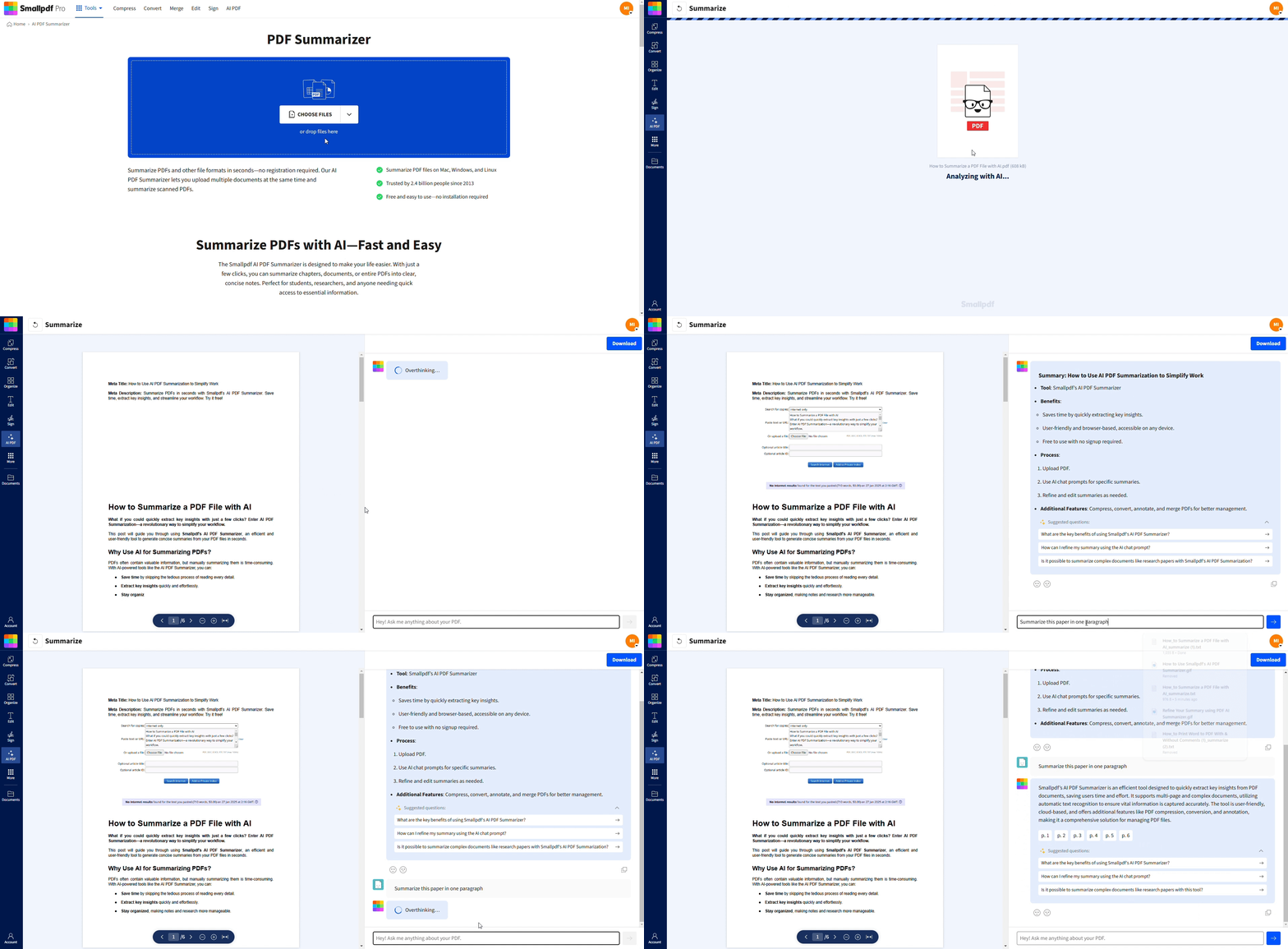
Why Use an AI PDF Summarizer for Long PDFs?
Long documents eat up valuable time that could be spent on more important tasks. That‘s where Smallpdf‘s AI PDF Summarizer comes to the rescue.
AI PDF Summarizer helps you:
Understand contract terms and obligations
Identify key clauses faster
Review compliance or policy documents
Summarize multi-page reports for quick decision-making
Reduce back-and-forth between sections
AI gives you the main ideas first, so you can focus on what matters instead of scanning every paragraph.
How an AI PDF Summarizer Works
The AI reads through your entire document, identifying main themes and critical information using advanced natural language processing. It analyzes the structure, context, and key concepts to create accurate summaries.
Here‘s the simple process of how AI summarization works:
Document analysis: The AI scans your entire file, including headers, clauses, and tables of content.
Content processing: It detects recurring themes, legal terms, obligations, definitions, and relationships between sections.
Summary generation: It produces short, accurate summaries that capture essential points, timelines, and risks.
The result is you’ll get executive summaries that capture the essence of your document while maintaining accuracy and context.
How to Use Smallpdf‘s AI PDF Summarizer
Follow this step-by-step guide to summarize any document in seconds. Works with contracts, research papers, reports, and more.
Upload Your PDF (Drag and Drop or Import)
Open AI PDF Summarizer. You can upload documents in several ways:
Drag and drop into the upload area.
Select a file from your device.
Import from Google Drive, Dropbox, or OneDrive.
The AI supports PDFs, Word documents, PowerPoint slides, and more.
Choose Summarize or Ask with AI Chat
After upload, AI automatically creates a summary highlighting the most important clauses and findings.
If you want deeper insight, use the AI Chat feature. Type questions like:
“What are the main obligations of each party?”
“Are there any termination clauses?”
“What risks does this agreement mention?”
AI Chat gives you explanations that reference specific sections of your document.
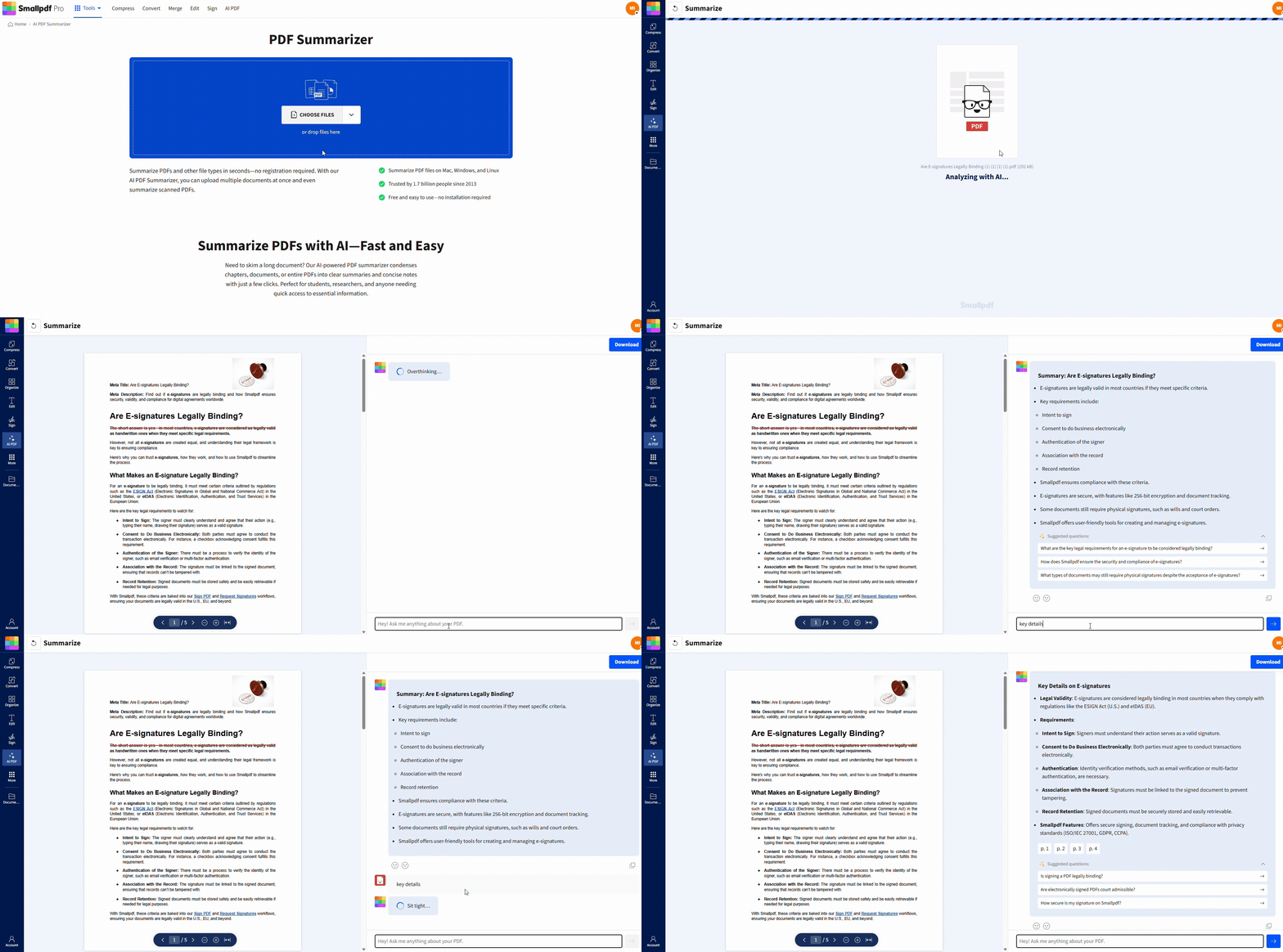
Customize, Copy, Download, and Share
You can choose how you want the summary to appear:
Bullet points
Paragraph overview
Short or extended format
Download the summary for your records or share it with your team.
Alternative Methods for Summarizing Legal Documents
Before AI, people summarized legal documents manually. That’s still possible, but slower.
1. Manual Summaries
Most accurate but very time-consuming
Requires you to read the entire document
Hard for long or complex contracts
2. Traditional Paralegal Review
Essential for official legal evaluation
Ensures compliance and accuracy
Expensive and slow compared to AI summaries
3. AI Summaries with Smallpdf
Fastest method
Great for early review and understanding
Not a substitute for legal advice
Helps you focus on key areas before full review
AI PDF Summarizer Use Cases
AI-powered summarization helps you cut through long documents faster, whether you’re reviewing legal agreements, studying academic texts, or preparing business reports.
Here are the most common scenarios where the AI PDF Summarizer makes a real difference.
1. Legal Document Review and Contracts
Legal documents are structured, long, and full of specialized terminology. NDAs, service agreements, employment contracts, lease documents, and compliance reports often span dozens of pages. AI summarization helps you:
Identify key clauses and risks
Extract main obligations and responsibilities
Understand renewal, termination, and liability terms
Review definitions, scope, and limitations faster
Compare contract versions without reading line by line
This gives you a clear overview before a deeper legal review.
2. Academic Papers and Study Notes
Research papers include abstracts, methodology, literature reviews, results, and discussion sections. Summaries help you:
Pull out main findings and conclusions
Capture methodology details quickly
Prepare literature review sections
Convert long chapters into study notes
Understand complex terminology in plain English
Perfect for thesis research, coursework, and staying up to date with new publications.
3. Business Reports and Project Documentation
Business documents are often dense and data-heavy. With AI summaries, you can:
Turn quarterly financial reports into executive summaries
Extract key metrics from market analysis
Summarize project documentation for team updates
Quickly brief stakeholders without sending long PDFs
Review policy changes and internal memos faster
This keeps everyone aligned without reading full-length documents.
4. Technical Manuals, Contractor Docs, and Policy Files
Technical and operational documents can be overwhelming. AI helps you:
Summarize engineering or product manuals
Extract safety steps and compliance requirements
Understand contractor documentation
Review procurement or vendor files
Break down multi-section policy documents
This is helpful for operations, safety compliance, HR, and procurement teams.
Security, Privacy, and Compliance at Smallpdf
Legal documents require protection. Smallpdf uses:
TLS encryption for all uploads
Automatic file deletion after one hour
GDPR-compliant data processing
ISO/IEC-certified data centers
No permanent file storage
No manual file access
This means your contracts and legal reports stay private and secure throughout processing.
Free vs Pro: What You Get with Smallpdf
You can start summarizing legal documents for free. As a free user, you get two summaries per day and access to the standard AI features, including quick summaries and AI Chat for follow-up questions. This is perfect when you only need to review an occasional contract, research paper, or policy document.
If you handle documents more frequently, upgrading to Pro gives you more flexibility. Pro users get:
Unlimited daily summaries
Faster processing for large PDFs
Batch document handling
Integration with other Smallpdf tools
Priority support for heavier workflows
Whether you're reviewing contracts every week or summarizing long reports for your team, Pro helps you work faster and keep everything in one streamlined workflow.
Once you’re ready to try it, upload your document and let the AI pull out the key points in seconds.
Frequently Asked Questions
Can AI summarize a legal document?
Yes, AI can summarize contracts, agreements, and case files by identifying key clauses, terms, and responsibilities. Review with human oversight for accuracy.What is the best AI tool to review legal documents?
Smallpdf’s AI PDF Summarizer is ideal for quick summaries and clause-level insights. For official legal review, a licensed attorney should evaluate the document.Can AI proofread legal documents?
AI can help detect unclear language or inconsistencies, but it cannot replace a legal professional for proofreading binding agreements.Is there an AI that can summarize documents?
Yes, Smallpdf’s AI Summarizer summarizes PDFs, Word files, and scans while preserving structure.Is ChatGPT a good summarizer?
ChatGPT can summarize pasted text, but cannot preserve formatting or analyze full PDFs. Smallpdf reads entire files and summarizes them directly.Summarize and review legal documents using Smallpdf Pro
