- Home
- ›
- ›What Fonts Are Appropriate for Academic Work?
What Fonts Are Appropriate for Academic Work?
Your font choice affects how academic work is read and remembered. Discover the best fonts for papers and theses, plus formatting tips.
More on PDF Fonts
More on Edit PDF
PDF Tips & Resources
Your font choice affects how your academic work is read, graded, and understood. Most universities have strict expectations for research papers, essays, and theses, and the wrong font can make your work look unprofessional or even break submission rules.
A clear, accessible font helps reviewers read your arguments easily, keeps your pages formatted correctly, and ensures your PDF exports look the same on every device.
In this guide, we’ll walk you through the best fonts for academic work, how to format them correctly, and how to make quick font fixes in your PDFs—so your document always looks submission-ready.
Best Academic Fonts for Papers and Theses
Times New Roman, Calibri, and Cambria are the most widely accepted choices across institutions. The following fonts meet academic standards for readability, professionalism, and widespread acceptance.
1. Times New Roman
Style: Serif
Why It Works: Timeless and widely considered the gold standard for academic writing. It’s the most widely accepted academic font and is accepted by most formatting styles, including APA and MLA.
Where to Use It: Essays, research papers, and formal reports
2. Arial
Style: Sans-serif
Why It Works: Known for its clarity on digital screens. Its clean and simple look makes it a favorite for academic posters and presentations.
Where to Use It: Academic posters, PowerPoint presentations, and online submissions
3. Calibri
Style: Sans-serif
Why It Works: Modern and clean, Calibri is the default font for many word processors. APA format also recommends Calibri for academic papers.
Where to Use It: Academic essays, research proposals, and digital files
4. Cambria
Style: Serif
Why It Works: Designed for excellent readability both on-screen and in printed documents. Its classic, professional look fits academic standards.
Where to Use It: Dissertation writing, theses, and research papers
5. Georgia
Style: Serif
Why It Works: Combines a traditional serif style with better readability on both print and digital formats.
Where to Use It: Research documents, academic journals, and case study write-ups
6. Garamond
Style: Serif
Why It Works: A classic serif font offering elegance and space efficiency, particularly suitable for lengthy dissertations. Its traditional appearance maintains professionalism while being easy on the eyes.
Where to Use It: Dissertations, book manuscripts, and extended academic texts
7. Palatino
Style: Serif
Why It Works: A highly readable serif font that works well for extended academic texts. Its distinctive character makes it stand out while remaining professional.
Where to Use It: Long-form academic writing, theses, and scholarly articles
Serif vs Sans Serif for Print and Screen
Serif fonts (like Times New Roman and Garamond) have small decorative strokes that traditionally aid reading in print.
Sans serif fonts (like Arial and Calibri) offer cleaner lines that work well on screens. For academic work, both types are acceptable. Choose based on your style guide requirements and personal preference.
Scientific Papers and LaTeX
For technical documents with complex mathematical equations, LaTeX users typically rely on Computer Modern fonts. This typeface is specifically designed for scientific typesetting and handles formulas beautifully.
What Fonts to Avoid
Stay away from informal or decorative fonts like Comic Sans or cursive fonts. These fail to exude professionalism and could harm the credibility of your work.
Academic Font Requirements by Style Guide
Different academic style guides have specific font requirements. Always check your institution’s or publisher’s guidelines first, as requirements can vary significantly.
APA Style Font Requirements
APA Style accepts several fonts including Times New Roman, Calibri, Arial, Georgia, Computer Modern, and Lucida Sans Unicode, all in 12-point size. The key is choosing one that’s accessible and readable for all users.
MLA Format Font Guidelines
MLA format recommends easily readable fonts, with Times New Roman 12-point being the standard choice. The key requirement is consistency throughout your document—stick with one font from start to finish.
Chicago Manual of Style
The Chicago Manual of Style offers flexibility but generally prefers traditional serif fonts like Times New Roman or Book Antiqua for academic manuscripts. Check with your publisher for specific requirements.
IEEE and Technical Papers
Technical papers following IEEE format typically require Times New Roman, with specific sizing for different elements like headings, captions, and body text.
Academic Formatting Essentials Beyond Font Choice
Consistent formatting makes your work easier to read and appears polished. Use these tips for academic writing font and size standards.
1. Font Sizes
Body Text: Typically, 12-point font is standard for most academic papers. For digital academic posters or A1 presentations, an 11-point font might be more appropriate.
Headings: Use 14–16 pt fonts for section titles to create a visual hierarchy.
2. Line Spacing
Double-spacing is required for most academic documents, as it improves legibility and makes room for notes or edits from reviewers.
3. Margins
Keep it simple with standard 1-inch margins on all sides. This ensures your content stays balanced and readable.
4. Consistency Matters
Use the same font and size throughout your document. Mixing fonts can make your work look unprofessional and hard to follow.
Pairing Fonts for Headings and Body Text
For visual hierarchy, consider pairing a serif body font with sans serif headings. Popular combinations include Times New Roman with Arial or Garamond with Calibri.
Just make sure to limit yourself to two fonts maximum.
Using Lining Numerals for Tables
When presenting data in tables, choose fonts with lining numerals that align properly, rather than old style numerals that vary in height. This creates cleaner, more professional-looking data presentations.
Fix Academic Font and Formatting Issues in PDFs
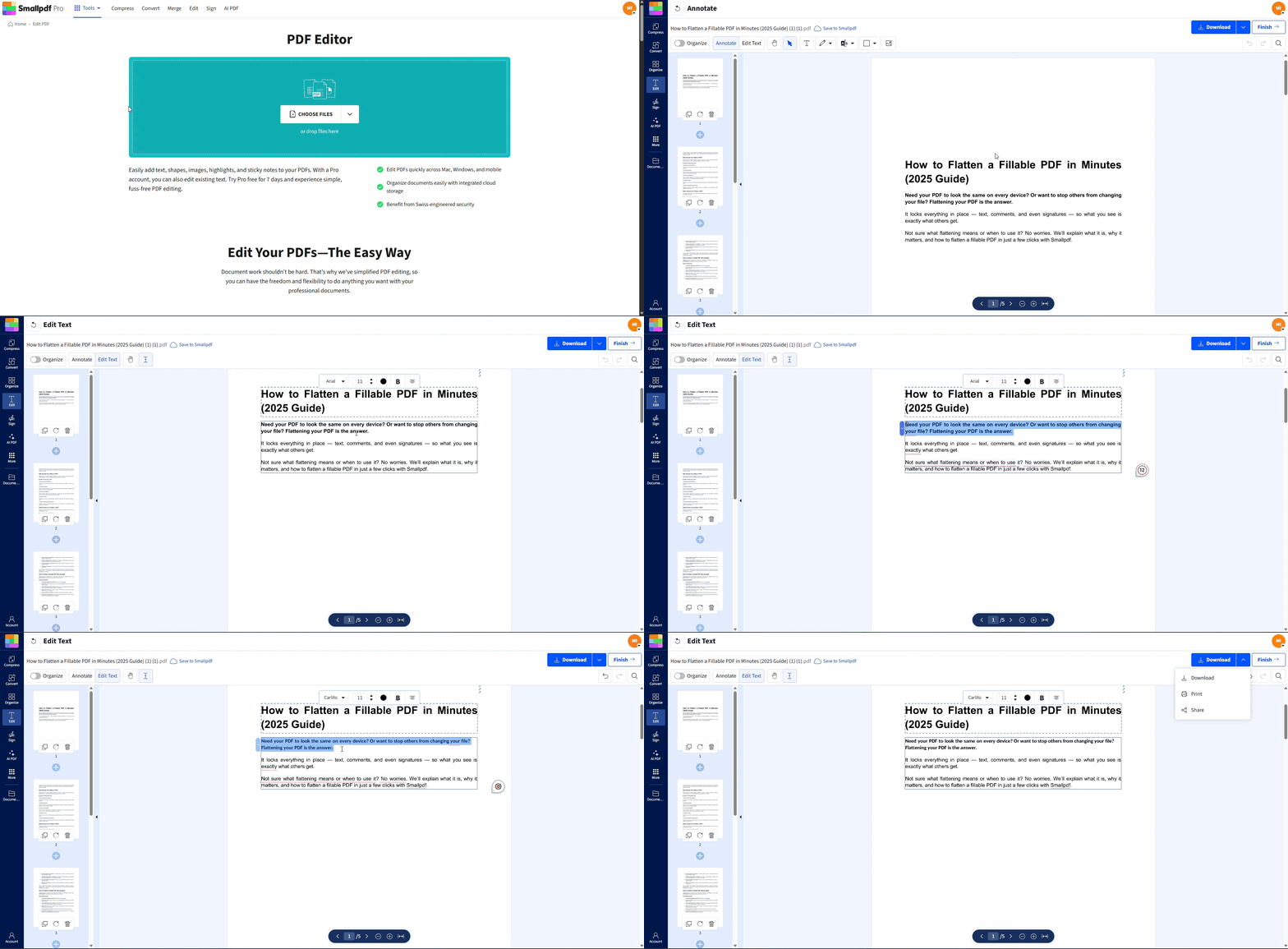
Once you export your paper to PDF, fixing formatting errors, like wrong fonts or uneven spacing, can be tricky without starting all over. With Smallpdf’s Edit PDF, you can correct last-minute issues directly in your file without the need to re-export—perfect for those submission deadline crunches.
Here’s how you can do it in just a few clicks:
Upload Your File: Head to Edit PDF and drag in your document.
Fix Fonts: Change font size, style, or spacing on any text element.
Add Finishing Touches: Insert headers and footers, or even page numbers effortlessly.
Save & Share: Hit “Download” once your paper is polished and ready to submit.
Why Your Academic Font Choice Matters
Using the correct academic essay font or presentation font size affects many aspects of your work:
Better readability makes it easier for reviewers to follow your arguments.
Professional appearance builds credibility and aligns with academic standards.
Consistent formatting shows attention to detail, which can make a difference in your grade or evaluation.
Frequently Asked Questions
Which font is best for academic writing?
Times New Roman is the most widely accepted font for academic papers, but Calibri and Cambria are also excellent choices based on your specific formatting requirements.What is the preferred academic font?
Serif fonts like Times New Roman and Cambria are often preferred for their professional and traditional look.What is considered an academic font?
Fonts that are professional, easy to read, and widely accepted by academic formats are considered academic fonts. Examples include Times New Roman, Arial, and Georgia.What is the best font for academic figures?
For charts and diagrams, sans-serif fonts like Arial or Calibri are ideal due to their clarity and modern look.What fonts are appropriate for academic work in Word?
Times New Roman (12-point), Calibri (11 or 12-point), and Cambria (12-point) are appropriate for academic papers created using Microsoft Word.What font does APA style recommend?
APA Style approves several fonts including Times New Roman, Calibri, Arial, Georgia, Computer Modern, and Lucida Sans Unicode, all in 12-point size.What’s the best font for a letter of recommendation?
Times New Roman or Calibri in 12-point size work best for professional academic correspondence, maintaining formality while ensuring readability.Can I use different fonts for headings and body text?
Yes, pairing serif body text with sans serif headings creates visual hierarchy. Just limit yourself to two fonts maximum and ensure both are professional choices.Format and finalize academic papers in PDF format with Smallpdf Pro
