- Home
- ›
- ›Trust Is the New Bottleneck at Work: Most Professionals Doubt the Files They Receive
Trust Is the New Bottleneck at Work: Most Professionals Doubt the Files They Receive
New research reveals how fabricated and edited files make “proof” a bottleneck, forcing teams to spend more time verifying than doing.
The biggest productivity killer isn’t meetings or AI, it’s verification. Modern work runs on “proof” like screenshots, PDFs, exported dashboards, and shared docs. But when digital evidence is easy to edit and hard to validate at a glance, even honest files can trigger doubt. That shift turns simple handoffs into slowdowns, with people double-checking before they can move forward. The result isn’t always mistrust of people, it’s mistrust of “proof” that arrives without enough context.
To understand how often questionable documents show up at work and how professionals respond, Smallpdf surveyed 1,000 full-time US professionals across various industries and job levels. The results show that many professionals now approach documents with skepticism by default.
Key takeaways
87% of professionals have dismissed a document because it looked fake, and 19% have caught someone fabricating a file at work.
More than 1 in 5 professionals admit they’ve accepted a document they didn’t trust just to keep work moving.
Nearly 1 in 10 American workers have shared a fake document at work.
More than 1 in 10 professionals admit they can’t confidently spot a fake or AI-generated document.
1 in 5 professionals lost trust in a colleague due to a questionable file.
A number like 87% can sound like coworkers don’t trust each other, but the data points to something slightly different: people don’t trust files as “proof” unless the context is solid. In a world of forwarded attachments and cropped screenshots, the safest default is often “verify first.”
Here’s what’s driving that verification mindset:
First impressions carry outsized weight: nearly 9 in 10 have ignored a file outright because it looked fake.
Most validation is social, not technical: 68% check the sender or source first, while far fewer look at the file format (9%) or date/timestamp (8%).
Confidence is shaky: 13% say they couldn’t identify a doctored document or AI-generated image.
Speed wins over certainty: about 1 in 5 admit they accepted a questionable screenshot or document to avoid conflict or delays.
The Document Trust Index
Editing files is a normal part of digital work. Most professionals agree there is a line between what is acceptable and what crosses into unethical territory. The problem is that not everyone draws that line in the same place. To measure the current trust levels among American workers who handle documents, we created the following index.
“The Document Trust Index puts a number on something teams feel every day: when ‘proof’ is easy to edit and hard to validate, work slows down. Our goal isn’t to make people suspicious, it’s to make files easier to trust by default, with clearer context, cleaner originals, and fewer verification loops.”
– Malte Schiebelmann, Senior Vice President of Product at Smallpdf
How DTI Scores Varied Across Different Groups
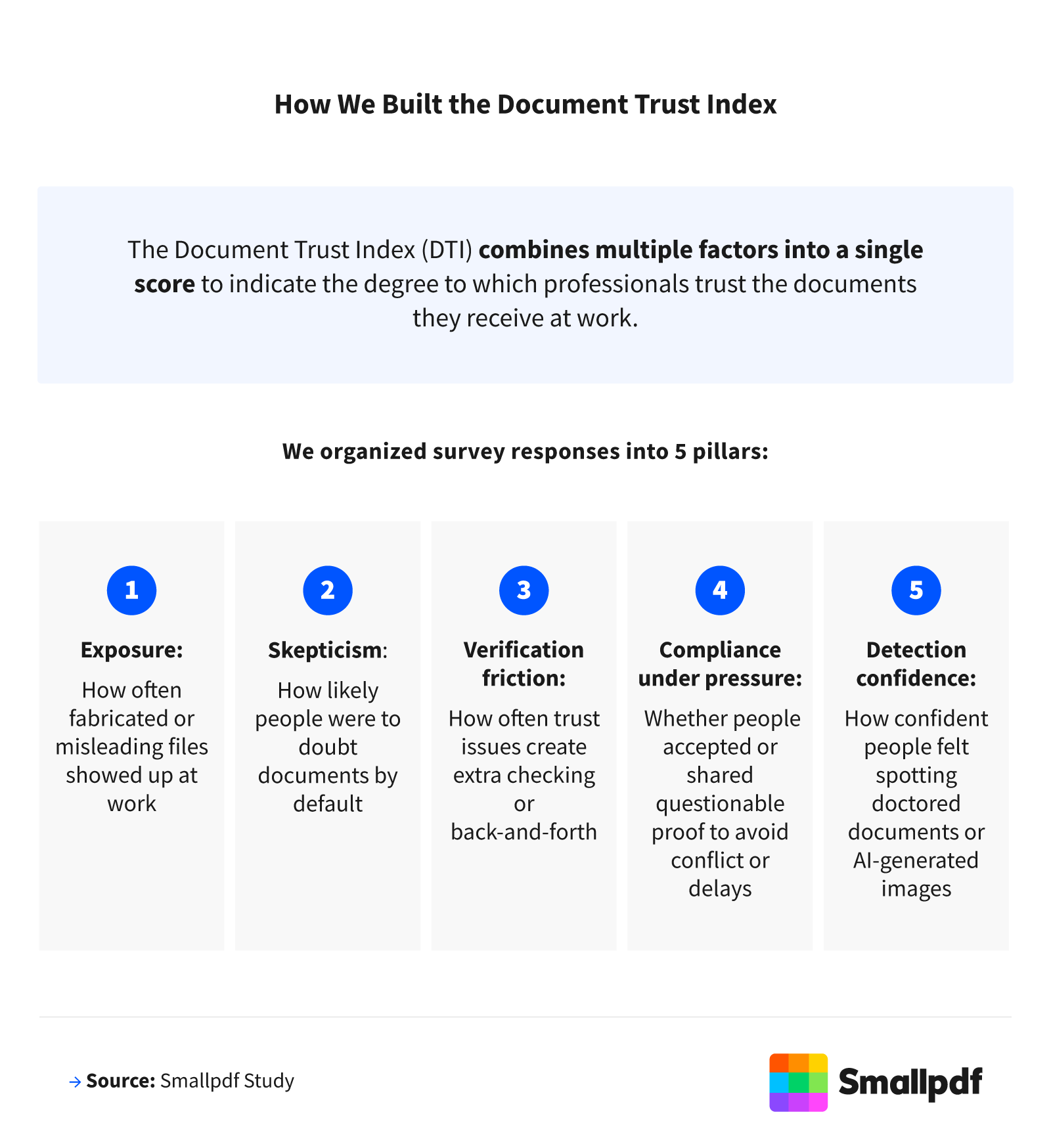
Overall, the Document Trust Index averaged 60 out of 100, suggesting workplace trust in digital files was solid but far from automatic. This score reflected the average trust score across all respondents, built from five pillars—exposure, skepticism, verification friction, compliance under pressure, and detection confidence—each standardized to a 0–100 scale. The pillar values shown in this report represent risk/friction (higher = more risk). To calculate the overall DTI as a trust score (higher = more trust), we first averaged the five pillar risk scores and then subtracted that average from 100.
Notably, the biggest drags on trust came from skepticism (57/100) and verification friction (57/100), suggesting a “verify-first” mindset was creating the most day-to-day friction. In other words, the slowdown is driven more by default doubt and extra checking than by the idea that coworkers are constantly acting in bad faith. Meanwhile, exposure (20/100) and compliance under pressure (19/100) were much lower, suggesting the slowdown is less about constant fraud and more about verification becoming the default.
To make the numbers easier to interpret, we used simple benchmarks: 0–49 indicated low trust, 50–69 indicated moderate trust, and 70+ indicated high trust. Most groups clustered around the low 60s, placing workplace document trust in the moderate range, where verification is common and trust isn’t automatic. A practical goal for smoother workflows is pushing the DTI toward 70+, where teams can validate selectively instead of by default.
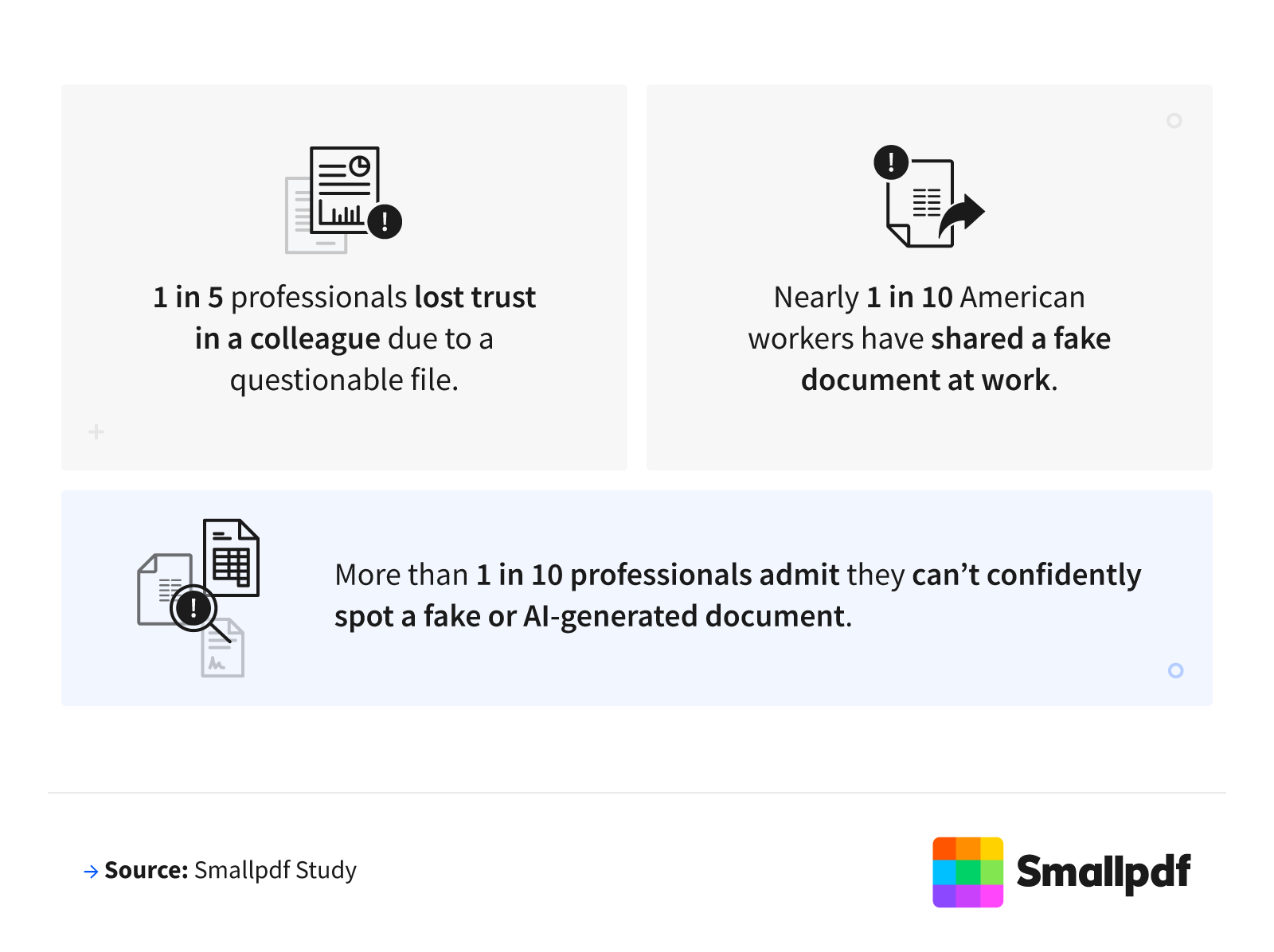
About 1 in 5 professionals said they’ve caught a coworker fabricating documents on the job. Another 9% admitted to sharing a fake file or screenshot. One-quarter of professionals (25%) reported feeling pressured to accept digital proof they were not entirely certain was legitimate, while 13% said they couldn't identify a doctored document or AI-generated image.
These moments add up. Manipulated or misleading documents are already showing up in everyday workflows, and they can damage working relationships. Over 1 in 5 professionals (21%) said a questionable document or screenshot caused them to lose trust in a colleague or manager.
People don’t distrust documents because they’re edited. They distrust them when edits change reality. While most Americans say annotation, cropping, and blurring are acceptable, the line gets drawn the moment edits touch the truth. Nearly 9 in 10 say changing numbers is unethical, and the same share say removing timestamps crosses the line, which suggests the “trust crisis” isn’t about edits—it’s about evidence
Why First Impressions Decide Whether Files Get Trusted or Ignored
In the workplace, digital files get judged fast. Often, those first impressions matter more than the facts inside the file.
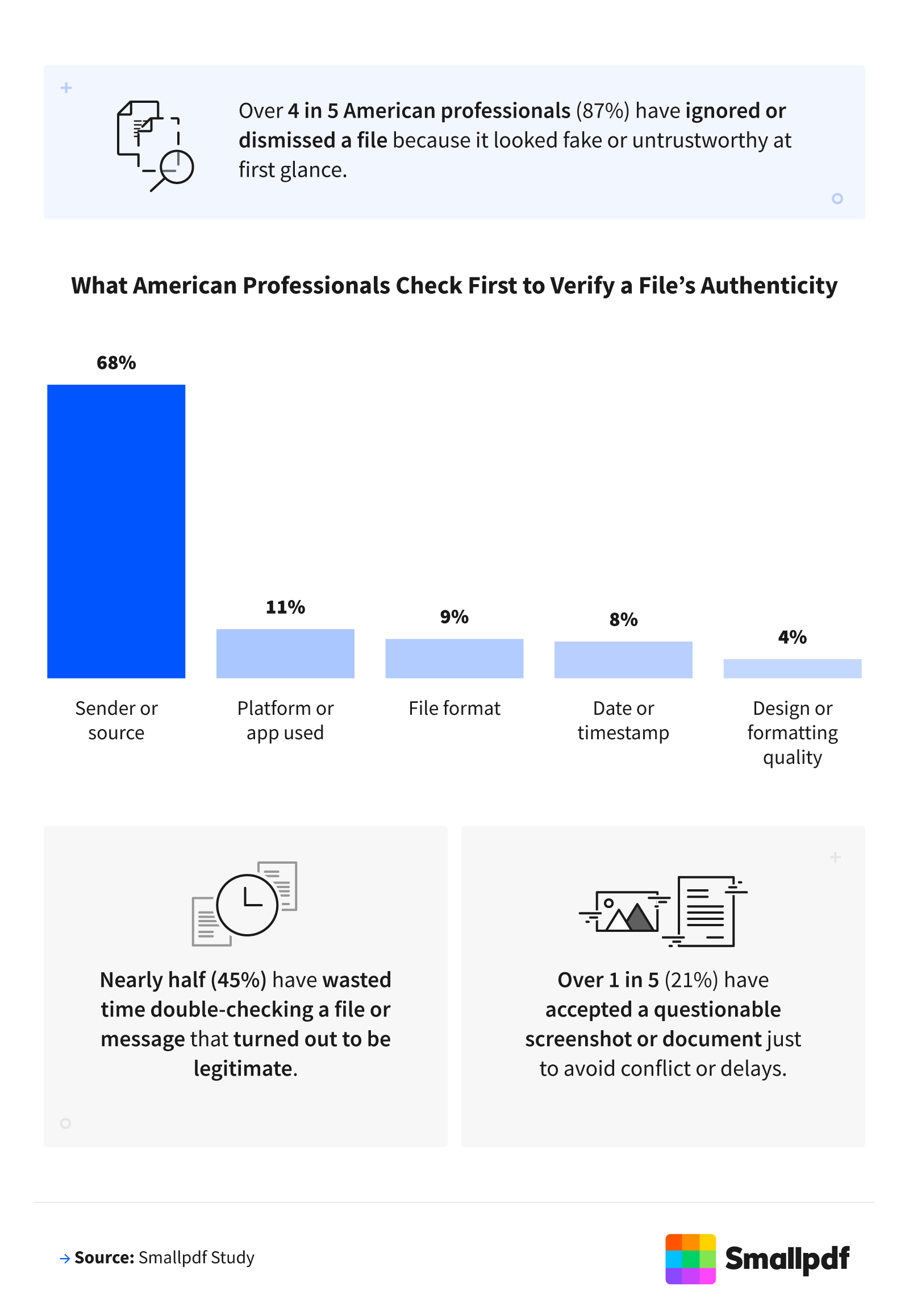
Nearly 9 in 10 professionals said they’ve ignored a file outright because it looked fake. Nearly half of professionals said they’ve wasted time fact-checking files because they didn’t trust them. At the same time, about 1 in 5 professionals (21%) admitted they accepted a questionable screenshot or document just to avoid conflict or delays.
That tension shows up in how people try to protect themselves. Most professionals rely on who sent a file, not the file itself, to decide whether it’s real. (68%). Far fewer look at the platform or app used (11%) or the file format itself (9%). This leaves plenty of room for second-guessing, miscommunication, and frustration when files do not look right.
Document Verification Checklist (S.C.O.R.E.)
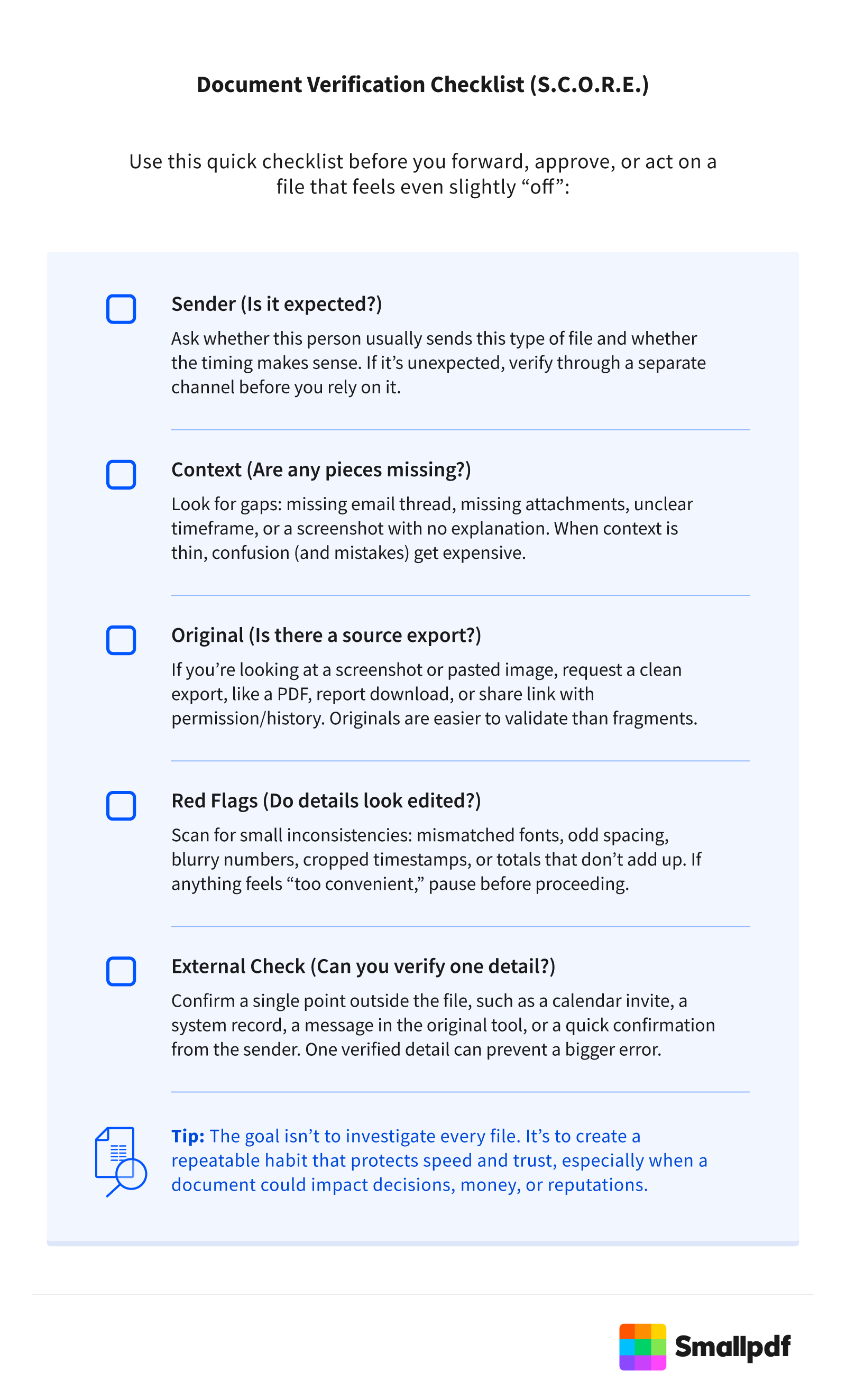
Use this quick checklist before you forward, approve, or act on a file that feels even slightly “off”:
Sender (Is it expected?)
Ask whether this person usually sends this type of file and whether the timing makes sense. If it’s unexpected, verify through a separate channel before you rely on it.
Context (Are any pieces missing?)
Look for gaps: missing email thread, missing attachments, unclear timeframe, or a screenshot with no explanation. When context is thin, confusion (and mistakes) get expensive.
Original (Is there a source export?)
If you’re looking at a screenshot or pasted image, request a clean export, like a PDF, report download, or share link with permission/history. Originals are easier to validate than fragments.
Red Flags (Do details look edited?)
Scan for small inconsistencies: mismatched fonts, odd spacing, blurry numbers, cropped timestamps, or totals that don’t add up. If anything feels “too convenient,” pause before proceeding.
External Check (Can you verify one detail?)
Confirm a single point outside the file, such as a calendar invite, a system record, a message in the original tool, or a quick confirmation from the sender. One verified detail can prevent a bigger error.
Tip: The goal isn’t to investigate every file. It’s to create a repeatable habit that protects speed and trust, especially when a document could impact decisions, money, or reputations.
Trust Is Becoming the Real Cost of Questionable Files
Fake and doctored documents may not be “everywhere,” but they’ve become common enough that many teams operate in verify-first mode. And when proof moves faster than context, even small doubts can slow work down or erode trust, often because of pressure, speed, or uncertainty rather than bad intent. As teams rely more on digital proof to make decisions, even small doubts can slow work down or quickly erode trust. Clear standards, shared expectations, and better tools will not eliminate every risk, but they can help you spend less time second-guessing files and more time confidently moving work forward.
Methodology
This report is based on original, first-hand research commissioned by Smallpdf to gain a deeper understanding of how trust in digital files is evolving in today's workplace. We surveyed 1,000 full-time American professionals across industries, job levels, and age groups, ensuring a diverse and representative sample of the modern workforce.
The study focused on how employees judge credibility, validate digital proof, and respond to potentially fabricated or AI-generated content. Respondents ranged in age from early-career professionals to seasoned leaders, with an average age of 39. The sample consisted of 48% women, 51% men, and 1% non-binary individuals. Generationally, 59% were millennials, 26% were Gen X and older, and 15% were Gen Z.
By collecting direct, first-person feedback from workers who regularly exchange digital documents, the findings provide a clear, data-backed view of how trust is evolving and what it means for teams that rely on accurate and reliable files to keep work moving.
About Smallpdf
Smallpdf helps millions of professionals and businesses simplify digital document management with secure, easy-to-use tools. From protecting sensitive files to streamlining workflows, Smallpdf makes working with PDFs simple. Popular tools include Merge PDF to combine documents and PDF to Word to quickly convert files for editing. With Smallpdf, you can manage documents smarter and more efficiently in today's AI-driven workplaces.
Fair Use Statement
The information in this article may be used for noncommercial purposes only. If you share it, please include proper attribution with a link back to Smallpdf.
