- Home
- ›
- ›How File Errors Derail Workflows and Cost Businesses
How File Errors Derail Workflows and Cost Businesses
Broken PDFs, version mix-ups, and outdated tools are quietly draining productivity and costing businesses thousands.
File issues don't just slow people down. They create stress, waste money, and lower morale across workplaces. To understand the scale of the problem, Smallpdf surveyed 1,002 employees across U.S. industries about the time, costs, and frustrations caused by inefficient document processes.
This is the challenge Smallpdf was created to solve. With tools that make it easy to compress, convert, edit, and eSign PDFs, Smallpdf helps teams cut out unnecessary setbacks and keep projects moving forward. The results of this study show both the high costs of file errors and the benefits of investing in smarter, more reliable tools.
Key takeaways
Nearly 1 in 4 employees (23%) spend at least 10% of their workweek hours (4 hours) troubleshooting file issues.
On average, troubleshooting file issues costs employers $6,790 per employee in salary.
65% of employees claim fixing a broken file is a more stressful part of their day than dealing with their boss.
Over 1 in 4 employees (26%) have considered leaving a job because of outdated or inefficient document processes.
Time and Money Lost to File Problems
Even small file errors can create ripple effects that cost companies valuable time and resources.
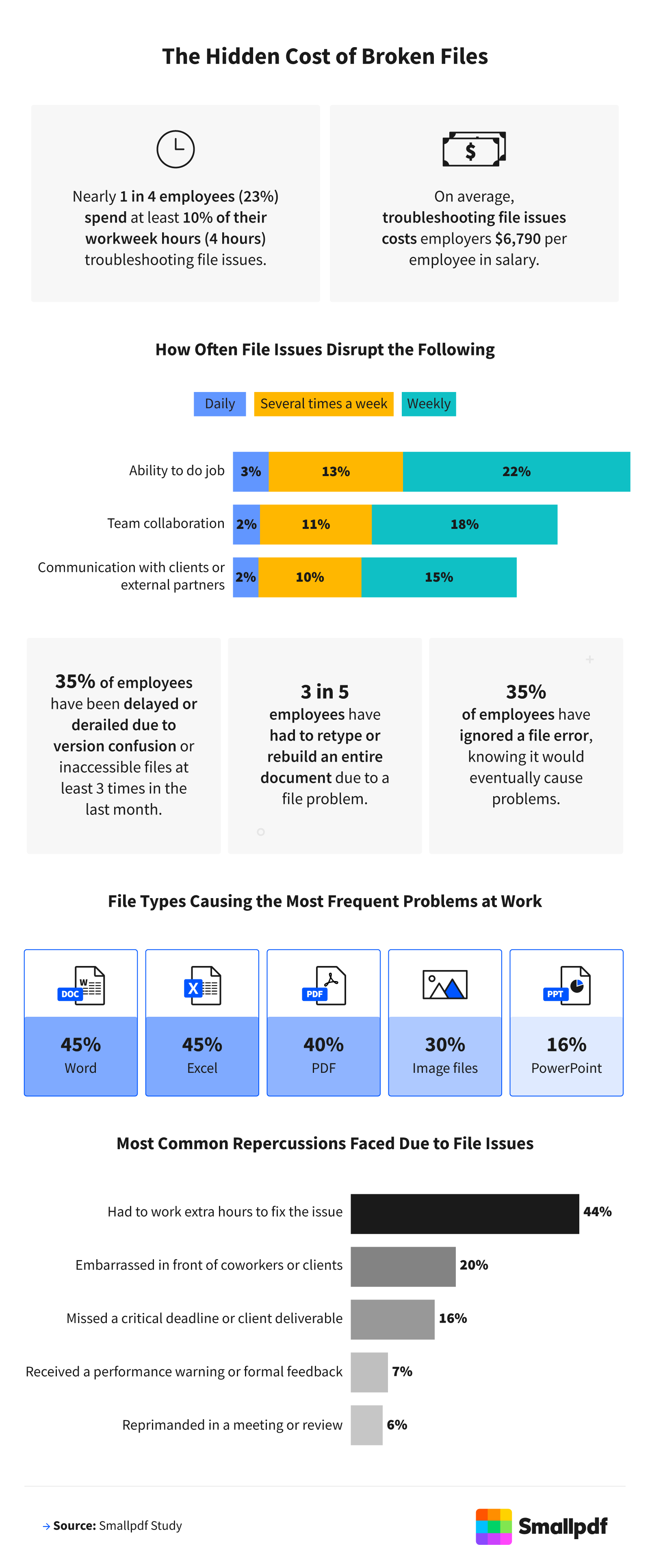
Nearly 1 in 4 employees (23%) said they spent at least 4 hours of their workweek troubleshooting file issues. Gen Z workers were even more affected, with 30% reporting this level of disruption. On average, these delays added up to $6,790 per employee in lost salary costs each year. For those in the finance industry, this figure soared to $13,694 per employee.
The setbacks weren't limited to wasted time. Nearly 2 in 5 employees (38%) reported that file issues impacted their ability to do their job at least once a week. More than a third (35%) admitted being delayed by version confusion or inaccessible files 3 or more times in the last month, and 21% of Gen Z said it happened 5 or more times.
Word and Excel files—both at 45%—caused the most frequent problems in the workplace, followed by PDFs (40%). Healthcare workers were most affected by PDF issues (47%). Younger employees (Gen Z) were also especially likely to report frequent PDF challenges at work.
Due to file problems, 60% of employees have had to completely retype or rebuild a document from scratch. Over 2 in 5 (44%) reported working extra hours to resolve issues, while 20% experienced embarrassment in front of colleagues or clients, and 16% missed critical deadlines. Nearly 1 in 10 finance employees said file errors led to formal reprimands.
Emotional and Career Costs of File Frustrations
Beyond wasted time and money, file issues also took a heavy toll on employee well-being and retention.
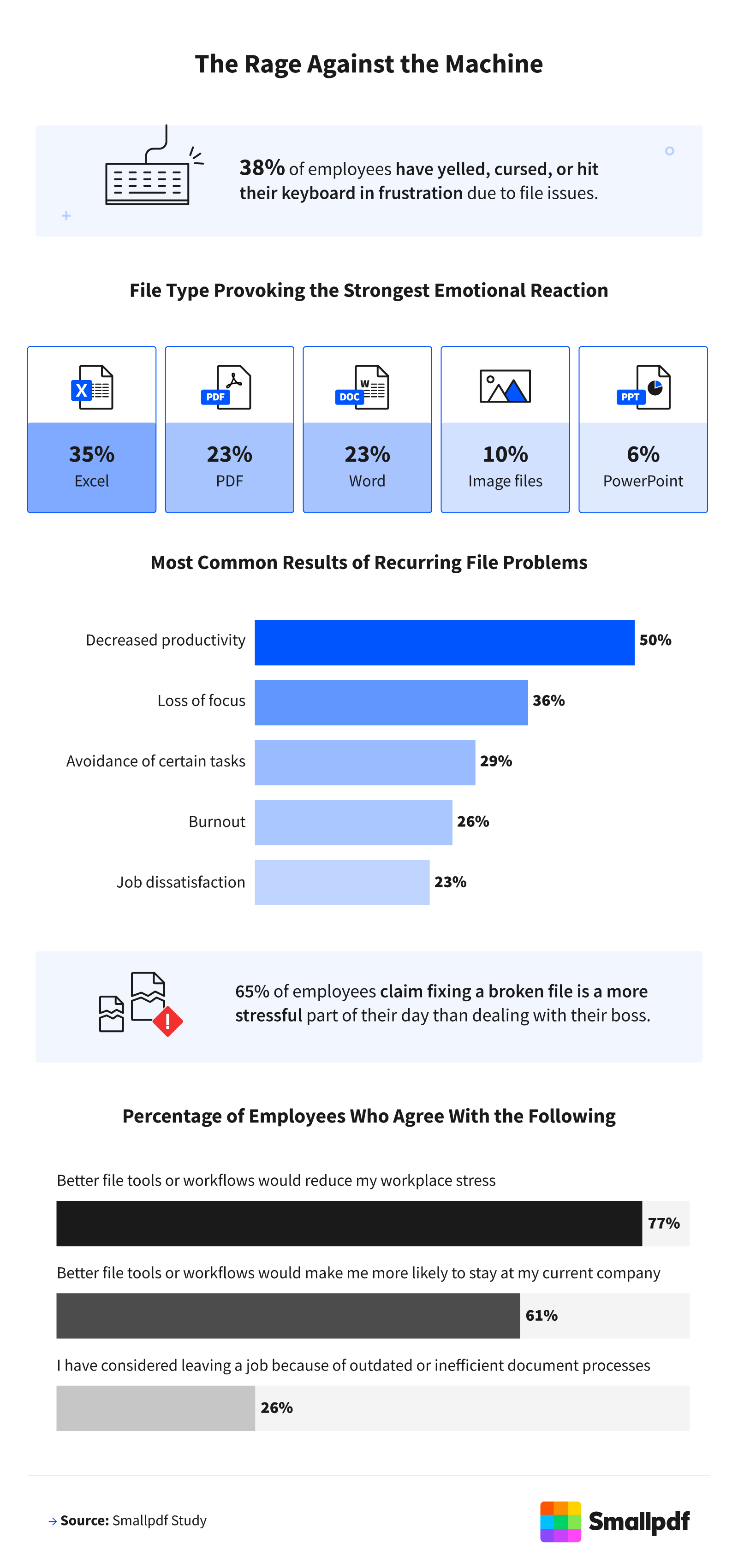
File frustrations sparked strong emotional reactions. Thirty-eight percent of employees admitted to yelling, cursing, or hitting their keyboard in response to file problems. Nearly a quarter said PDF errors triggered their strongest emotional reactions at work. Surprisingly, 65% of employees said fixing a broken file was more stressful than dealing with their boss.
These frustrations also drained morale and productivity. Half of employees said recurring file issues decreased their productivity, while 26% reported feelings of burnout. Another 23% said the ongoing problems left them dissatisfied with their jobs, and 26% had even considered quitting because of outdated or inefficient document processes at work.
Practical Steps To Reduce File Frustrations
These survey results highlight just how disruptive file errors can be, but there are simple ways to keep work moving smoothly:
Use reliable tools that ensure compatibility: Compress, convert, edit, and eSign files with software that actually works. Less time fixing files means more time getting real work done.
Create consistency with file management: Establish version control, shared cloud folders, and naming conventions so teams always know which file is the latest.
Pick tools employees actually like using: Complicated, outdated software only adds stress. Choose tools that are simple, secure, and user-friendly, like Smallpdf.
Train teams on file best practices: A quick guide or short training on versioning and file-sharing saves hours of confusion later.
Standardize and simplify your toolkit: Minimize the number of platforms your team uses so people don't waste time navigating between multiple apps.
Automate repetitive tasks: Use features that streamline file conversions, signatures, and storage so employees can focus on meaningful work.
Review processes regularly: Set quarterly check-ins to spot outdated workflows before they cause frustration or burnout.
When file tasks feel easy, teams save time, stress less, and keep projects on track, while businesses protect their bottom line.
Smarter Tools, Stronger Workplaces
File issues may seem like small annoyances, but the evidence shows they add up to major financial and emotional costs for employees and employers. Inefficient document processes quietly drain workplace productivity and morale. Businesses that invest in smarter, more reliable tools can reduce stress, recover lost time, and strengthen employee satisfaction—all while saving thousands in hidden costs.
Methodology
This report is based on original, first-hand research commissioned by Smallpdf to better understand how file-related challenges affect today's workforce. We surveyed 1,002 employees across the United States about their experiences with file issues at work, focusing on the time lost, financial costs, and emotional strain caused by these problems.
The sample included a diverse mix of generations, including 16% Gen Z, 60% millennials, 23% Gen X, and 2% baby boomers, and represented a wide range of industries. Respondents worked in technology (19%), education (12%), finance (10%), manufacturing (8%), government (8%), marketing (7%), nonprofits (6%), and healthcare (6%); 24% worked in other industries.
About Smallpdf
Smallpdf makes working with documents simple, fast, and stress-free. From compressing and converting to editing and eSigning, Smallpdf helps millions of professionals, students, and businesses around the world streamline file management. With smarter tools for every stage of the document workflow, Smallpdf reduces file frustrations and frees up more time for meaningful work.
Fair Use Statement
The information in this article may be used for noncommercial purposes only. If you share it, please include a link back to Smallpdf with proper attribution.
