- Home
- ›
- ›Form SS-5: Social Security Card Replacement Form
Form SS-5: Social Security Card Replacement Form
Here’s your complete guide to Form SS-5. Get your Social Security card with step-by-step instructions, required documents, and free PDF tools.
PDF Tips & Resources
More on Edit PDF
More on Protect PDF
Form SS-5 is the official Social Security Administration (SSA) form for applying for an original Social Security card, replacement card, or correcting information on your existing card.
We’ll walk you through what you need to know. Plus, free download and form fill-out with Smallpdf.
Summary of How to Get and Fill Out Form SS-5
1. Download the Form
Get Form SS-5 from the Social Security Administration or open the editable version with Smallpdf’s PDF Editor.
Tip: Download Form SS-5 using the link below, open it on your device, and start editing or filling it out right away.
2. Fill in Your Details
Add your personal information, citizenship status, parent details, and sign the form. Use blue or black ink if you print it.
3. Gather Your Documents
Collect proof of identity, age, and citizenship or lawful status. First-time applicants may need additional documents.
4. Submit Your Application
Mail the completed form with original documents to your local Social Security office or apply in person if required.
Download And Edit SS-5 Form
What Is Form SS-5?
Form SS-5, officially called the “Application for a Social Security Card,” is the standard form used by the Social Security Administration for all Social Security card requests. Whether you need your first card, a replacement, or want to update information, this is the form you’ll use.
The SS-5 form serves three main purposes:
Original card: For first-time applicants who have never had a Social Security number
Replacement card: For lost, stolen, or damaged cards (same information)
Corrected card: For name changes due to marriage, divorce, or legal name changes
Here’s what you need to know upfront: The process involves filling out the form, gathering required documents, and submitting everything to the SSA. Most replacement applications can be mailed, but first-time applicants over 12 must apply in person.
Who Can Apply for a Social Security Card Using Form SS-5?
Not everyone can apply for a Social Security card, and the requirements depend on your status and situation.
U.S. Citizens: All U.S. citizens can apply for a Social Security card using Form SS-5, regardless of age. Parents or legal guardians can apply on behalf of minor children.
Non-citizens: You can apply if you’re lawfully authorized to work in the United States and have proper documentation from the Department of Homeland Security (DHS). This includes permanent residents and temporary workers with valid work authorization.
Special requirements:
First-time applicants age 12 and older must apply in person at a local SSA office.
Children under 12 can have applications submitted by mail (with proper documentation).
You must provide acceptable proof of identity, age, and citizenship or lawful status.
Documents You Need for Form SS-5
The documents you need depend on what type of Social Security card application you’re submitting. Here’s what’s required for each situation:
For an original Social Security card: You need at least two different documents that prove your age, identity, citizenship, or work-authorized status.
For a replacement card: You only need one form of identification.
For a corrected card (name change): You need a document to prove your identity, support the requested change, and establish a reason for the change.
Here’s an overview of acceptable documentation:
Documents That Establish Identity
US driver’s license
US, state-issued, non-driver identity card
US passport
Documents That Establish Citizenship
US birth certificate
US passport
Documents That Establish Immigration Status
Current unexpired immigration documents provided to you by the Department of Homeland Security
If you have any issues or questions with the necessary documents, call the SSA at their toll-free number: 1-800-772-1213. If you need further assistance, you can also go to your local Social Security office.
How to Fill Out Form SS-5 Step by Step
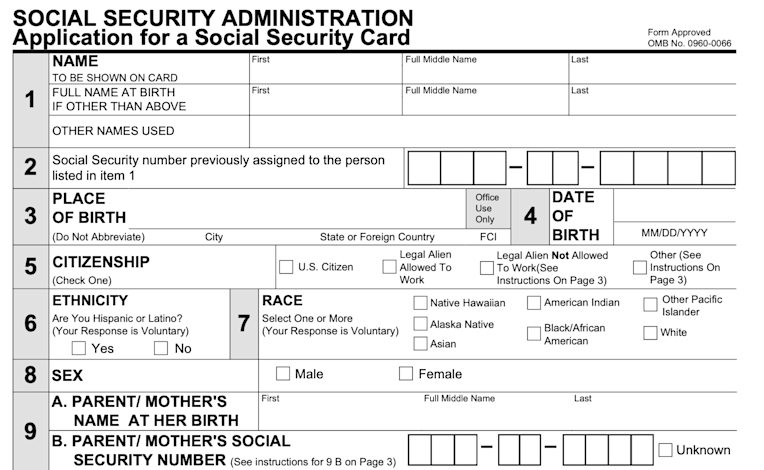
To make things easy for you, Smallpdf has the SS-5 form available to download. Click the image below to open the document with our PDF Editor. You can either fill it out by typing the information into the fields before downloading or print the form to fill it out later.
Download SS-5 Form
Note that the Social Security Administration requires the application to be completed in blue or black ink. Also note that if the applicant is 12 years of age or older and has never received a Social Security card, the application must be completed in person.
Now, let’s go through the steps of filling in the form together.
Note: Only use blue or black ink and ensure you print the document on 8.5’’ by 11’’ paper.
Personal Information (Fields 1-6)
Fill out the name to be shown on the card in the first row of box one. Ensure you fill out the first, middle, and last names. If your name has changed (choice, adoption, marriage, etc.) since birth, add your full name at birth in the line below.
Fill out the social security number unless this is a first-time card. In that case, leave this box blank.
Add the place of birth. Don’t abbreviate any locales, cities, states, or countries. If you were born in the UK, write out United Kingdom.
Enter your date of birth. Use the whole year (e.g., 2010, not ‘10) and remember to follow American date formatting: Month-Date-Year (smallest unit to largest).
Check the applicable citizenship box.
Citizenship and Demographics (Fields 6-8)
The ethnicity box (asking if you’re Hispanic or Latino) is voluntary information.
The same applies to the race information. Voluntarily check the race box.
Check the applicable sex box.
Parent Information and History (Fields 9-18)
Fill in the parent/mother’s name at birth along with their Social Security number.
Do the same for the parent/father’s name at birth, along with their Social Security number.
Answer whether the person from question one (the person applying for the card, most likely you) has ever received a Social Security card before (yes or no). If yes, continue with question 12. If no, skip to question 14.
Fill out the name shown on the individual’s most recent Social Security card.
Enter any different date of birth if used on an earlier application for a card. If the date of birth is the same, you don’t need to add this information.
Write today’s date. Again, remember to use this format: MM/DD/YYYY.
Fill in your daytime phone number.
Enter your mailing address.
Sign that you have completed the form correctly. Better be safe than sorry: Check the info once more to be sure.
Check the appropriate box for your relation to the person applying for the card (self, parent, guardian, other).
Great! You’ve filled the document out. Step 1 of 3 complete!
How to Submit Form SS-5 (Online, Mail, or In Person)
You have three options for submitting your Form SS-5, depending on your situation and preferences.
In Person (Required for some applicants): If you’ve never received a Social Security card before and you’re over 12, you need to complete the application in person at your local Social Security office. This is also the fastest option if you prefer face-to-face service.
By Mail (Most common for replacements): If you’re requesting a replacement card, you can gather all the required documentation and mail it to your local Social Security office. All original documents you mail will be returned when your application has been processed.
Online Options: While you can’t submit Form SS-5 entirely online, you can use online tools to prepare your application and find your local SSA office.
Once you receive your card, store it in a safe place and be cautious about who you share your Social Security number with—especially in phone calls, texts, or emails you didn’t initiate.
Processing Times, Fees, and Tracking for Form SS-5
Here’s what to expect after you submit your Form SS-5:
Processing Time: Most Social Security card applications are processed within 10-14 business days after the SSA receives your complete application and supporting documents.
Fees: There’s no fee for your first Social Security card or for most replacement cards. However, you’re limited to three replacement cards per year and 10 replacement cards during your lifetime.
Tracking: The SSA doesn’t provide online tracking for Form SS-5 applications. You can call 1-800-772-1213 to check on your application status if it’s been longer than the expected processing time.
Special Cases for Form SS-5
Some situations require additional steps or different procedures when applying for a Social Security card.
Name Changes
If you’ve legally changed your name due to marriage, divorce, or court order, you’ll need to provide acceptable evidence of the name change, such as a marriage certificate, divorce decree, or court order for name change.
Applications for Children
Parents or legal guardians can apply for Social Security cards for children under 18. You’ll need to provide evidence of your relationship to the child and meet the same documentation requirements.
Noncitizen Applications
If you’re not a U.S. citizen, you must be lawfully authorized to work in the United States to get a Social Security number. You’ll need current, unexpired immigration documents from the Department of Homeland Security.
Applications from Outside the U.S.
U.S. citizens living abroad can apply for Social Security cards through U.S. embassies or consulates. Contact the nearest U.S. diplomatic post for specific procedures and requirements.
Download Form SS-5 (Official Links and Resources)
You can download Form SS-5 directly from the Social Security Administration’s official website or use Smallpdf’s hosted version for easy editing and completion.
Official SSA Link: Visit ssa.gov to download the most current version of Form SS-5 directly from the source.
Smallpdf Version: Use our PDF Editor to fill out the form digitally before printing, making the process faster and reducing errors.
Prepare and Manage Your SS-5 Application With Smallpdf
Smallpdf’s tools can help you prepare your Form SS-5 application more efficiently:
PDF Editor: Fill out Form SS-5 digitally before printing to ensure neat, legible text.
Compress PDF: Reduce file sizes if you need to email supporting documents.
Merge PDF: Combine your completed form with supporting documents into one file.
Convert to PDF: Turn photos of documents into PDF format for better organization.
These tools help ensure your application is complete, organized, and professional-looking when you submit it to the SSA. Free users can work with up to two documents per day. If you need more tasks or want to save time, Pro gives you unlimited use, advanced features, and secure file storage.
You can try every Pro feature with a free trial and see how much faster your SS-5 prep becomes.
Frequently Asked Questions
Do I need to pay to replace my Social Security card?
No. Replacing your Social Security card is free. The SSA does set limits on how many replacement cards you can request in a year and across your lifetime.Can I submit Form SS-5 online?
Not fully. You can download and fill in the form online, but you must mail it or take it to your local Social Security office. Some states offer online replacement services, but these do not use Form SS-5.What documents do I need to include with my application?
The SSA needs original documents that prove your identity, age, and citizenship or lawful status. Replacements usually require only a current ID. First-time applicants or name-change requests need more documentation.Will the SSA return my original documents?
Yes. The SSA sends originals back to you after they process your application.How long does it take to receive my new card?
Most cards arrive within 10–14 business days after the SSA receives your completed application and documents.Do children need their own Form SS-5?
Yes. Parents or legal guardians must complete a separate Form SS-5 for each child and include the required proof of identity, age, and relationship.Can non-U.S. citizens apply using Form SS-5?
Yes, but only if they are lawfully allowed to work in the United States and can show valid DHS documents. Additional steps may be required depending on immigration status.Prepare and fill Form SS-5 as a PDF using Smallpdf
