Are PDF Documents Legally Binding?
Learn what makes a document legal and binding. Plus, how that applies to PDFs, e-signatures, and scanned contracts so your digital agreements hold up.
More on Legal Documents
PDF Tips & Resources
More on Edit PDF
You probably sign and send PDFs all the time—from contracts, agreements, offers, or even policy documents. But…
Can a PDF be treated like a “real” legal document, and what makes a document legal and binding in the first place?
We’ll walk through the core legal building blocks of a valid agreement, how they apply to PDFs, and what you can do to keep your digital documents enforceable and secure.
What Makes a Document Legal and Binding?
When people ask what makes a document legal and binding, they’re really asking when a court or authority will treat an agreement as enforceable.
In most legal systems, a document is binding when it reflects a valid contract or formal agreement.
Core Elements Of A Legally Binding Document
Most binding documents share the same key elements:
Offer and acceptance
One party makes a clear offer. The other party clearly accepts those exact terms. If someone changes the terms, that becomes a counteroffer and must be accepted again.
Consideration
Each side gives something of value. This can be money, services, goods, or a promise to do (or not do) something. Without some form of exchange, many agreements are not enforceable as contracts.
Intention to create legal relations
The parties must intend the agreement to have legal consequences. Business agreements usually have this intention. Casual family or social arrangements usually do not, unless clearly formalized.
Capacity to contract
Each person signing must have the legal capacity to agree. That usually means being of legal age and mentally capable of understanding the terms. If someone lacks capacity, the document can be challenged.
Legal purpose
The agreement must be for a lawful purpose. Documents involving illegal acts are not enforceable, even if everyone signs and agrees.
Certainty and completeness
The terms must be clear enough to follow. If key details like price, obligations, or timelines are vague or missing, the document may be too uncertain to enforce.
Legal Formalities And Special Cases
Some documents must meet extra rules to be binding, for example:
Real estate transfers
Certain employment contracts
Wills and estate planning documents
These may need to be in writing, signed by specific parties, and sometimes witnessed or notarized. The exact rules depend on your country or region, so it is always smart to check local requirements for high-stakes documents.
Is A PDF A Legally Binding Document?
A PDF is just a file format. On its own, it is not automatically legal or illegal.
A PDF document can be legally binding when:
The content reflects a valid agreement with all the elements above.
Any required formalities (such as signatures or witnesses) are met.
The version you keep accurately matches what everyone agreed to.
In other words, a PDF contract can be just as binding as a paper contract, as long as the underlying agreement is valid.
Are Electronic Signatures On PDFs Legally Binding?
In many parts of the world, electronic signatures (e-signatures) on PDFs are valid, as long as they meet local legal requirements.
Examples include:
In the United States, laws such as the ESIGN Act (2000) and the Uniform Electronic Transactions Act (UETA) confirm that electronic signatures and records can be enforceable.
In the European Union, eIDAS provides a framework for electronic identification and trust services, including e-signatures.
The details differ by jurisdiction, but the core idea is similar: If the signature process reliably links the signer to the document and captures their intent to sign, it can usually carry legal weight.
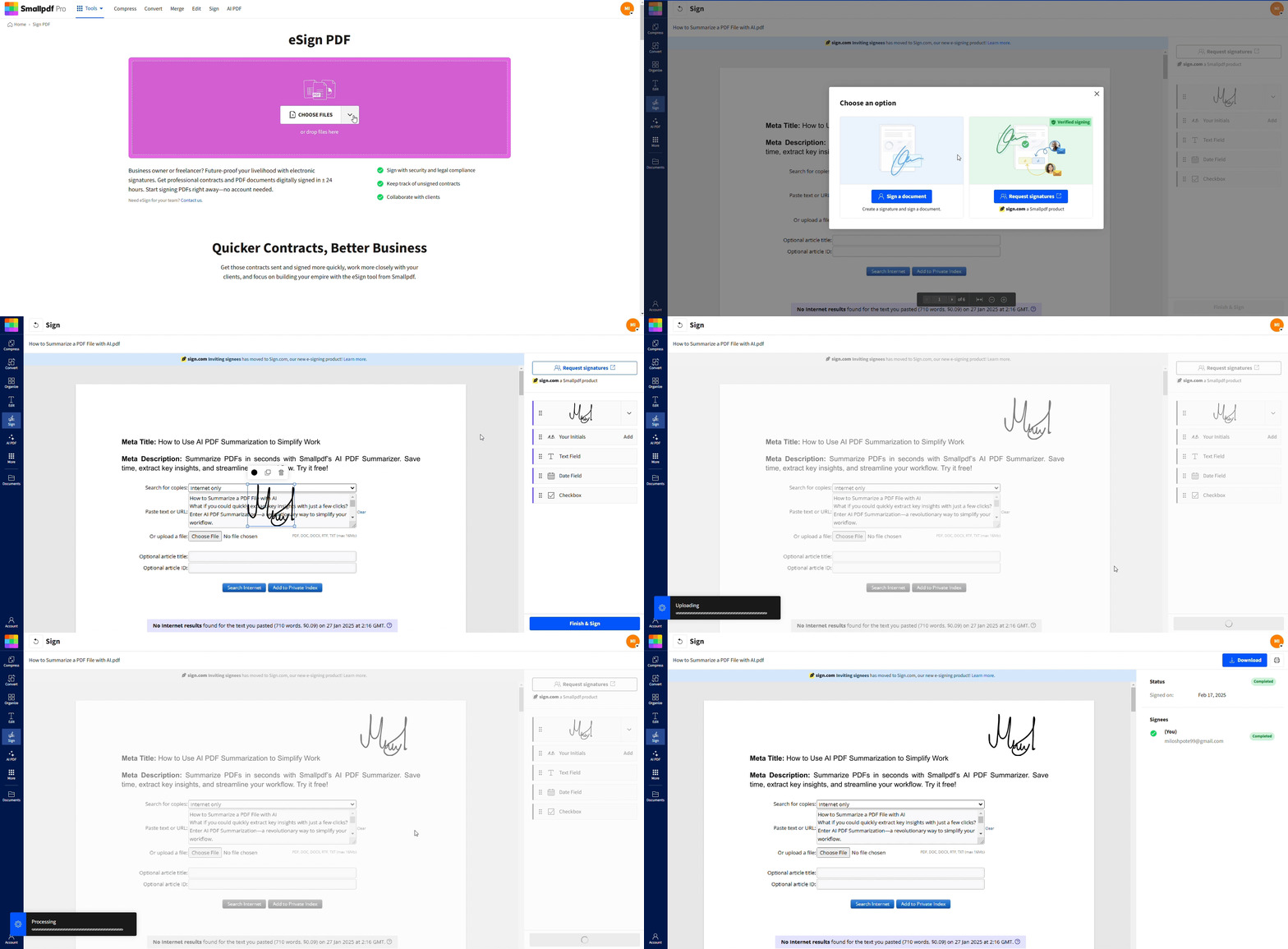
With Smallpdf, you can use Sign PDF to collect e-signatures, track who signed, and keep a consistent, time-stamped record of the agreement.
How To Keep Your PDF Documents Legally Binding
Once you understand what makes a document legal and binding, the next step is protecting that status in a digital workflow.
1. Make Sure The Agreement Itself Is Valid
Include clear terms: who does what, when, for how much, and under which conditions.
Avoid vague promises or missing details for key obligations.
Confirm that all parties understand and agree to the same version of the document.
2. Use Reliable E-Signatures
A structured e-signature process helps show:
Who signed the document
When they signed
Which version of the document they signed
Using a dedicated signing flow like Sign PDF can provide audit trails, email confirmations, and consistent handling of signatures.
3. Prevent Unauthorized Changes
After signing, you want to avoid silent edits that could call the agreement into question.
You can:
Add a password using Protect PDF so only authorized people can modify the file.
Limit editing rights while still allowing viewing and downloading.
Store a “final” version that you do not alter after execution.
4. Follow Any Extra Formalities
For certain document types, you may need:
Witness signatures
Notarization
Separate disclosure or consent forms
Digital workflows can still support these needs, but you should mirror the formal process that would be used on paper.
5. Store PDFs Securely
A legally binding document is not very useful if you cannot prove what was signed.
Good practices include:
Keeping backups in secure cloud storage or encrypted drives.
Retaining copies of any email confirmations or signing logs.
Smallpdf integrates with cloud storage providers and lets you download copies locally, so you can maintain your own archive.
Real-World Examples Of Legally Binding PDFs
Here are a few common scenarios where PDFs can be binding:
Service agreements: A freelancer sends a PDF contract outlining scope and fees. The client signs electronically. If the elements of a contract are present, this PDF can be enforceable.
Sales contracts: A business sends a purchase agreement as a PDF, with pricing, delivery terms, and warranties. Both sides sign online. The PDF file is the formal record of the deal.
HR and employment documents: Offer letters, policy acknowledgements, and NDAs often arrive as PDFs. When signed correctly, they can form part of the employee’s legal documentation.
For very sensitive or complex situations, it is always wise to seek legal advice, but the format itself is widely accepted.
Keep Your PDF Agreements Clear, Secure, And Enforceable
PDFs have become a standard way to create, sign, and store important agreements. If you understand what makes a document legal and binding, then use secure e-signatures, protect the file from changes, and keep clear records, your PDF contracts can be just as strong as paper.
Use Smallpdf to sign, protect, and manage your PDFs so your digital agreements stay organized, secure, and ready to rely on when you need them.
FAQs About What Makes A Document Legal And Binding
Can a PDF be a legal document?
Yes, a PDF can be a legal document if it reflects a valid agreement and includes all required elements, such as offer and acceptance, consideration, capacity, and any required formalities like signatures or witnesses.What makes a document legal and binding in simple terms?
A document is legal and binding when everyone clearly agrees to the same terms, each side provides something of value, the purpose is lawful, and any required formal steps are followed. The format (paper or PDF) matters less than the agreement itself.Are scanned signatures on a PDF legally binding?
A scanned handwritten signature can be accepted in some contexts, especially for lower-risk agreements. The key question is whether it reliably shows who signed and that they intended to agree. For stronger proof, an electronic signing process with clear records is usually better.Do electronic signatures on PDFs hold up in court?
In many countries, yes. Courts often recognize electronic signatures when they meet local legal standards, and there is evidence of who signed, how they signed, and what they agreed to. Using a structured e-signature flow helps provide this evidence.Is a PDF considered an “original” document?
In digital workflows, a final, locked PDF with confirmed signatures is often treated as the “original” record of the agreement. As long as you can show its integrity and signing history, it can serve the same function as an original paper document.Are PDF documents safe to open?
Most PDFs are safe, but some can contain malicious content. Open PDFs only from trusted sources and keep your PDF reader’s security settings up to date. Avoid clicking suspicious links or enabling unusual features inside unknown files.Do definitions of legally binding PDFs change across countries?
The basic contract elements are similar worldwide, but the rules on electronic signatures, notarization, and form requirements can vary. For major contracts or regulated areas, check the law in your country or get professional legal advice.Manage important PDF files reliably with Smallpdf Pro