Convert PPT to PPTX Online for Free
Convert PPT to PPTX format in seconds with Smallpdf. Keep every slide, layout, and animation intact while you update to the modern format.
More on PPT to PDF
More on PDF to PPT
PDF Sharing Tool & Guides
Convert PPT to PPTX: Click “Choose file” above to upload your .ppt, then download a modern PPTX presentation in seconds.
Old “.ppt” files can be tricky to share and open on newer devices. Modern PowerPoint uses “.pptx” as the default format, and many apps work better with it.
Our browser-based PowerPoint converter PPTX, lets you upload an old deck, convert it online, and download a fresh “.pptx” file with just a few clicks.
Quick Steps: Use Our PowerPoint Converter PPTX
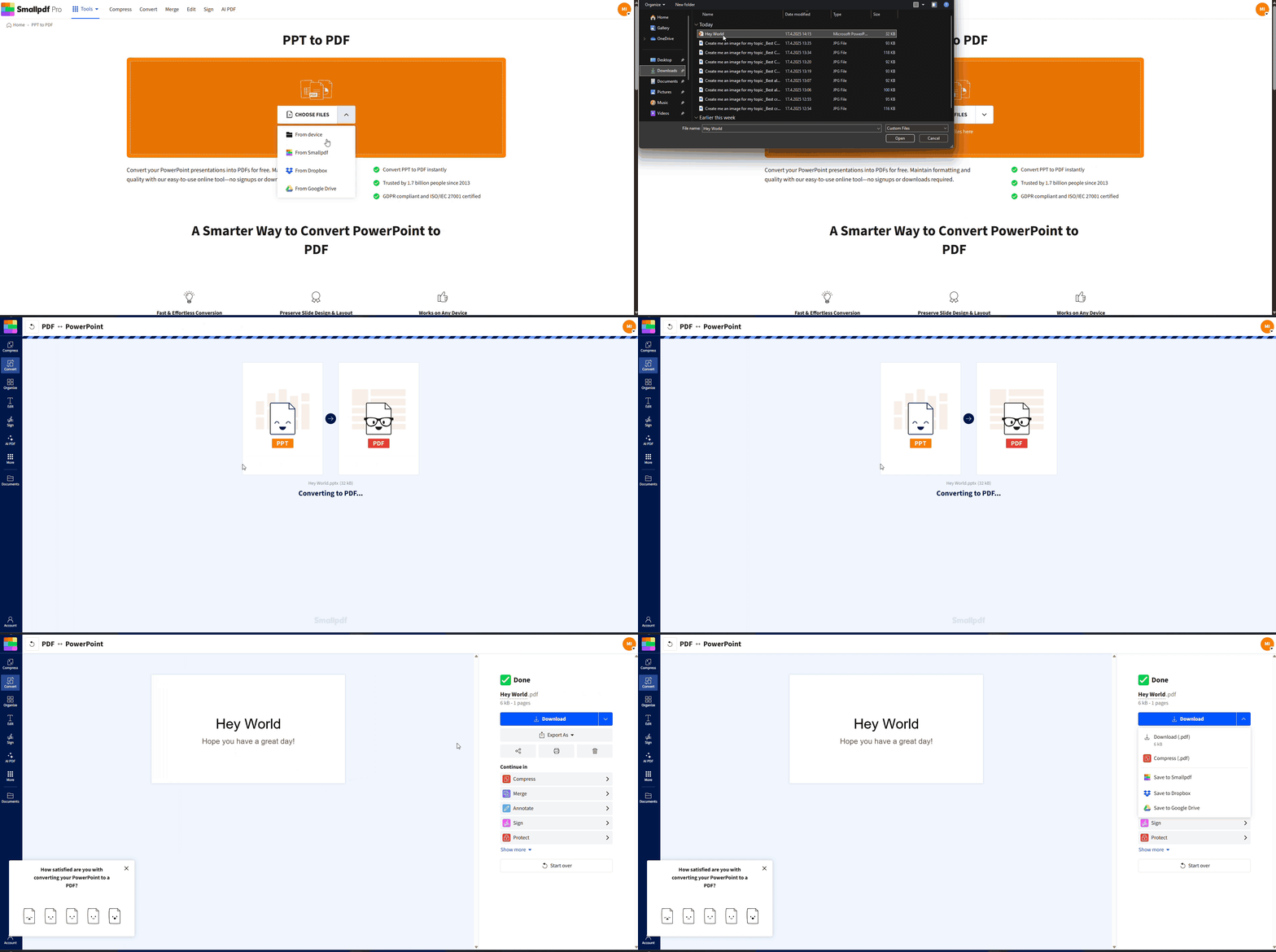
How To Convert PPT to PPTX Online With Smallpdf
You don’t need PowerPoint installed to update your files. Everything happens in your browser.
Step 1: Upload Your PPT to Smallpdf
Open our PPT to PPTX converter in your browser. Drag and drop your .ppt presentation into the upload area, or click “Choose Files” to browse.
If your presentation is stored in the cloud, you can also import it directly from Google Drive, Dropbox, or OneDrive.
Step 2: Export as PowerPoint (PPTX)
Once your file uploads, click “Export As” and choose “PowerPoint” from the list of formats. Our converter automatically uses the modern .pptx format for the export.
You do not have to change any complex settings. Just confirm the format and let our servers handle the rest.
Step 3: Download Your New PPTX File
When the conversion is complete, click “Download” to save your .pptx file. You can also send it straight back to Google Drive, Dropbox, or OneDrive from the result page.
We automatically delete your files from our servers after a short time processing, so your information stays safe and protected.
Will Layout or Content Change After Conversion?
In most cases, no. Converting PPT to PPTX is mainly a format update. The content and layout should look the same as before.
Here’s what stays the same. Our PowerPoint converter PPTX is designed to keep:
All slide text and basic formatting
Images, icons, and graphics
Slide layouts and themes
Most animations and transitions, where supported by the format
If your slide deck uses very old custom fonts or unusual effects, it’s a good idea to quickly click through the converted PPTX and confirm everything looks right.
PPT vs. PPTX vs. Other PowerPoint Formats
Understanding the main PowerPoint formats can help you choose the best one for your work.
PPT: Legacy PowerPoint Format
PPT is the older binary format used in PowerPoint 97–2003. It tends to:
Create larger file sizes
Have limited support in some newer apps
Miss out on some newer features and security options
PPTX: Modern Default Format
PPTX uses the Office Open XML (OOXML) standard, introduced around 2007. It:
Uses ZIP compression to keep file sizes smaller
Works better across modern operating systems and devices
Plays nicely with cloud services and online viewers
This is the format most users expect today.
Other PowerPoint Formats You Might See
PPTM: Macro-enabled version of PPTX for presentations with VBA macros
PPSX: PowerPoint Show format that opens directly in slideshow mode
PDF: Read-only format for sharing decks without letting others edit them
Our converter focuses on PPT to PPTX for modern editing, but we also support workflows that include PDF and other formats.
How To Convert PPT to PPTX in Microsoft PowerPoint
If you already have PowerPoint on your device, you can convert PPT to PPTX using the built-in “Save As” option.
Step 1: Open Your PPT In PowerPoint
Open the .ppt file in Microsoft PowerPoint. Check a few slides to confirm everything looks as expected.
Step 2: Save as a PPTX Presentation
Click “File” > “Save As” > “Browse.”
In “Save as type,” select “PowerPoint Presentation (*.pptx).”
Click “Save.”
PowerPoint will create a new .pptx version while keeping your original .ppt file unless you overwrite it.
If your presentation contains macros, PowerPoint may suggest saving as PPTM to keep that functionality.
Key Features Of Smallpdf’s PowerPoint Converter
Our converter does more than just flip the file ending. It is built to handle everyday needs when you work with PowerPoint presentations online.
Why Use Smallpdf Converter for PPT to PPTX
With Smallpdf, you can:
Convert PPT to PPTX online without installing any software.
Upload files from your device, Google Drive, Dropbox, or OneDrive.
Keep slide layouts, text, and graphics as close as possible to the original.
Use the converter on Windows, Mac, Linux, and ChromeOS.
Security and Privacy
We also take security seriously:
All transfers use TLS encryption.
Files are automatically deleted from our servers after a short time of processing.
Our platform is ISO 27001 certified.
Basic conversions do not require registration.
For frequent use, Smallpdf Pro adds batch processing, higher usage limits, and faster uploads, which can help if you manage many legacy decks.
Troubleshoot Common PPT to PPTX Conversion Issues
Most conversions are smooth, but sometimes you might notice issues. Here’s how to handle them.
1. The Converted File Shows Layout Problems
If your PPTX looks different from the original PPT:
Check for unusual fonts and replace them with standard fonts before converting.
Look at slides with very complex animations or custom templates, as these are more likely to shift.
Try converting the file to PDF first, then back to PowerPoint if you need a more stable layout for sharing.
This two-step path can sometimes flatten complex designs in a way that holds up better across devices.
2. Animations or Transitions Do Not Work as Expected
Older animations or transitions may behave differently in newer formats. If you see odd behavior:
Open the PPTX in the latest version of PowerPoint and check the “Transitions” and “Animations” tabs.
Replace very old effects with similar modern ones if needed.
This is usually only an issue for decks built in much older PowerPoint versions.
3. The File Will Not Upload or Is Too Large
If you cannot upload your PPT:
Check your internet connection and try again.
Make sure the file name does not contain unusual characters.
Consider compressing the original deck or splitting it into smaller sections if it is very large.
Smallpdf Pro offers higher file size limits and batch workflows that are ideal for larger libraries of presentations.
Convert Other PowerPoint Formats With Smallpdf
Many users who search for a PowerPoint converter PPTX, also need to move between other formats.
With Smallpdf, you can:
Convert PPT or PPTX to PDF when you want a read-only version for sharing.
Convert PDF to PPTX to bring slides from a static PDF back into PowerPoint for editing.
Export PowerPoint to JPG or PNG for use in documents, social media, or image galleries.
These features help you handle older decks, client files, or slide exports in one place. If you have any questions or concerns, we’re just an email away!
Frequently Asked Questions
Can I convert multiple PPT files to PPTX at once?
Yes. Smallpdf Pro lets you batch convert several PPT files to PPTX in one go. Free users convert one file at a time, which still works well for occasional updates.What happens if my PPT has macros?
Macros do not carry over to standard PPTX files. If your presentation uses VBA macros, you should save or convert it to PPTM, the macro-enabled format. That way, your code still runs in supported versions of PowerPoint.Can I convert PPT to PPTX without PowerPoint?
Yes. Our online PowerPoint converter PPTX runs completely in your browser. You do not need PowerPoint on your device, and you can use it on any modern operating system.Is PPT the same as PPTX?
No. PPT is the older binary format from pre-2007 versions of PowerPoint, while PPTX uses the newer Open XML standard. PPTX usually creates smaller files and has better compatibility with current apps and devices.How can I view PPTX files online?
You can upload a PPTX to Smallpdf and open it in your browser, or convert it to PDF for easy viewing and sharing. Many cloud storage platforms also preview PPTX files directly.Why is my converted PPTX showing layout issues?
Layout issues are rare but can happen with very old presentations, unusual fonts, or complex designs. Try updating fonts to standard options, simplifying slide layouts, or converting PPT to PDF and then back to PPTX to stabilize the design.Is my data secure when I upload a PowerPoint file?
Yes. We encrypt uploads and downloads, store files only for a short time, and run on ISO 27001-certified infrastructure. We also follow GDPR standards, so your data is handled responsibly.Change PPT to PPTX online in seconds with Pro
