


- CompressConvertAI PDF
- Organize
- View & Edit
- Convert from PDF
- Convert to PDF
- SignMoreScan
- Home
- ›
- ›Playground/Testing For Blackbird (DO NOT PUBLISH) Compress PDF to 1MB for Free
Compress PDF to 1MB for Free
Need to compress PDF to 1MB? Upload your file to Smallpdf, pick Basic Compression, and download a high-quality PDF under 1 MB—fast, free, no signup.
How To Compress a PDF to 1MB or Less for Free
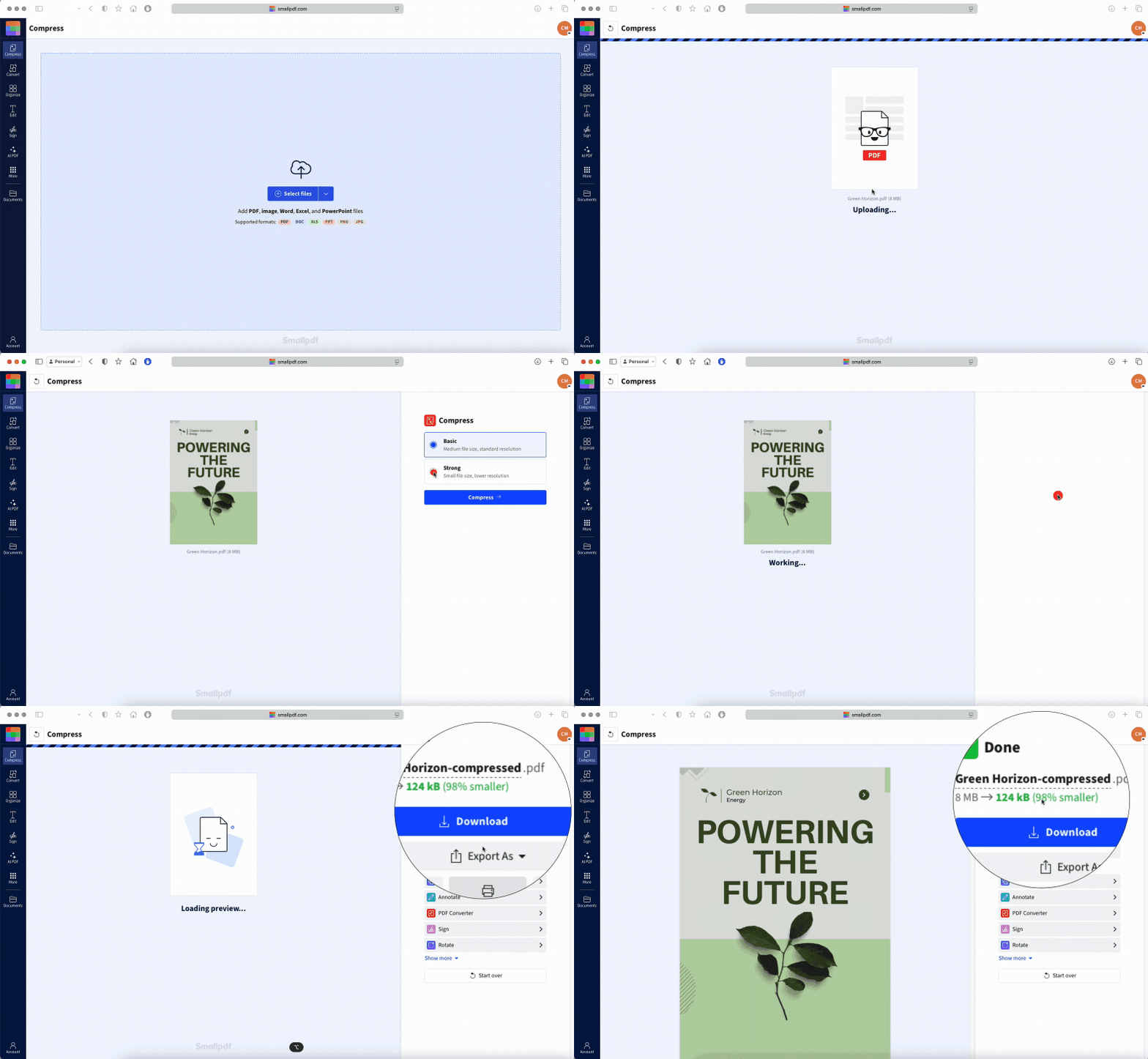
Compress PDF to 1MB Using Smallpdf
Why Compress a PDF to 1 MB?
Many online portals, especially for job applications, university submissions, and government services, limit file uploads to 1 MB. If your PDF is too large, you might not be able to submit it at all. Compressing it solves that instantly.
When you shrink PDF files under the 1 MB threshold, it helps you avoid upload errors, keep emails under size limits, and speed up sharing across devices. This is super useful when you’re working with forms, scanned images, or multi-page reports.
| Compression Level | Best For | Expected File Size | Expected Quality |
|---|---|---|---|
| Basic Compression | Forms, text‑based PDFs, standard documents | Usually under 1 MB | High – looks almost identical to original |
| Strong Compression (Pro) | Image-heavy PDFs, scanned files, strict upload limits | Smallest possible size | Medium – slight image quality loss possible |
| Re-Compression | Already compressed PDFs that need to be even smaller | Varies, usually 10–20% smaller than previous | May reduce readability if repeated |
Compress PDF to 1MB
We use the best technology on the market to reduce your PDF documents’ size while maintaining the highest file quality. With Basic Compression, your file will look just like the original, just with a smaller file size.
Note that the stronger the compression level you use, the more distortion you may see in the compressed document, especially in files containing many images. That’s why Strong Compression, a Pro feature, might result in small quality losses, but it can achieve smaller file sizes when needed.
We use the best technology on the market to reduce
Compress Non-PDF Files
Compressing your PDFs isn’t all we can do, though! Our online PDF compression tool can also reduce the file size of other file types, including:
JPG images
Word documents
PPT slides
Excel spreadsheets
Once you upload one of these documents, we’ll first turn your file into a PDF so our compressor can shrink the file, as described above.
Then of course, we can convert the compressed PDF back to its original format. Just head over to the PDF Converter, drag and drop the file, pick the format you need, and we’ll take care of the rest.
Did you know? Over 70% of PDF uploads on online portals fail because they exceed size limits - compressing to 1 MB solves this instantly
Secure and Free PDF Compressing
From the moment you upload your file to when you download your compressed PDF, your document is in a fully secure processing environment. On top of that, our servers automatically delete uploaded files after an hour of processing for further security.
All of our tools comply with GDPR standards, ensuring your personal data stays private and protected. We also apply 256-bit TLS encryption across all uploads and downloads for added peace of mind.
Once you reduce PDF size, you’ll see options to protect, edit, or convert your file before downloading. If the file contains sensitive information, you may want to protect it—even after you shrink the PDF file.
You can do this by encrypting your compressed PDFs with a password using our Protect PDF tool. Just choose this option on the result page to go straight to the tool before downloading your file. If you accidentally protected a PDF before compressing it, just use Unlock PDF to remove the protection.
Reduce PDFs to Other Sizes (200KB, 300KB, and Custom Targets)
Already compressed your file to 1 MB and need to go even smaller? No problem—Smallpdf gives you the flexibility to apply compression more than once by switching to Strong Compression (Pro) to shrink PDF files even further.
Whether you’re trying to compress PDF to 200KB, compress PDF to 300KB, or just need a smaller file for strict upload limits, Strong Compression is your best bet. You can also re-compress files that were previously compressed with Basic Compression to achieve even smaller sizes.
If you’re working with images, simply upload them to the Compress PDF tool. Smallpdf will first convert them to PDF, compress them, and then you can use the PDF to JPG tool to convert your file back to image format. It’s a quick way to reduce JPG file size without extra steps.
Troubleshooting Compression Issues
If your PDF doesn’t shrink enough or looks blurry, a few quick fixes usually help:
Try Strong Compression (Pro) for a higher reduction rate on large or image-heavy files.
Convert image-based PDFs to grayscale before compressing. This often reduces size without hurting readability.
Split very large PDFs into separate documents, then compress each section separately.
Remove unnecessary pages or images using the Delete PDF Pages tool.
Save edited PDFs as “reduced size” files in your document creator before uploading to Smallpdf.
Start Your Free Trial to Access All Smallpdf Tools
Want to unlock Strong Compression and other Pro features? Try Pro free for 7 days and get access to unlimited compressions, batch processing, and advanced compression options that can shrink files even further while maintaining quality.
Reduce PDFs to Other Sizes (200KB, 300KB, and Custom Targets)
Frequently Asked Questions About Compressing PDFs to 1MB
Will compressing a PDF reduce its quality?
Basic Compression keeps your file visually identical to the original in most cases. Strong Compression (Pro) may slightly impact image-heavy documents.
Can I compress the same PDF multiple times?
If you first used Basic Compression, you can upload the compressed file and use Strong Compression to shrink it further. Keep in mind that re-compressing an already compressed file might not shrink it much further and could affect readability if done repeatedly.
Can I use Smallpdf’s compression tools on my phone?
Absolutely! It’s just as easy to make your PDF smaller from your mobile browser. The tool works smoothly on Android and iOS, no app needed.
Can I compress scanned PDFs to under 1 MB?
Yes, but image-based scans tend to be larger. For best results, use grayscale scans and try Strong Compression if the file is still too big.
Is it secure to compress PDFs online?
Yes! We use 256-bit TLS encryption for all uploads and downloads, comply with GDPR standards, and automatically delete your files after one hour of processing.
What if my PDF is already under 1 MB?
You can still compress it if you’d like to make sharing even faster or save a bit of extra space. Just upload it and select Basic Compression—it will confirm the final size once done. If there’s no major change, that simply means your file is already as light as it can

Super Helpful Tool
I absolutely love using the Smallpdf app! It has made my life so much easier when it comes to managing and editing PDF documents. The interface is clean and user-friendly, making it simple to navigate and find the tools I need. I especially appreciate the ability to compress large PDF files without losing quality, as well as the option to convert PDFs to different formats with just a few clicks. The app is fast, efficient, and reliable, and I can always count on it to get the job done. I highly recommend Smallpdf to anyone in need of a convenient and practical PDF solution

David
Lead Engineer

Try Pro free for Stronger Compression – Cancel anytime
Related Articles

David Beniček
Engineering Manager at Smallpdf