- Home
- ›
- ›The Difference Between Wet, Typed, Stamped & Digital Signatures
The Difference Between Wet, Typed, Stamped & Digital Signatures
Understand wet signature meaning, how it compares to digital and electronic signatures, and when each type makes the most legal and practical sense.
More on Sign PDF
More on Edit PDF
PDF Tips & Resources
When you sign a contract today, you might see several options:
Wet signature
Electronic signature
Digital signature
Typed name
Stamped mark
All indicate agreement, but they don’t all carry the same legal weight, security, or practical use. Knowing what a wet signature means and how it differs from digital and other signatures helps you choose the right method for each document.
Wet Signature Meaning
Wet signatures are still the reference point for many laws and processes, so it helps to define them clearly.
What Is a Wet Signature?
A wet signature is a traditional ink signature made by hand on a physical document. You sign with a pen, pencil, or stamp directly onto paper. The “wet” part refers to the ink or medium that must dry on the page.
People sometimes call this an ink signature or a handwritten signature. It usually matches the way you sign checks, forms, or contracts in person.
Legal Status of Wet Signatures
Wet signatures have a long history in contract law and are widely accepted:
Many jurisdictions treat them as the default form of signing.
Notaries, witnesses, and in-person verification often rely on them.
Courts are used to interpreting them as evidence of intent and identity.
Some documents still specifically require a wet signature even in countries that recognize electronic signatures. Always follow local rules or your organization’s policies for high-risk agreements.
When Wet Signatures Are Still Required
Wet signatures often remain mandatory in scenarios such as:
Real estate deeds and mortgage documents
Wills and estate planning papers
Certain court filings and notarized documents
Some banking, insurance, or government forms
In these cases, you might still scan a signed document and handle the rest of the process digitally, sometimes with help from OCR to make scans searchable and easier to store.
What Is a Digital Signature?
Digital signatures sound similar to electronic signatures, but they refer to a specific cryptographic method rather than any online scribble or click.
Core Idea of Digital Signatures
A digital signature uses public-key cryptography to prove:
Authentication - who signed the document
Integrity - that the content has not changed since signing
Non-repudiation - that the signer cannot credibly deny signing
Instead of ink, a digital signature relies on a private key, a public key, and a digital certificate issued by a trusted authority.
How Digital Signatures Work (Short Version)
You don’t need to know all the math behind it, but the basic flow looks like this:
Software generates a key pair: One private key (kept secret) and one public key (shared).
It runs the document through a hash function to create a unique fingerprint.
It encrypts that fingerprint with the private key to form the digital signature.
A digital certificate from a Certificate Authority links the public key to the signer’s identity.
Anyone can use the public key to check if the signature is valid and the document is untouched.
If someone changes even one character in the document, the fingerprint no longer matches, and the signature shows as invalid.
Legal Frameworks For Digital Signatures
Most regions recognize digital signatures within broader electronic signature laws:
eIDAS (EU) defines Advanced and Qualified Electronic Signatures. Qualified digital signatures can have the same legal effect as handwritten signatures across EU member states when certified correctly.
ESIGN Act and UETA (US) give electronic signatures legal validity, including digital signatures that meet certain requirements.
Exact rules vary by country, so regulated industries often follow strict standards for digital signatures.
Other Signature Types: Electronic, Typed and Stamped
Digital signatures are one subset of electronic signatures. Several simpler forms also exist for everyday work.
Electronic Signatures
An electronic signature is any electronic method that shows someone has agreed to a document. Examples include:
Clicking “I agree” on a contract
Drawing a signature with a mouse or touchscreen
Uploading an image of a handwritten signature
Electronic signatures focus on intent rather than strong cryptographic proof. They are widely used for business agreements, HR documents, and sales contracts because they are fast and legally acceptable in many situations.
Typed Signatures
A typed signature is usually just your name typed in a specific place to show agreement, for example:
Typing your name at the end of an email
Entering your name in a signature field in a form
Typed signatures signal intent but offer limited identity verification. They work best for internal approvals, low-risk confirmations, and simple agreements where strict security is not required.
Stamped Signatures
Stamped signatures add a physical or digital stamp that represents a person or organization, often with a logo or unique mark. They are common where:
Many documents need to be processed quickly
A stamp carries recognized authority, such as a company seal
In some cultures and sectors (for example, certain Asian business contexts), stamps or chops function similarly to signatures. Their legal weight depends on local laws and internal policies.
Digital Signature vs Electronic Signature vs Wet Signature
It helps to compare the main types side by side.
Security and Best-Use Overview
Digital signature: Highest security, uses cryptography and certificates, best for regulated or high-value agreements.
Electronic signature: Flexible and convenient, suitable for most business contracts and everyday workflows.
Wet signature: Traditional ink on paper, still required for some legal and high-formality documents.
Typed and stamped signatures: Simple and fast, suited to internal documents or workflows where identity is controlled by process rather than technology.
The right choice depends on legal requirements, risk level, and how important long-term verification is for that document.
When To Use Each Signature Type
Picking the right signature method protects your business and keeps workflows smooth.
Everyday Business Agreements
For most day-to-day agreements, a standard electronic signature is enough:
Employment contracts and onboarding documents
Sales contracts, NDAs, and service agreements
Simple supplier or partner agreements
Electronic signatures keep things moving, reduce printing, and allow people to sign on almost any device.
Regulated, High-Risk, or Long-Term Documents
For sensitive or heavily regulated documents, digital signatures may be safer:
Financial services agreements and lending documents
Healthcare and patient records in strict environments
Government submissions and public sector contracts
Intellectual property, licensing, and high-value deals
Here, cryptographic proof and clear audit trails help meet compliance and audit expectations.
Paper-Based or Special Legal Requirements
Some documents still need wet signatures because of law, policy, or tradition:
Real estate deeds, notarized documents, and some court filings
Wills, trusts, and estate documents in certain jurisdictions
Some cross-border agreements where parties prefer ink
In these cases, you can still digitize signed pages, store them securely, and use OCR to make them searchable and easier to find later.
How To Sign Documents Online With Smallpdf and Sign.com
You don’t need to choose between paper and fully cryptographic systems for every document. Often, you can combine simple electronic signing with stronger workflows where needed.
Create an Electronic Signature With Smallpdf
Smallpdf eSign helps you sign PDFs yourself in a few simple steps:
Upload your contract or agreement to Smallpdf eSign using the drag-and-drop area below (or click to choose a file).
Create your signature by drawing, typing, or uploading an image.
Place your signature where it needs to appear.
Add the date or initials if required.
Save and download the signed PDF, or store it in Google Drive, Dropbox, or Smallpdf storage.
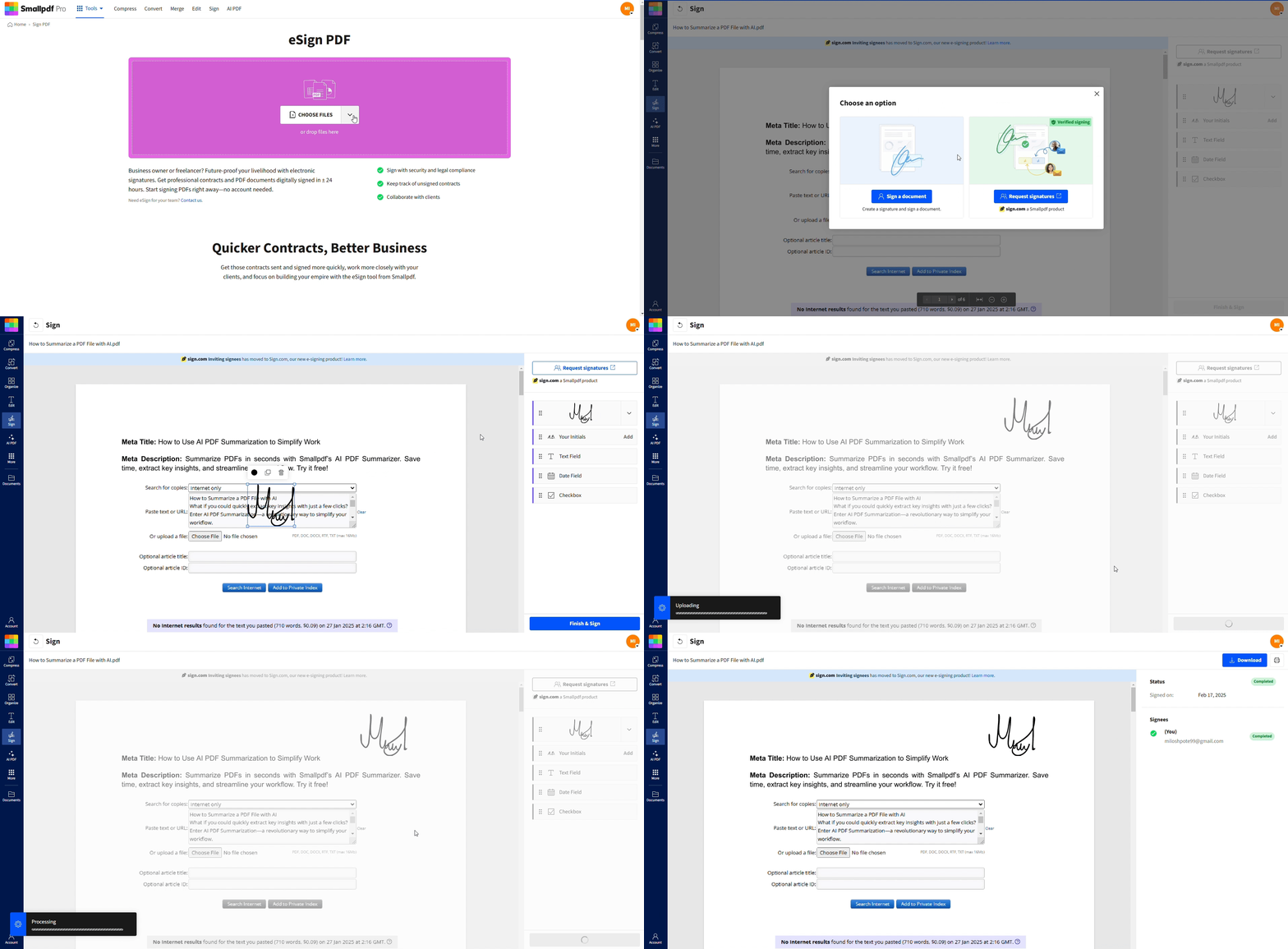
This works well when you only need your own signature or a simple workflow and want a clean, signed PDF without printing.
Request Signatures and Get an Audit Trail With Sign.com
When you need several people to sign or want a more complete workflow, you can move to Sign.com:
Upload the contract to Sign.com.
Add signers by entering their email addresses.
Place signature, initials, date, and text fields for each signer.
Set a signing order if the sequence matters.
Send the request and track progress from your dashboard.
Sign.com gives you status updates and an audit trail that shows who signed, when they signed, and from which device or location, helping you document the validity of the agreement over time.
Frequently Asked Questions
What does wet signature meaning refer to?
Wet signature meaning refers to a traditional ink signature made by hand on a physical document. The signature is “wet” because it uses ink or another medium that must dry on the paper, and it often appears on contracts, forms, and official documents.Are wet signatures more legal than digital signatures?
Wet signatures are familiar to courts and still required for some documents, but digital signatures can have equal or even stronger legal standing when they meet specific standards and regulations. The key is whether the law in your region accepts digital signatures for that document type and whether you use a compliant solution.When should I still use a wet signature?
You should still use a wet signature when laws, regulations, or company policies explicitly require it, such as certain real estate transactions, wills, notarized documents, or particular court filings. When in doubt, check with legal counsel or the receiving institution.Is a typed name a valid signature?
A typed name can be a valid electronic signature if the context clearly shows intent to sign, such as typing your name in a signature field and clicking a confirmation button. However, it offers weaker identity verification than a digital signature with certificates, so it is better for low-risk agreements.Is a stamp the same as a signature?
A stamp can act like a signature in some business contexts, especially where it is controlled and recognized as an official mark. Whether a stamped signature is treated the same as a handwritten signature depends on local law, industry practice, and internal rules.Can I turn a wet signature into a digital one?
Yes. You can sign a piece of paper, scan or photograph it, and upload the image into an electronic signing feature such as Smallpdf eSign. The image becomes part of an electronic signature. For stronger guarantees, you can combine that image with a digital signature process that uses certificates and audit trails.Sign and manage documents digitally using Smallpdf
