- Home
- ›
- ›Dead-End Documents: The Hidden Cost of Work That Never Gets Used
Dead-End Documents: The Hidden Cost of Work That Never Gets Used
A new survey reveals how often professional documents are abandoned before they're ever used, and the hidden toll that waste takes on time, morale, and careers.
Every week, professionals create proposals, contracts, reports, and presentations that never see the light of day. As a platform built to help people work with documents more simply and efficiently, Smallpdf wanted to understand just how much that invisible waste was costing modern teams.
To find out, we surveyed 1,004 U.S. professionals across various industries about their document habits, workflows, and frustrations. Abandoned files are quietly draining hours, productivity, and morale across industries. For teams that rely on digital documents every day, these hidden losses add up fast. But with the right tools and habits, they don't have to.
Key takeaways
On average, professionals create, edit, or interact with 11 documents each week, and 16% of them are abandoned before they are ever used, shared, or finished.
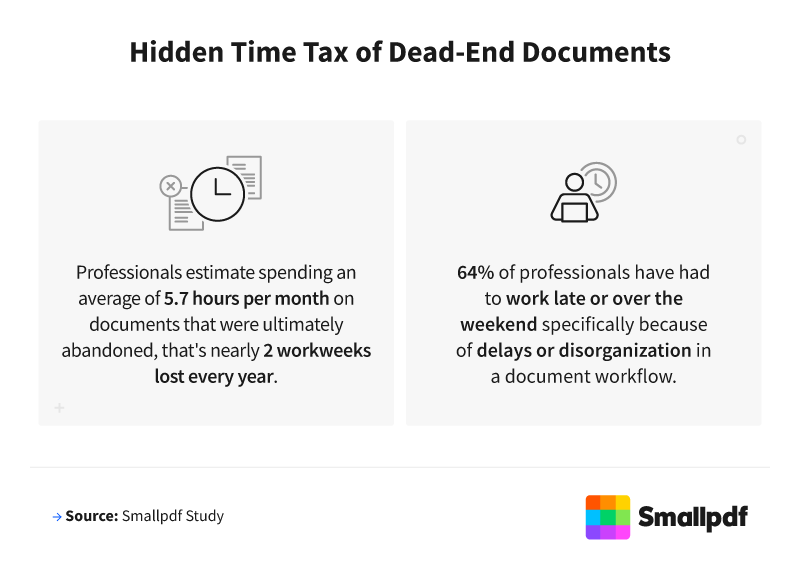
Professionals waste an average of 5.7 hours per month on documents that were ultimately abandoned, the equivalent of nearly 2 workweeks lost every year.
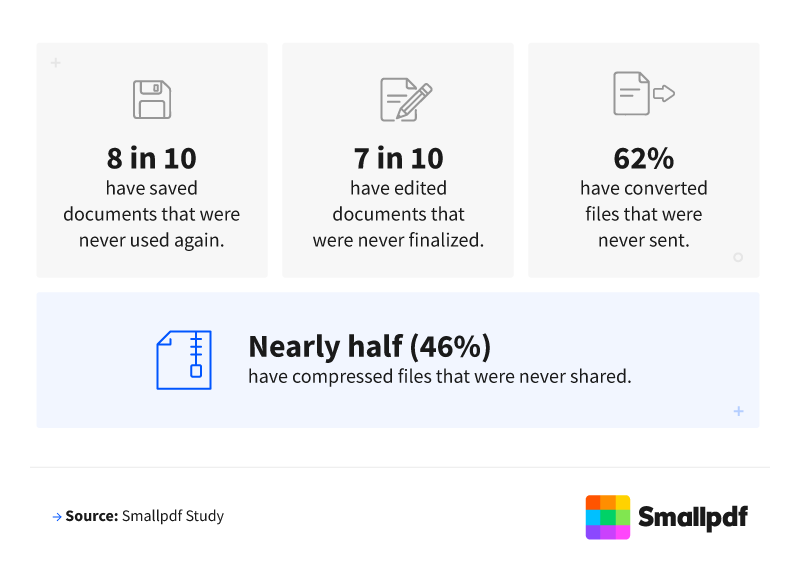
8 in 10 professionals have saved documents that were never used again.
7 in 10 have edited documents that were never finalized.
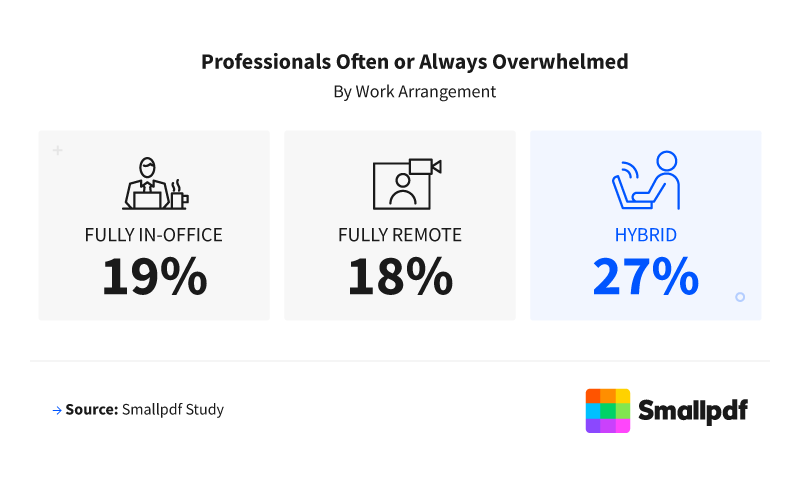
64% of professionals have had to work late or over the weekend due to delays or disorganization in a document workflow, rising to 72% among hybrid workers.
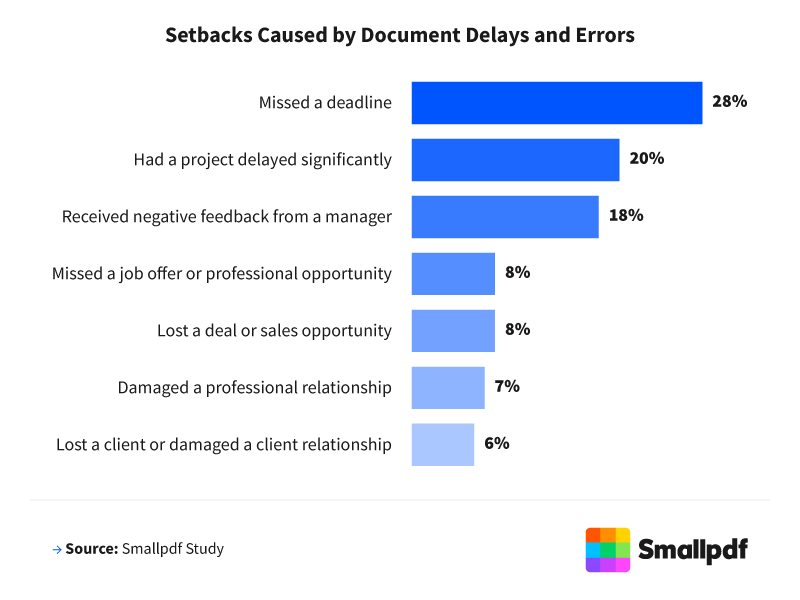
55% of professionals have experienced a setback, such as a missed deadline, a lost deal, or a damaged relationship, as a result of a document delay, an error, or incomplete paperwork.
The Documents That Never Make It
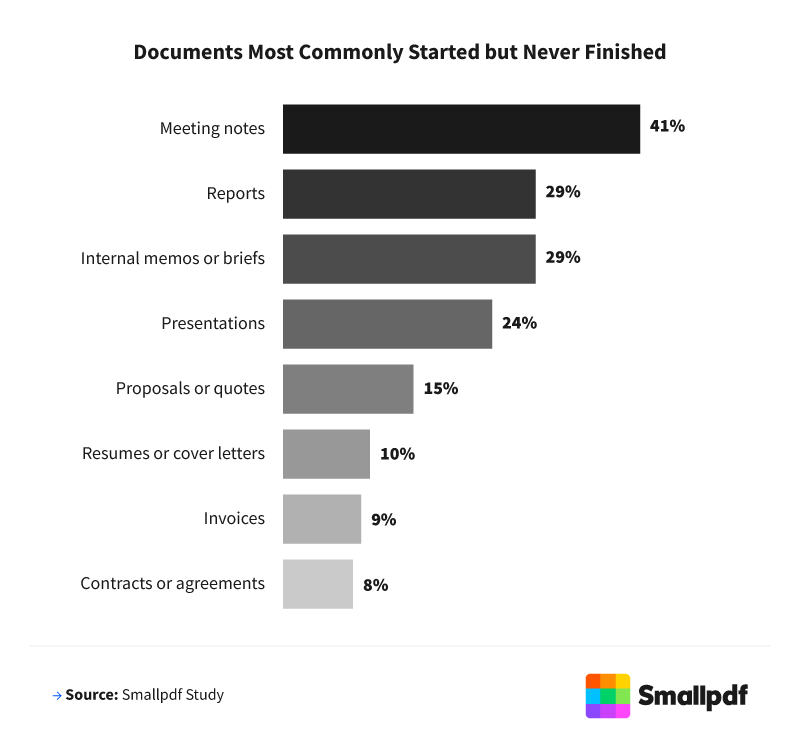
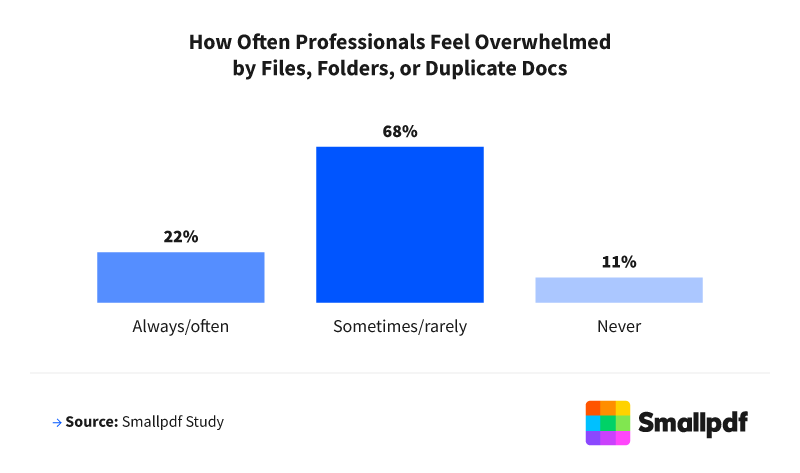
Building documents that go unused isn't a rare event. While 37% of professionals said it rarely happened, and 15% said never, 32% experienced it occasionally, 12% regularly, and 4% frequently. That means nearly half of professionals (48%) face this frustration at least occasionally, turning effort into digital clutter.
On average, professionals created, edited, or interacted with 11 documents each week, and 16% of them were abandoned before they were ever used, shared, or finished. Younger professionals reported higher abandonment rates, with Gen Z and millennials at 17%, compared to 14% for Gen X and 10% for baby boomers.
When Documents Go Wrong, Careers Pay the Price
Document issues rarely stay contained within a single file. They ripple outward, affecting deadlines, work relationships, and confidence. More than half of professionals (55%) have experienced a setback due to a document delay, error, or incomplete paperwork.
Missed Deadlines and Constant Interruptions
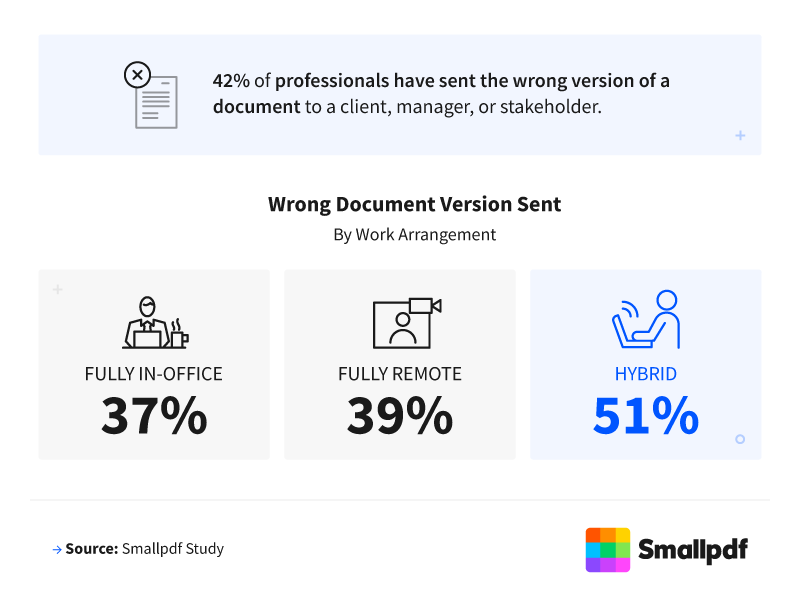
Over a quarter of professionals (28%) said document confusion or delays caused them to miss a deadline. Hybrid workers were most affected at 33%, compared to 29% of fully in-office professionals and 22% of remote professionals. Gen Z and millennials were the most likely to report missed deadlines (both at 29%), compared to 26% of Gen X and 23% of baby boomers.
Measure Your Own Document Waste
Curious how your workflow compares to the national averages? Our interactive tool makes it easy to find out in seconds. Just enter four simple data points and instantly receive a personalized breakdown of your document waste in hours and dollars.
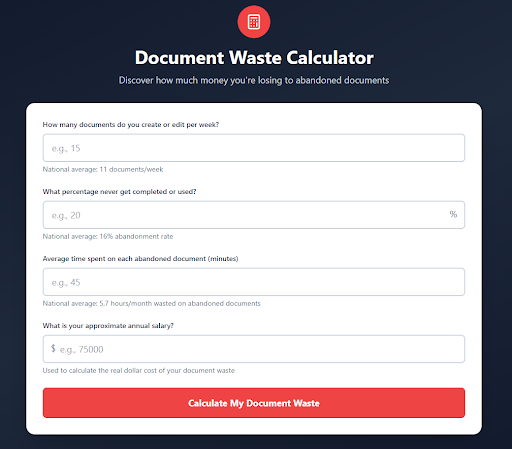
See Your Cost of Abandoned Documents
If the numbers surprised you, you're not alone. Most teams don't realize how much time slips away through small workflow gaps and repeated formatting work. The real cost becomes clear when you look at where those lost hours actually land.
How Document Waste Becomes Overtime
The time lost to abandoned files does not just disappear from your calendar. It often shows up as late nights, weekend work, and mounting pressure.
Remote workers: 6.5 hours
Hybrid workers: 5.8 hours
Fully in-office professionals: 4.1 hours
Document disorganization pushed many beyond regular hours. Nearly two-thirds of professionals (64%) have worked late or over the weekend due to document workflow delays, rising to 72% among hybrid workers. By comparison, 62% of remote workers and 57% of in-office workers reported the same experience.
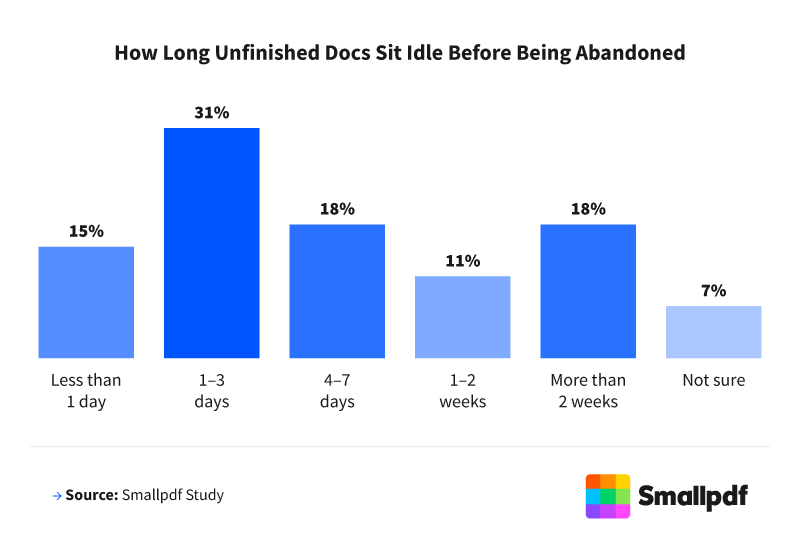
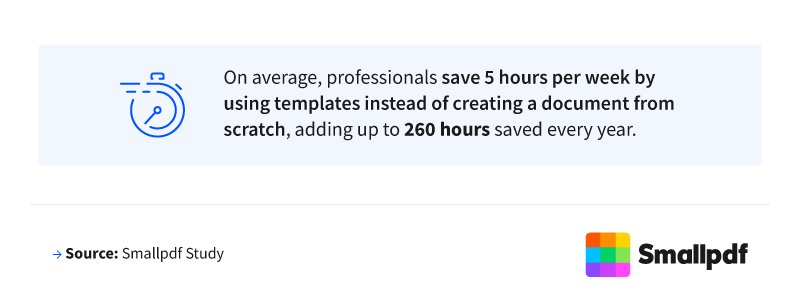
It's a finding that aligns closely with what we see across our user base. When document workflows are standardized and streamlined, their work accelerates.
Reclaiming the Hours Hidden in Your Workflow
Abandoned files, missed versions, and duplicated work quietly consume hours each month. They also contribute to stress, overtime, and professional setbacks. Document decay has become a measurable drain on modern work, but a few small changes can make a meaningful difference:
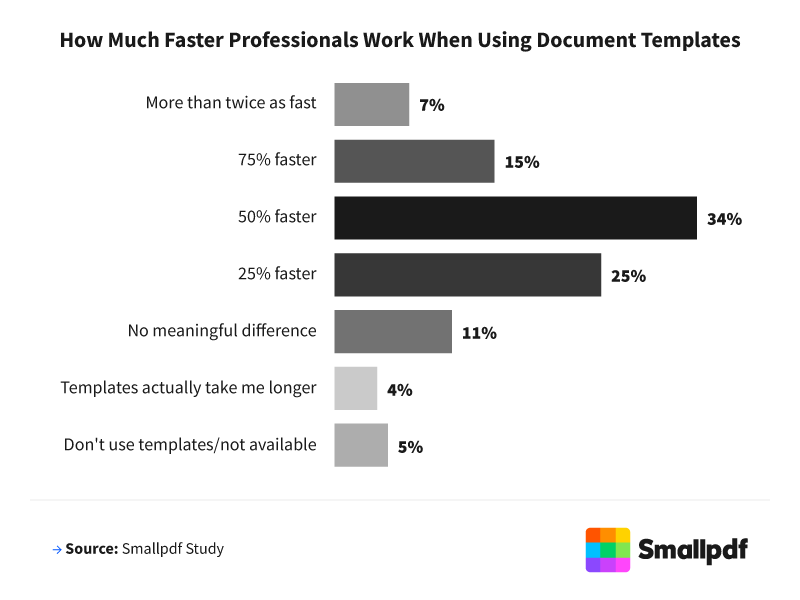
Use templates. Most professionals said templates made them noticeably faster at completing documents. Standardizing your most common formats cuts formatting time and reduces rework.
Establish a single source of truth. Agreeing on where files live and sticking to it reduces the version confusion that leads to missed deadlines and duplicate effort.
Set clear approval expectations. Nearly half of professionals have abandoned a document while waiting on someone else's input. Defining review timelines keeps work moving and prevents files from stalling out entirely.
When professionals feel in control of their workflows, they save time, protect relationships, and avoid preventable errors. In a world where every hour counts, finishing what you start may be one of the most powerful productivity upgrades of all. Smallpdf is built to help you get there.
Methodology
The data behind this report comes from firsthand research commissioned by Smallpdf. In February 2026, Smallpdf surveyed 1,004 U.S. professionals across a range of industries and job levels about their document creation, management, and workflow habits. The sample was designed to reflect the diversity of today's workforce, spanning four generations: Gen Z (21%), millennials (52%), Gen X (23%), and baby boomers (4%).
Participants worked across a broad mix of industries, including healthcare (17%), information technology (16%), education (15%), finance/banking/insurance (10%), and other fields (9%). Additional representation included government/public sector (7%), media/entertainment (5%), retail/e-commerce (5%), and manufacturing (3%). Construction/real estate, marketing/advertising/PR, transportation/logistics, legal, and nonprofit each accounted for 3%, while hospitality/food and beverage represented 1% of respondents.
Work arrangements were equally represented, with fully in-office (35%), hybrid (35%), and fully remote workers (30%) all included. All findings are based on self-reported responses collected directly from participants. Percentages that do not total 100% are due to rounding.
About Smallpdf
The patterns uncovered in this research reflect challenges that Smallpdf has spent years helping professionals solve. Smallpdf makes working with documents simple, fast, and stress-free. From compressing and converting to editing and eSigning, our tools are built to reduce the friction that turns documents into dead ends. For teams looking to spend less time managing files and more time finishing them, Smallpdf is a practical place to start.
Fair use statement
The information in this article may be used for noncommercial purposes only. If you share it, please include a link back to Smallpdf with proper attribution.
Related Articles
