- Home
- ›
- ›Best DocuSign Alternatives: Smallpdf & 5 Other Options
Best DocuSign Alternatives: Smallpdf & 5 Other Options
Need a DocuSign alternative for quick PDF signing? Compare six top options, see real limits, and pick the best fit in minutes.
DocuSign is widely known, but it isn’t always the right fit for every budget, volume, or signing workflow. If you just need fast, reliable PDF signing—or want fewer limits and lower costs—it’s worth looking at alternatives.
In this guide, we compare Smallpdf with five popular DocuSign alternatives: Acrobat Sign, PandaDoc, Dropbox Sign, signNow, and Zoho Sign. You’ll see how they differ on pricing, limits, and real-world use cases, so you can choose the option that actually fits how you sign documents today.
DocuSign Alternatives at a Glance
We’ll start with the short version. Smallpdf is listed first because it’s one of the best free alternatives when your work is mostly PDFs.
| Option | Best For | Starting Price | Limits To Watch |
|---|---|---|---|
| Smallpdf | PDF-first signing plus 20+ PDF actions | Free (usage limits apply) | Free usage caps. Advanced signing features depend on plan. |
| Adobe Acrobat Sign | Teams already deep in Acrobat | From $14.99 per license/month (annual) | Transaction caps may apply by plan. |
| PandaDoc | Proposals, quotes, and sales flows | From $19 per user/month (annual) | Some eSign features vary by plan and tier. |
| Dropbox Sign | Simple eSign + Dropbox-friendly workflows | From $20/month (Essentials) | Some plans have minimum user requirements and feature gating by tier. |
| signNow | Budget-friendly signing for growing teams | From $8 per user/month | Advanced workflow and admin controls depend on plan level. |
| Zoho Sign | Zoho ecosystem users and simple approvals | From $10/month | Some workflows, templates, and automation features vary by tier. |
If you already know your category, jump to the matching section below. If not, the next checklist helps you pick faster.
Quick Checklist Before You Switch
Most switching regrets come from limits and workflow mismatch. Run through this before you commit.
How many signature requests do you send per month? DocuSign and Zoho Sign both tie many plans to envelope limits.
Do you only need to sign yourself, or collect signatures from others? Those are different workflows with different pricing.
Do you edit PDFs daily, or only sign? If you edit, convert, compress, or flatten often, an all-in-one PDF platform can replace extra subscriptions.
Do you need audit trails or a completion certificate? Many teams only need this for specific documents, not everything.
How We’re Comparing These DocuSign Alternatives
To keep this useful, we’re focusing on the decision-making factors that matter to most people:
Cost to get started (and what you lose on the lowest tier)
Sending limits (envelopes, transactions, or monthly caps)
PDF handling (editing, converting, compressing, and preparing files)
Trust factors (security basics and compliance signals)
DocuSign Overview
DocuSign is reliable, widely accepted, and built around signature requests, templates, and tracking.
The catch is that many DocuSign plans are tied to envelope limits, which can feel tight if you send documents frequently.
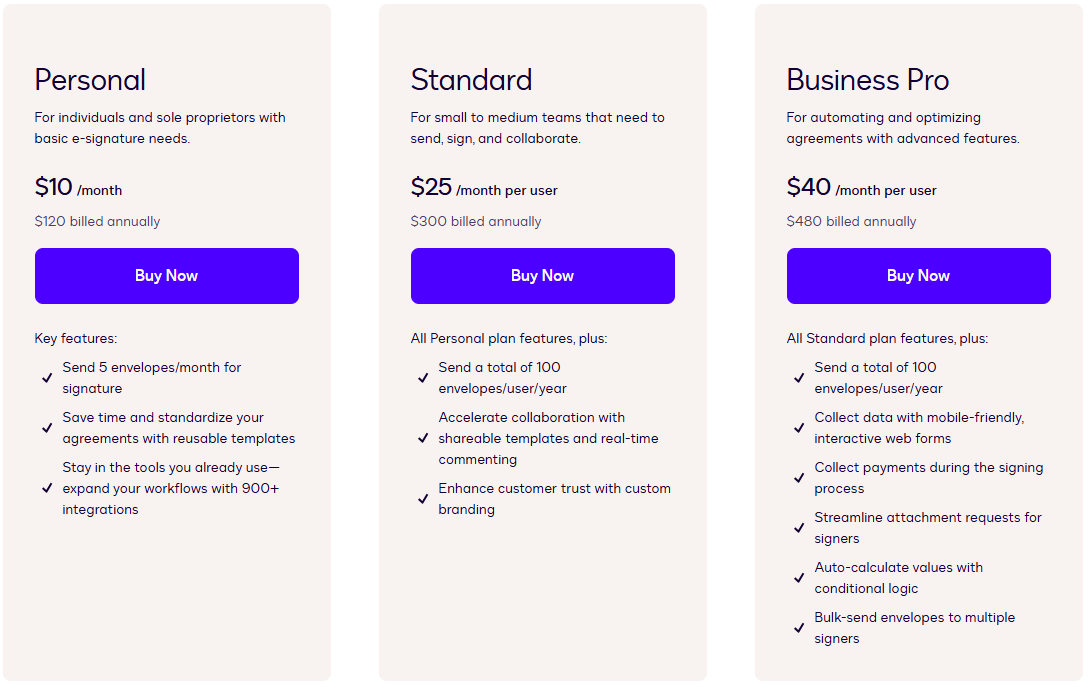
For example, DocuSign’s Personal plan lists five envelopes per month, and other tiers reference annual or monthly envelope allowances depending on billing.
DocuSign is often a solid fit if:
Your team already uses DocuSign templates and routing.
You need a well-known signing experience for external clients.
You can predict sending volume and stay within plan limits.
We’ve made an entire guide on how to use DocuSign, you can check it to learn more.
If you’re paying mainly to send signatures, and you also do a lot of PDF prep work, this is where alternatives can pull ahead.
Smallpdf eSign: Best DocuSign Alternative for PDF-First Work
If your daily work starts and ends with PDFs, Smallpdf is usually the fastest way to sign a PDF and move on.
What You Get With Smallpdf
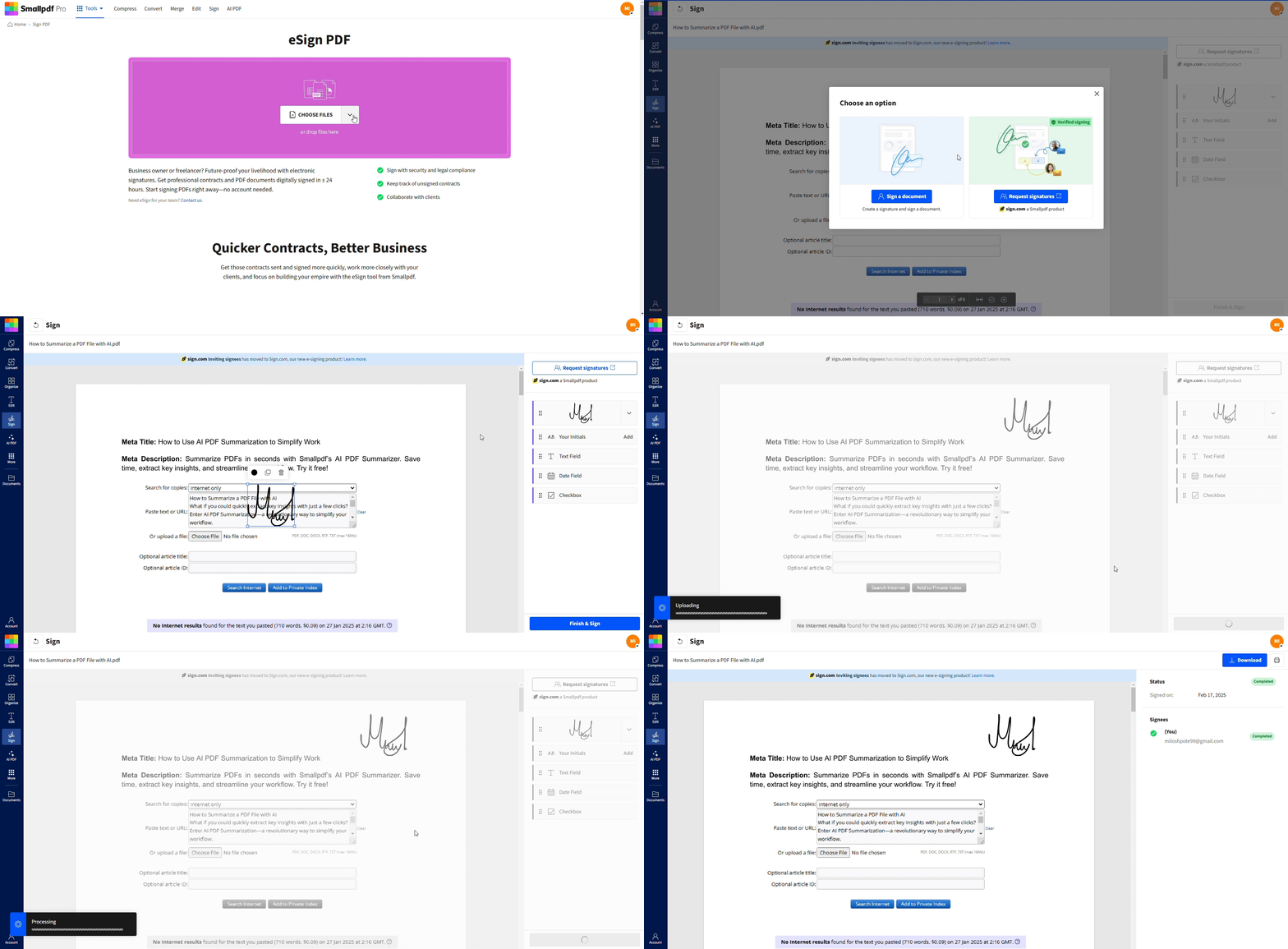
Smallpdf is a browser-based PDF platform that lets you sign PDFs and handle the PDF tasks that usually show up before signing: compressing file size, converting formats, flattening elements, or unlocking printing restrictions.
You can sign a PDF in seconds, and your file transfers are protected with TLS encryption. By default, files are deleted automatically from our servers after one hour of processing unless you choose to store them in your secure account.
Self-Signing vs. Requesting Signatures With Smallpdf
This is where people get confused, and it’s important to understand the difference.
Self-signing is when you add your own signature or initials to a PDF.
Requesting signatures means you invite others to sign, track status, and collect completed copies.
Smallpdf connects to Sign.com for that kind of request-based workflow, including plan-based limits. For example, Sign.com offers a free plan that allows a few documents per month, with higher usage on paid tiers.
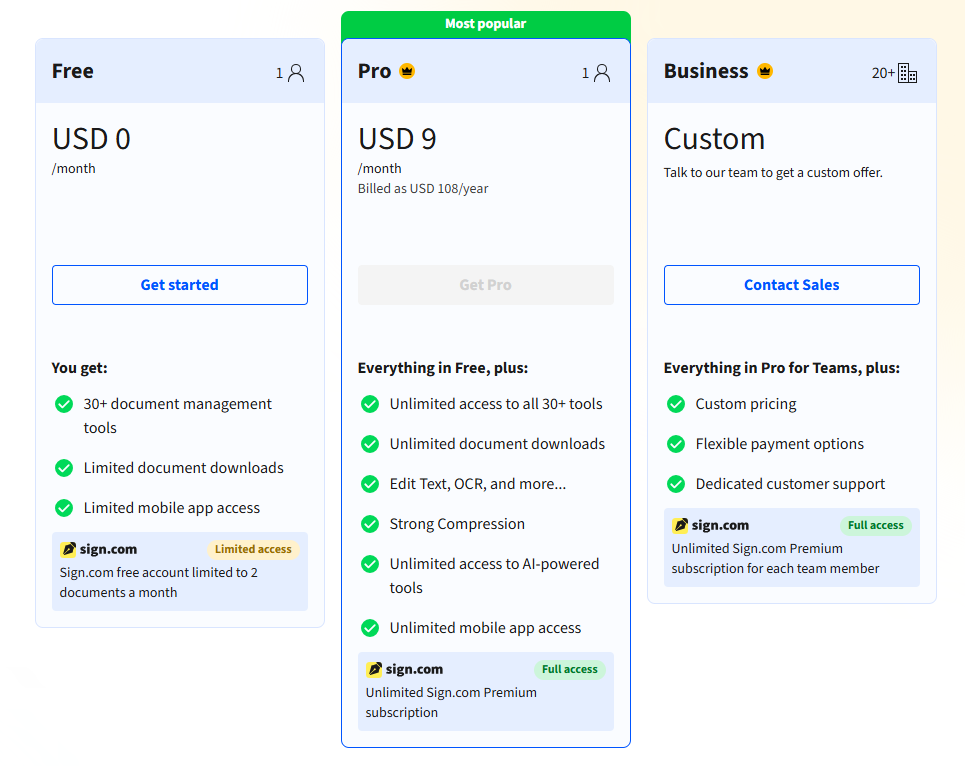
If you mainly sign your own PDFs, Smallpdf keeps things simple. If you send lots of requests, compare Sign.com’s plans against DocuSign envelope limits before you pick.
Pros of Using Smallpdf
Smallpdf is a strong DocuSign alternative when:
You need to sign a PDF quickly and keep moving.
You also need to prepare PDFs in the same place (e.g., compress, convert, flatten, unlock).
You want a clean web workflow that works on Mac, Windows, and mobile browsers.
See our Trust Center for more reasons why millions of people choose Smallpdf.
Adobe Acrobat Sign: Best for Acrobat-Centered Teams
If your company is working inside Acrobat already, Acrobat Sign can feel like the only option.
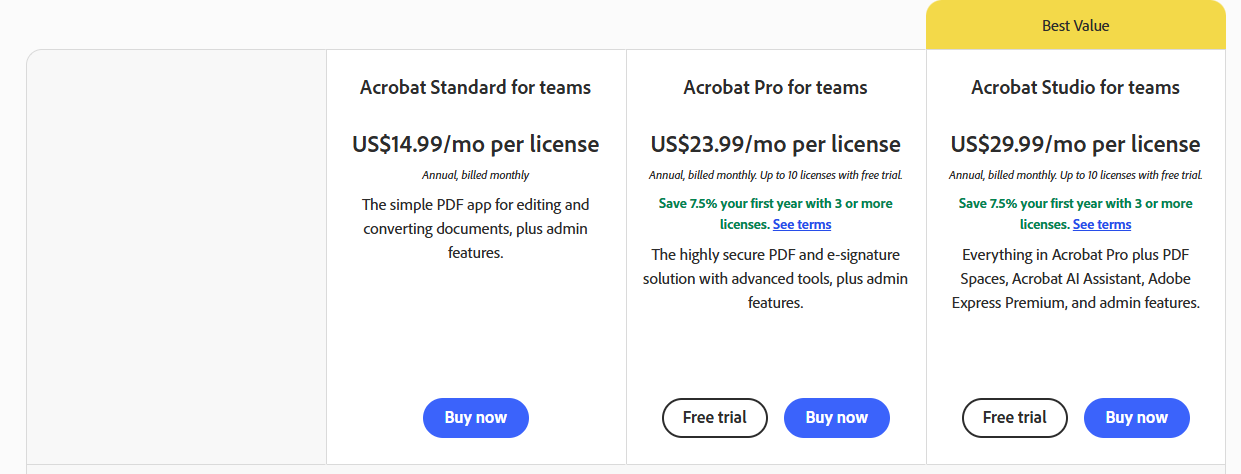
Adobe’s business pricing pages position Acrobat as a combined PDF and e-signature bundle, with business plans like Acrobat Standard for teams at $14.99 per license/month (annual, billed monthly).
Pros of Using Acrobat Sign
Acrobat Sign is often chosen by teams that:
Already pay for Acrobat and want signing inside the same ecosystem
Need heavier PDF-centric controls that match existing Adobe workflows
Have compliance requirements that are already mapped to Adobe processes
What to Watch Out For
For many businesses, the key downside isn’t signing quality. It’s that plan structures can include transaction caps depending on what you buy and how it’s billed.
If your signing volume is unpredictable, compare those caps against DocuSign envelopes and against simpler per-user plans like signNow.
PandaDoc: Best for Sales Docs and Proposal Workflows
PandaDoc is picked for the activities you do around signing. Think proposals, quotes, and documents tied to revenue teams.
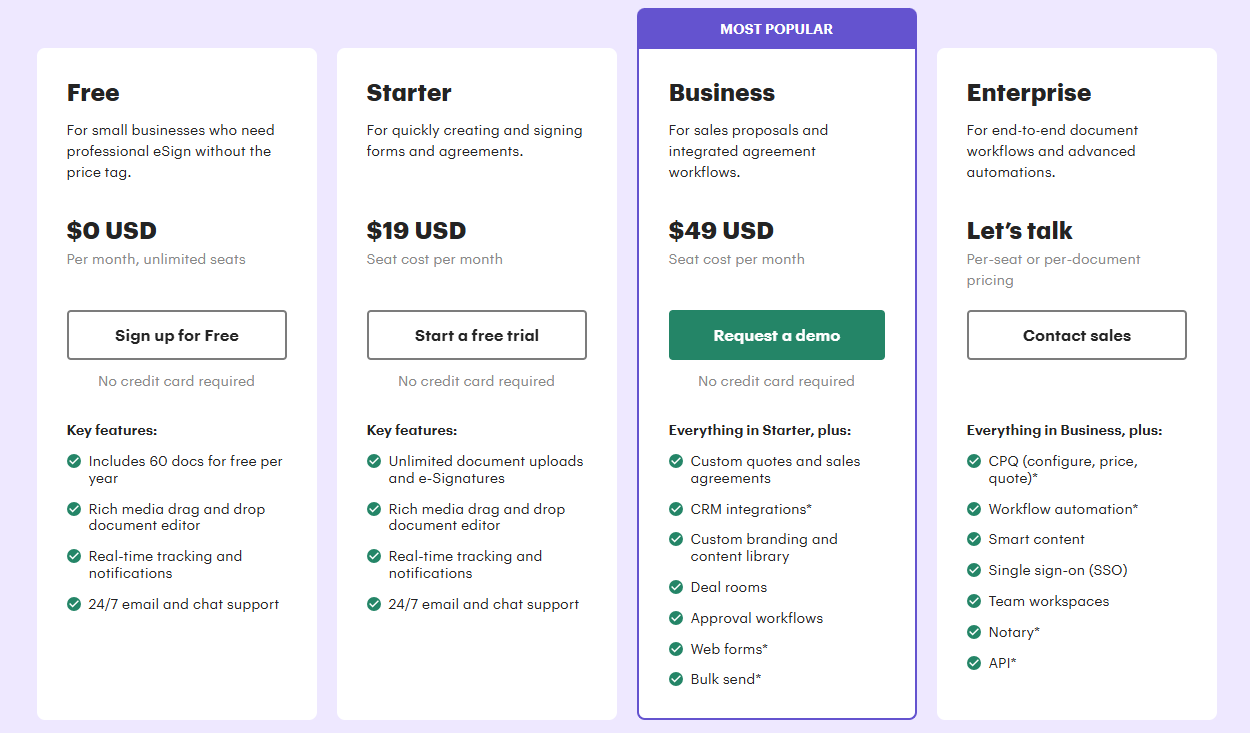
PandaDoc pricing lists a Launch plan starting around $9/month (annual) and higher tiers like Starter and Business as you add features.
Pros of Using PandaDoc
PandaDoc can be a strong DocuSign alternative if:
You send proposals and want a smoother signing flow.
Your signing step is part of a broader document pipeline.
You want a platform that feels more sales-oriented than PDF-oriented.
What to Watch Out For
Free tier expectations vary a lot with PandaDoc, and eSign features can differ by plan. PandaDoc’s own materials describe free eSign availability in plan terms, so check the specific plan details before you commit.
Dropbox Sign: Best for Dropbox-Based File Workflows
Dropbox Sign is a natural fit if your documents already live in Dropbox and you want signing that stays close to storage.
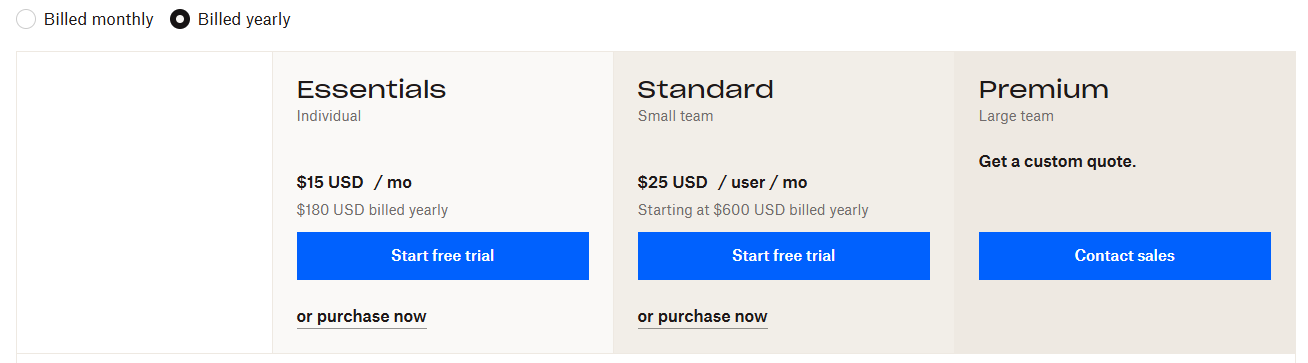
Dropbox Sign’s pricing page lists plans like Essentials at $17 per user/month and Standard at $30 per user/month, with annual billing references depending on the tier.
Pros of Using Dropbox
Dropbox Sign is often the right choice if:
Your team already works out of Dropbox folders every day.
You want a straightforward request-and-track experience.
You don’t want a large document platform, just signing plus basics.
What to Watch Out For
If you frequently prepare PDFs (like editing, merging, compressing, locking, etc), you may still end up paying for separate PDF editing or conversion elsewhere. That’s where Smallpdf can be a better single-subscription approach.
signNow: Best Value for High-Volume Signing
signNow is typically chosen for price-to-volume value. It’s built for sending and collecting signatures at scale.
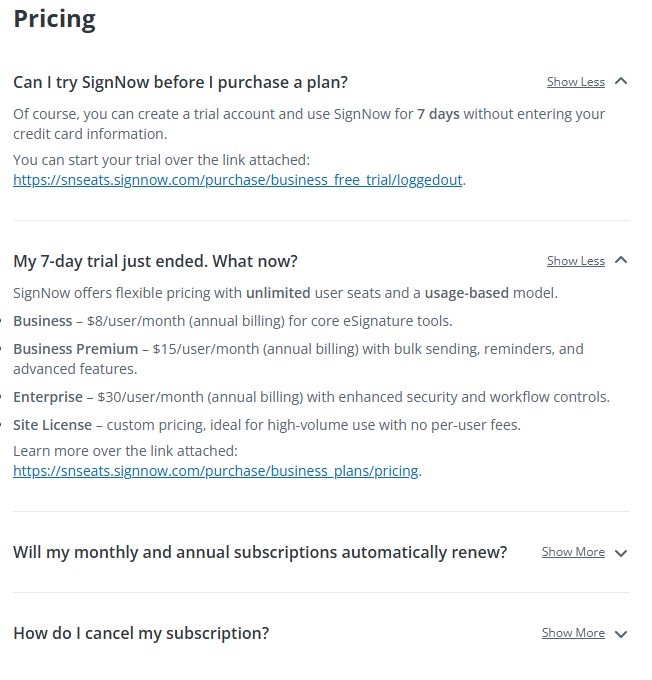
signNow’s pricing FAQ lists annual-billed plans like Business at $8/user/month, Business Premium at $15/user/month, and Enterprise at $30/user/month.
Pros of Using signNow
signNow can be a strong DocuSign alternative if:
You send signature requests frequently and want predictable per-user pricing.
You want a platform with clear sending and tracking features.
You need sufficient workflow depth without the DocuSign pricing structure.
What to Watch Out For
Consider how much your process includes frequent PDF cleanup before sending. Many teams end up pairing signNow with a PDF platform anyway.
Zoho Sign: Best for Zoho Customers
Zoho Sign is most compelling when you already use Zoho apps and want the signing layer to match.
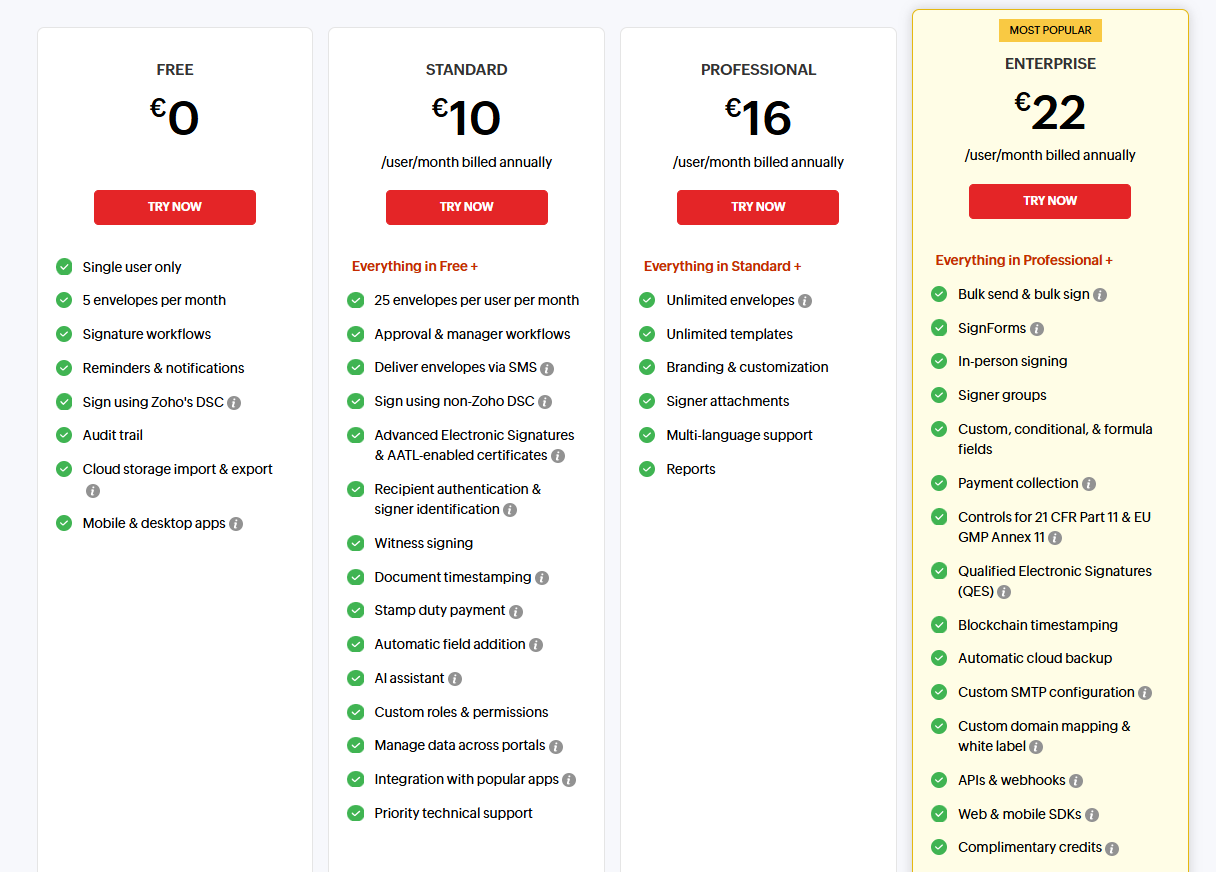
Zoho Sign’s pricing page clearly lists a Free tier that includes five documents per month, along with paid tiers that scale envelopes and features.
Pros of Using Zoho Sign
Zoho Sign is often ideal if:
You already use Zoho products and want a consistent admin setup.
You have moderate signing needs and can live inside document caps.
You want a simple alternative that’s not priced like enterprise-first platforms.
What to Watch Out For
The biggest thing to watch is the same issue as DocuSign: Plan limits tied to document volume. If you spike in sending, you’ll feel it.
Side-by-Side Comparison of DocuSign Alternatives: Price and Limits
Prices change, regions differ, and discounts come and go. Still, this table gives you a quick reference using published plan references.
| Platform | Entry Pricing Snapshot | Free Tier Signal | Most Common Limit Type |
|---|---|---|---|
| DocuSign | From $10/month (Personal) | Personal includes five envelopes/month | Envelopes per month or year |
| Smallpdf | Free (usage limits apply) | Free usage caps. Pro expands access. | Usage limits by feature/action |
| Adobe Acrobat Sign | From $14.99/license/month (annual) | Trial options vary | Transactions by plan |
| PandaDoc | From $9/month (annual) | Free eSign described by plan terms | Plan feature gates |
| Dropbox Sign | From $17/user/month | The Pricing Page is trial-and-paid focused | Seats and tier features |
| signNow | From $8/user/month (annual) | Depends on plan and billing model | Per-user pricing and tier features |
| Zoho Sign | Free tier plus paid tiers | Five documents/month on Free | Document caps by plan |
What Legally Binding Means
In most places, electronic signatures are legally valid when you can show intent and agreement, and when the signing process keeps a reasonable record of who signed and when.
A digital signature is more specific. It includes cryptographic protections and identity validation, and it’s often used in regulated contexts.
If you’re signing standard business PDFs, most mainstream providers can support legally valid signing. The bigger question is the level of identity proof and audit trail you actually need.
Which DocuSign Alternative Should You Pick?
If you’re stuck between options, these are the most common best-fit matches:
If You Mainly Sign PDFs and Also Edit Them
Pick Smallpdf, as it’s one of the best free alternatives. You can sign and handle common PDF tasks in the same workflow, like compressing a file for email, converting a Word document into a PDF before signing, or flattening a form so it prints cleanly.
If You Send Lots of Signature Requests Every Month
Compare DocuSign, signNow, and Zoho Sign by limits first. DocuSign and Zoho Sign publish envelope or document caps, and signNow leans on per-user plans with tier features.
If You Build Proposals and Want Signatures Attached
Look at PandaDoc. It’s built around proposal workflows, not just the signature step.
If Your Files Live in Dropbox and That’s Non-Negotiable
Choose Dropbox Sign. It’s a clean way to keep signing close to storage.
Try Smallpdf First
If your goal is to get a PDF signed and keep your document workflow moving, Smallpdf is the easiest place to start.
You can sign your PDF online, then handle the PDF cleanup steps that usually show up right after, without bouncing between services.
Start a 7-day free trial and get unlimited access to over 30+ PDF tools.
Frequently Asked Questions
What are the best free DocuSign alternatives?
If you want a free starting point, Smallpdf is a strong option for signing PDFs and handling common PDF preparation steps, with usage limits depending on the feature. Zoho Sign also offers a free tier with five documents per month.What’s the best DocuSign alternative for small businesses?
For many small businesses, it comes down to workflow. If you’re a PDF-first company and want signing plus everyday PDF tasks in one place, Smallpdf is a top fit. If you’re sales-proposal-first, PandaDoc might make more sense for you.Which DocuSign alternative is best for high-volume sending?
If you send a lot of requests, focus on plan limits and predictable pricing. signNow publishes low entry pricing by user tier, while DocuSign and Zoho Sign commonly tie value to envelope or document allowances.Do DocuSign alternatives include audit trails?
Many do, but not always on the lowest tier. If you need a completion certificate or detailed signing record, confirm it’s included in the plan you’re actually buying before you switch.Is Smallpdf secure for signing documents?
Smallpdf uses TLS encryption for file transfer and is ISO 27001 certified, with GDPR compliance messaging in its trust and support materials. Files are automatically deleted from our servers after one hour of processing for most tasks unless you choose to store them.Get Smallpdf eSign Free for 7-days
