- Home
- ›
- ›How Legal Are the Different Types of Signatures?
How Legal Are the Different Types of Signatures?
Not sure what counts as a legal signature? Learn what makes signatures legally binding, how wet vs digital options differ, and when to use each one.
More on Sign PDF
More on Edit PDF
More on Legal Documents
Legal signatures can feel confusing, especially as electronic and digital signatures become more widely used.
In this guide, we break down what makes a signature legally valid, how different signature types compare, and when each one is appropriate.
We’ll also show how to sign documents securely with Smallpdf eSign. All laid out clearly, practically, and without legal jargon.
What Is a Legal Signature?
A legal signature is a mark, symbol, or electronic process that shows your intent to accept the terms of a document. It doesn’t need to be cursive handwriting. It can be initials, a typed name, a drawn signature on your phone, or a digital certificate.
For a signature to count as legally binding, you usually need four core elements:
Authentication: It must be possible to identify who signed.
Attribution: The signature must be clearly linked to the signer.
Intent: The signer must show they meant to sign and agree.
Integrity: The document should not be changed after signing.
The format is less important than proving identity and consent. If you can show that you signed and agreed, in a way your legal system accepts, the signature can be treated as valid.
What Makes a Signature Legally Binding?
The details change from country to country, but most laws focus on similar ideas. The goal is to show that the right person signed, they understood the document, and the record can be trusted.
Core Requirements Across Most Legal Systems
In many regions, a signature is more likely to be treated as binding when:
The signer can be identified with reasonable certainty.
The signer had access to the full document before signing.
The signer had a clear chance to accept or reject the terms.
The system records when and how the signature was applied.
The signed document is protected from unnoticed changes.
Good eSign services support these requirements with audit trails, timestamps, and secure storage.
Legal Frameworks by Region
This is a general overview, not legal advice, but it can help you understand the landscape.
United States (ESIGN and UETA)
In the US, the ESIGN Act and UETA give electronic signatures the same legal status as handwritten signatures in most business and consumer contexts. Parties must agree to use electronic records, and they must be able to access and store the signed documents.
European Union (eIDAS: SES, AES, QES)
The eIDAS regulation in the EU recognizes three levels of electronic signatures. All three can be legally valid, but Qualified Electronic Signatures (QES) carry special weight and are treated like handwritten signatures in many cases.
Other Regions
Countries such as Canada, Australia, Japan, and many others also recognize electronic signatures in their laws. India, for example, offers Aadhaar eSign that links signatures to biometric identity data. For important cross-border deals, it is smart to check local rules or talk to a legal professional.
Different Types of Signatures
When you look at signature options, you will usually see a few main categories. Each one offers a different balance of convenience, security, and legal strength.
Wet Signatures (Handwritten)
Wet signatures are traditional signatures written with ink on paper. The term “wet” comes from the ink when it is first applied.
These are still common for:
Real estate transactions and mortgage documents.
Wills, estate planning, and some family law matters.
Documents that must be notarized in person.
Filings that certain government offices still require on paper.
Wet signatures feel familiar and are well understood, but they can be slower and harder to track across long workflows.
Electronic Signatures (eSignatures)
Electronic signatures cover many ways to sign without paper. You might type your name, draw with a mouse, tap with your finger, or upload an image of your handwritten signature.
Common electronic signature actions include:
Typing your name into a signature field.
Drawing your signature on a touch screen.
Clicking a button that says “Sign” or “I agree.”
Uploading a scan of your handwritten signature.
These are widely accepted for business contracts, HR forms, internal approvals, and many online agreements.
Digital Signatures (Certificate Based)
Digital signatures are a specific type of electronic signature that uses Public Key Infrastructure (PKI). They create a unique cryptographic fingerprint linked to a digital certificate.
Digital signatures usually provide:
Strong identity proof through a trusted certificate authority.
Clear tamper detection if a signed document is changed later.
Non-repudiation, which makes it harder to deny that you signed.
Long-term validation for archived records.
They are common in regulated industries, public sector use, and high-value contracts that need a robust audit trail.
Clickwrap Signatures (Checkbox and “I Agree”)
Clickwrap signatures show up whenever you tick a box or click “I agree” before using a service. The record of that click, tied to your account and time of acceptance, forms the signature.
You see clickwrap signatures when you:
Install software or mobile apps.
Accept website terms of service and privacy policies.
Buy products or services online.
Create accounts on digital platforms.
These are common for mass market agreements where many people accept the same terms.
Initials, Symbols, and Marks
A full signature isn’t always needed. Initials, symbols, or marks can also count if they clearly show intent and can be linked to the person.
These are often used for:
Initialing changes or specific clauses in a contract
Confirming that you read each page of a long document
Quick internal approvals in a company
Situations where physical limitations affect traditional signing
As long as identity, intent, and context are clear, these marks can still be treated as signatures.
SES, AES, and QES: Levels of Electronic Signatures
In the EU, eIDAS defines three levels of electronic signatures. You can think of them as different layers of assurance.
Simple Electronic Signature (SES)
A Simple Electronic Signature is any basic electronic method that shows acceptance. Examples include typing your name, ticking a box, or drawing a signature on screen.
SES is:
Easy to use for everyday agreements
Often enough for low-risk business documents
Less strong in terms of identity proof and tamper protection
Advanced Electronic Signature (AES)
An Advanced Electronic Signature must meet stricter rules. It needs to be uniquely linked to the signer and created with methods that only the signer can control.
AES typically offers:
Verified link between signer and signature
Secure storage of signing keys
Clear evidence if a signed document is altered later
It suits higher-value contracts, regulated industries, and cross-border deals where proof of identity matters more.
Qualified Electronic Signature (QES)
A Qualified Electronic Signature is the highest eIDAS level. It needs a qualified certificate from a trusted provider and careful identity checks.
QES gives you:
A signature with the same weight as a handwritten signature across the EU.
Strongest protection in case of disputes.
Extra confidence for high-value or high-risk agreements.
For very important contracts inside the EU, QES is often recommended or even required.
How Smallpdf eSign Supports Legal Signatures
Smallpdf designed Smallpdf eSign to balance ease of use with strong security, so you can sign and collect signatures with confidence.
Security and Compliance at a Glance
Our platform follows strict security standards to protect your documents and signatures.
Smallpdf eSign offers:
ISO/IEC 27001 certified information security management.
GDPR compliant data handling for users in Europe.
eIDAS-compliant processes for electronic signatures.
Advanced TLS encryption during file transfer and processing.
You can review our Privacy Policy and security pages at any time to learn more about how we handle your data.
Digital Signatures With LTV Timestamping
With Smallpdf eSign, you can apply digital signatures that include Long Term Validation (LTV) timestamps. That means:
The signature stores the exact time it was applied.
The document shows if any changes happened after signing.
You have a durable record for audits and future checks.
This is especially useful when you keep contracts, policies, and approvals for many years.
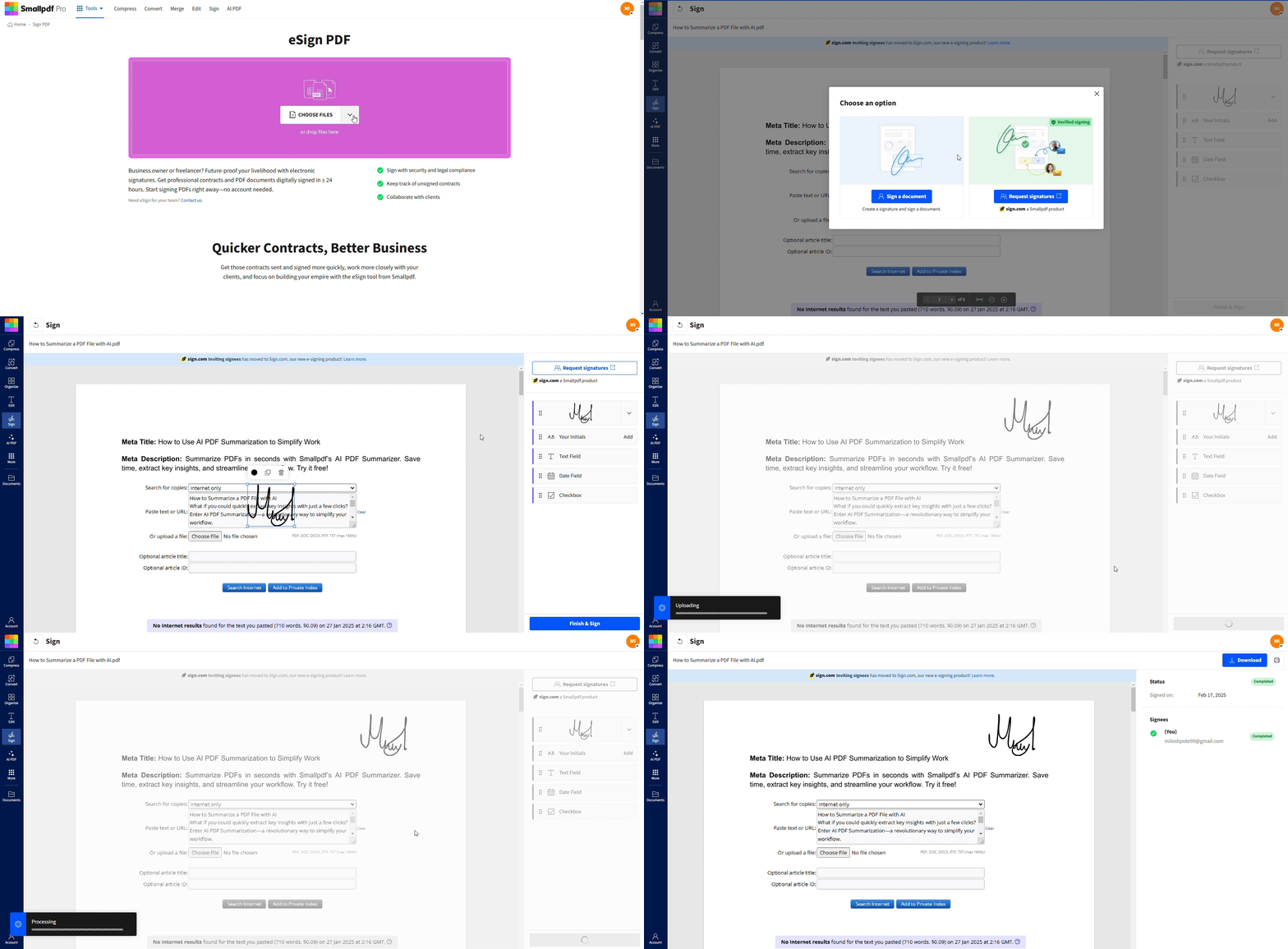
How to Sign a Document With Smallpdf eSign
If your document is a scan, you can first use our OCR feature in PDF Converter to turn it into a searchable PDF, then prepare it for signing.
Start Signing Documents Securely With Smallpdf
Once you understand what a legal signature is and how different types compare, you can pick the method that fits your document and risk level.
With Smallpdf eSign, you can upload a PDF, add fields, invite signers, and download a signed copy with a clear audit trail in just a few steps.
Frequently Asked Questions
What does /s/ mean in a signature?
The “/s/” notation indicates that a document was signed electronically or that a signature was applied in digital format. It’s commonly used in legal documents and email signatures to show that the person intended to sign, even when a handwritten signature isn‘t physically present.Why Are Digital Signatures Important?
Digital signatures are the most secure form of electronic signatures and the most trustworthy, making them perfect for legal documents and contracts. The certification and authenticity information stored within a digital signature is very difficult to manipulate or forge. If any changes are made to a digitally signed document, the validation of the signature will fail, rendering the signature void. This way, you don’t have to worry about anyone manipulating a contract or other legally binding documents after signing.Can I type my name as a signature?
Yes, typing your name can be a legally valid signature as long as you intend it to serve as your signature and the other party accepts it. Many contracts and agreements are signed simply by typing a name in a designated field.Are digital signatures more secure than electronic signatures?
Digital signatures (with PKI certificates) are generally more secure than basic electronic signatures because they include identity verification and tamper detection. However, the security level depends on the specific implementation and the legal requirements of your situation.Which type of signature should I use for contracts?
For many business contracts, a standard electronic signature is enough and widely accepted. For high-value deals, cross-border agreements, or documents that must meet strict rules, you might need stronger options such as digital signatures or, in the EU, QES. For some situations, your lawyer or local rules might still ask for a wet signature.Is a scanned signature legally binding?
A scanned image of a handwritten signature can be treated as legally binding if it meets the same basic tests as other signatures. The key questions are still identity, intent, and the reliability of the record. Because simple scans can be easier to copy or forge, they may receive more scrutiny in disputes compared to digital signatures with certificates.Do all countries accept electronic signatures?
Most developed countries now recognize electronic signatures in some form, but the scope and conditions vary. Some documents, such as certain wills, property transfers, or court filings, may still require wet signatures or special formats. When you work across borders, it’s wise to check local rules and choose stronger signature types for important agreements.Sign and manage documents digitally using Smallpdf