- Home
- ›
- ›What Happens if My Signed Document Expires?
What Happens if My Signed Document Expires?
An expired signed document doesn’t usually void your agreement, it only limits access to the file. Here’s how that works and how Smallpdf handles it.
More on Sign PDF
More on Edit PDF
Document Workflow Guides
Losing access to a signed PDF can be stressful, especially when the agreement itself still matters. Maybe a signing link expired, the file was auto-deleted, or you simply can’t download it anymore.
This guide explains what it really means when a signed document expires, whether the signature is still valid, how Smallpdf handles file retention, and what to do if your signed PDF is already gone.
You’ll also learn how to avoid access issues next time by saving and managing signed documents properly.
Quick FAQs: Signed Document Expiration
Here are fast answers to the questions people usually ask first.
Does a signed document legally expire?
In many cases, the signature itself stays legally valid even if the online copy is deleted. What expires is your access on a specific platform, not the agreement, as long as it was valid when signed.
How long do eSign platforms keep documents?
It depends on the platform. Smallpdf keeps eSign documents for 14 days, while others like Adobe Sign keep them for up to 180 days.
Can I recover a deleted signed document?
Once a file is permanently removed from our servers, it cannot be restored. You can, however, upload the same PDF again and send a fresh signing request.
What if only my download link expired?
If only the link stopped working, but the file is still stored in your account, you can open it from your document hub and download it again or create a new share link.
Do Signed Documents Actually “Expire”?
People often mix up legal validity with platform access. It helps to separate those two ideas.
Legal Validity vs Platform Access
A signed contract or agreement doesn’t usually stop being valid just because a signing link expired or a platform removed the file. Validity depends on things like:
The laws in your country or region
The type of document and any built-in expiry date
How the signatures were collected and recorded
Platform expiration, on the other hand, is simply about storage. When a service deletes your file or disables a link, you no longer reach that copy, but the underlying agreement may still stand if you have a saved version or other proof.
Common Ways a Signed Document “Expires” Online
In practice, you will see expiration in a few typical forms:
Link expiration: The email link you received no longer works.
Signing deadline: The sender sets a deadline, and after that date, nobody can sign using that request.
File deletion: The platform removes the document entirely after a retention period.
These are platform rules rather than legal rules, which is why saving your own copies is so important.
What Causes a Signed Document To Expire Online?
Understanding how online expiration works makes it easier to prevent surprises.
Link Expiration vs File Deletion
Some platforms only expire the link. The file remains on their servers and can be accessed from your account or via a new link. Others delete the document itself after a fixed period, especially on free tiers.
For most PDF tasks Smallpdf deletes files after one hour of processing. This is extended to 14 days for eSign scenarios where you share or request signatures.
Sender Deadlines and Time Limits
Many eSign services let you set a deadline for completion. When that date passes:
The signing link becomes inactive.
New signatures cannot be added through that request.
The original file may still live in the sender’s account, depending on the service and plan.
If you still need the document signed, you usually create a new request, often reusing the same PDF and signing order.
Retention Policies and Storage Limits
Each platform has its own storage policy. For example:
Smallpdf removes most processed files after one hour by default.
For eSign flows that involve sharing or requesting signatures, we keep the document for 14 days and reset the 14-day timer each time someone opens it.
If you save files in your Smallpdf account storage, they stay there as long as you want, until you delete them yourself.
These rules are designed to balance convenience with privacy and data protection.
How Smallpdf Handles Signed Document Expiration
Let’s look at what actually happens to a signed PDF when you use our eSign feature.
Temporary Processing and 14-Day eSign Retention
When you upload a file for most PDF actions, such as compressing or converting, we keep it for one hour and then automatically delete it.
There are exceptions:
If you share a file by link or email.
If you send a document for signatures or digital signing.
In these eSign cases:
The file is available for 14 days.
Each time you or a signee accesses the file, the 14-day timer restarts.
After 14 days of no activity, the document is permanently deleted from our servers.
This approach gives everyone enough time to sign and download the final version without us holding your data longer than needed.
Account Storage for Longer Access
If you have a Smallpdf account and choose to store documents in your document hub:
Files stay available until you decide to delete them.
When you delete a stored file, it is removed from our servers within about one hour.
This is ideal when you need long-term access to signed agreements and don’t want to rely on email links.
How This Compares to Other Services
Some eSign providers keep documents for longer periods by default and focus heavily on built-in storage.
Smallpdf does the opposite for privacy reasons: We keep temporary files only as long as needed and encourage you to download and store important contracts in your own systems.
What To Do if Your Signed Document Expired
If your document signed with Smallpdf already expired or a link stopped working, here’s exactly how to respond.
Scenario 1: Your Email Link Stopped Working
If only the link expired, you may still be able to reach the file.
Check your Smallpdf account. Log in and open your document hub or eSign section. If the file is there, you can download it or share it again.
Search your inbox. Look for earlier completion emails with download links. Recent emails may still work.
Ask other signers. Anyone who downloaded the PDF can share a copy back with you.
Scenario 2: The eSign Document Was Deleted From Smallpdf
If the 14-day period passes with no access, the file has been removed from our servers and cannot be restored.
Your options then are:
Use your original unsigned PDF. Open the contract or form you used before signing.
Set up a new signing request. Upload the file to Smallpdf eSign, place signature fields, and invite signers again through Sign.com.
Tell signers what happened. A short note explaining that the previous request expired will avoid confusion.
Ask signers to keep a copy. Encourage everyone to save the final signed PDF when the process is complete.
Scenario 3: You Need Signatures Again Quickly
Sometimes deadlines shift, or deals change, and you need another round of signatures.
Upload the latest version of the agreement.
Reuse the same signing order and fields where possible.
Set clear expectations on timing so people sign promptly.
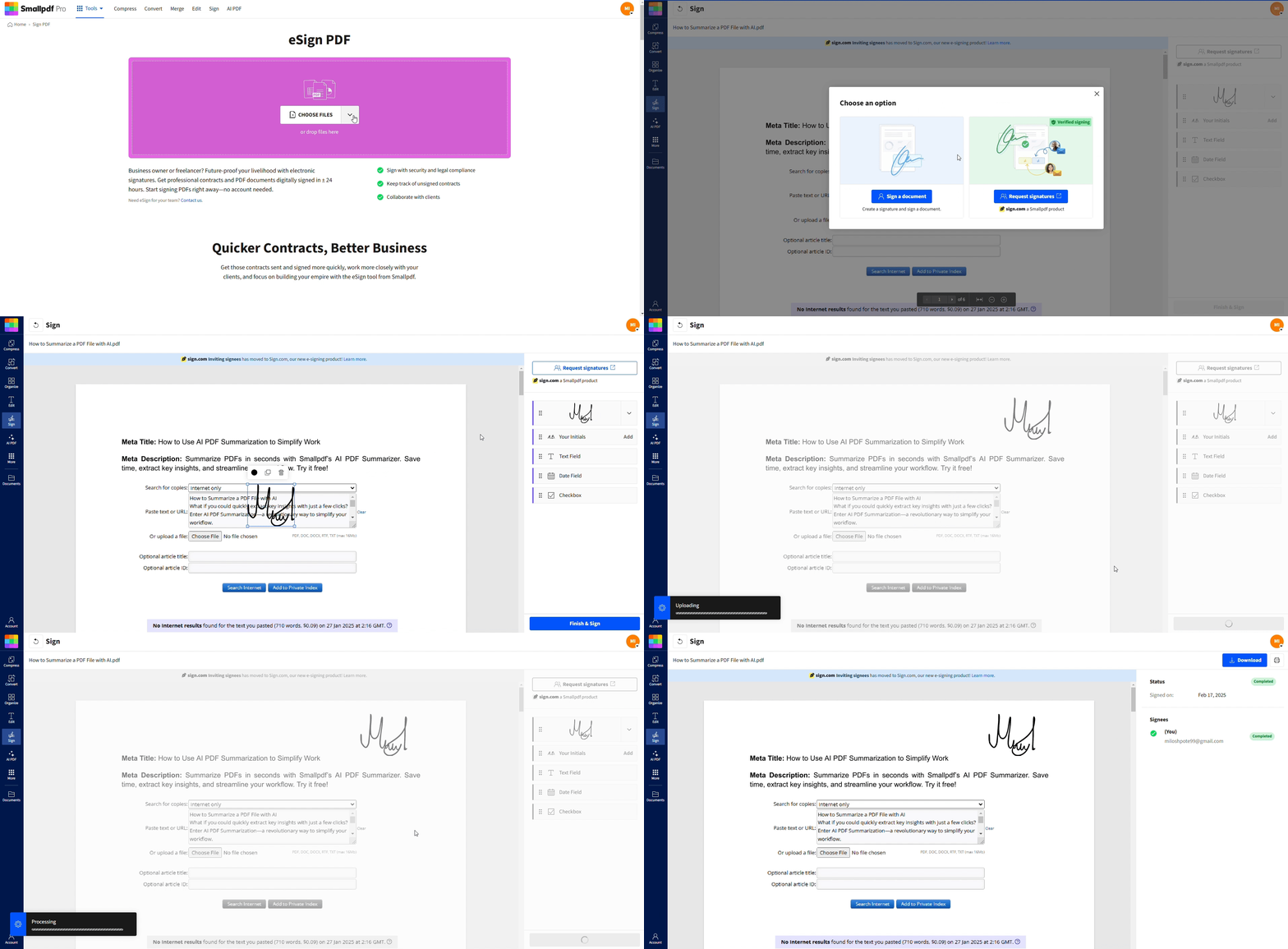
This can be faster than trying to chase down a document that has already been deleted.
How To Avoid Signed Document Expiration
A few simple habits will make expired links and deleted files very unlikely.
Before You Send a Document for Signing
Check how long your platform keeps unsigned and signed documents.
Decide where you will store final PDFs after download, such as your cloud drive or document system.
Make sure all signers’ email addresses are correct to avoid delays.
While the Signing Process Is Active
Watch the signing status so you know who has signed and who still needs to.
Send reminders if signatures are late, especially for time-sensitive agreements.
If someone will be away for a while, plan around those dates so the 14-day period does not lapse unnoticed.
After All Parties Have Signed
Download the final signed PDF as soon as possible.
Save it in at least one long-term location, such as your Smallpdf account storage plus your own cloud drive.
Share a copy with all parties so everyone has their own record.
Think of your signing platform as a secure channel to collect signatures, not as permanent storage.
Smallpdf Security, Privacy, and File Handling
When you work with signatures, data protection matters as much as convenience.
Smallpdf:
Is ISO/IEC 27001 certified for information security.
Complies with GDPR data protection rules.
Uses TLS encryption for file transfers and hosts data on secure European infrastructure.
Combined with clear deletion timelines and optional account storage, this gives you tight control over how long your documents live on our servers and who can reach them.
Keep Your Signed Documents Safe With Smallpdf
If you download your signed PDFs in time, store them in your own systems, and use your Smallpdf account storage for longer access, you stay in full control of your agreements.
Smallpdf gives you an easy way to send, sign, and secure your documents, backed by clear deletion timelines and strong privacy rules.
If you want more control over how long your signed files stay online, create an account, explore our document hub, and build a simple storage routine that fits your workflows.
Frequently Asked Questions
What happens if my signed document expires on Smallpdf?
If your signed document was only shared or sent for signatures and nobody accessed it for 14 days, it is permanently deleted from our servers. You cannot restore it, but you can upload the original PDF again and send a new signing request.Does deleting a signed file affect its legal validity?
If you already downloaded a copy or stored it elsewhere, deleting the version on Smallpdf does not usually affect legal validity. The agreement depends on the signatures and terms, not on a specific copy on one platform. You should always keep your own saved version for reference or evidence.Can I extend an expiring eSign deadline?
This depends on your platform. Some tools allow deadline extensions, while others require creating new signing requests. Smallpdf focuses on our 14-day retention period rather than signing deadlines.How can I make sure I never lose a signed PDF again?
Build a simple routine: Always download the final signed PDF, save it in a dedicated folder in your cloud drive or document system, and, if you like, add it to your Smallpdf account storage. This way, you never depend on a single email link.Is it safe to store signed documents in my Smallpdf account?
Yes. Files kept in your account storage are protected by the same security standards as our other services, including TLS encryption, secure European servers, and strong privacy protections. You can delete files at any time, and we remove them from our servers shortly after.Manage signed document versions and updates on Smallpdf
Related Articles
