How to Combine Signed PDF Files
Need to combine signed PDF files into one document? You can use Merge PDF to put files together, but first you need to know what kind of signature each PDF contains.
Quick Takeaways
Merging two PDFs creates a new file, so certificate-based digital signatures on the original files become invalid.
A visible electronic signature may still appear on the merged PDF, but it does not prove that the signer approved the new combined version.
The cleanest route is to merge unsigned source files first, then have the completed PDF signed.
Use Sign PDF to add your own electronic signature after merging.
If you cannot get the files signed again, keep the signed PDFs separate and share them in the right order.
A drawn, typed, or image-based signature will still be visible after merging. A certificate-based digital signature is different. It checks whether the file has changed since it was signed, so merging it with another PDF usually invalidates that original signature.
Here’s how to combine signed PDF files without creating confusion, losing track of approved versions, or accidentally treating an invalid signature as a valid one.
Can You Combine PDF Files Without Losing the Digital Signature?
Generally, no.
A certificate-based digital signature is tied to the exact version of a PDF that was signed. It records information about the signer, the time of signing, and whether the file has changed afterward. When you merge that file with another PDF, you create a new document. Even if every page looks identical, the file itself has changed.
That means the original digital signature may show as invalid after merging.
This is the typical obstacle when looking for how to combine PDF files without losing a digital signature. There is no normal merge method that turns two separately signed PDFs into one continuous PDF while keeping both original certificate signatures valid.
There are still a few practical options, but the right one depends on whether you can get the document signed again.
Check Which Type of Signature You Have
Before you merge anything, open each PDF in a reader that can show signature details.
A simple electronic signature might be:
A typed name
A drawn signature
An uploaded image of a handwritten signature
These signatures remain visible after you merge the files. But that does not mean they still confirm approval of the combined document.
A digital signature uses a certificate and checks the file for changes. Your PDF reader may show a notice that the document was modified after signing, or that the signature is invalid.
If you are unsure, ask the document owner or signer before creating a merged version.
The Golden Rule
If the original digital signature needs to remain valid, do not merge the signed files.
If everyone can approve and sign the combined version again, merge first, then sign the finished PDF.
That is the safest way to combine digitally signed PDF files. Start with the source documents whenever you can.
How to Combine PDF Files With Signatures Using Smallpdf
If the signatures are simple electronic signatures, or if every signer agrees to sign the final combined version again, Smallpdf offers an easy solution.
You will use Merge PDF to create the new file, then Sign PDF to add your own electronic signature. For certificate-based digital signatures, you can use Sign.com, or the signing method required by your company, client, or recipient after the files have been merged. The free plan of Sign.com allows you to sign two documents a month with simple email verification. Smallpdf Pro allows digital seals and unlimited documents. Get started with a 7-day free trial.
Step 1: Get the Unsigned or Approved Source Files
Start with unsigned PDFs whenever possible.
For example, say you have a signed contract and a signed appendix. You now need one file for your records. Instead of merging the two signed copies, go back to the unsigned contract and appendix. Combine those first, check the page order, and send the final version through signing again.
This gives everyone one document to review and approve.
If you only have signed PDFs, ask the document owner whether they can send unsigned copies or issue a revised version. It is an extra step, but it avoids a document that looks signed while its digital signature no longer checks out.
Step 2: Combine the Files With Merge PDF
Once you have the right versions, open Merge PDF in your browser.
Upload the PDFs you want to combine.
Drag the files or page thumbnails into the correct order.
Remove any duplicate pages before you finish.
Click “Finish” to create one PDF.
Download the combined file and save it with a clear name.
Use a filename that makes the document easy to identify later. Something like Contract-and-Appendix-Final.pdf is clearer than merged-final-new.pdf.
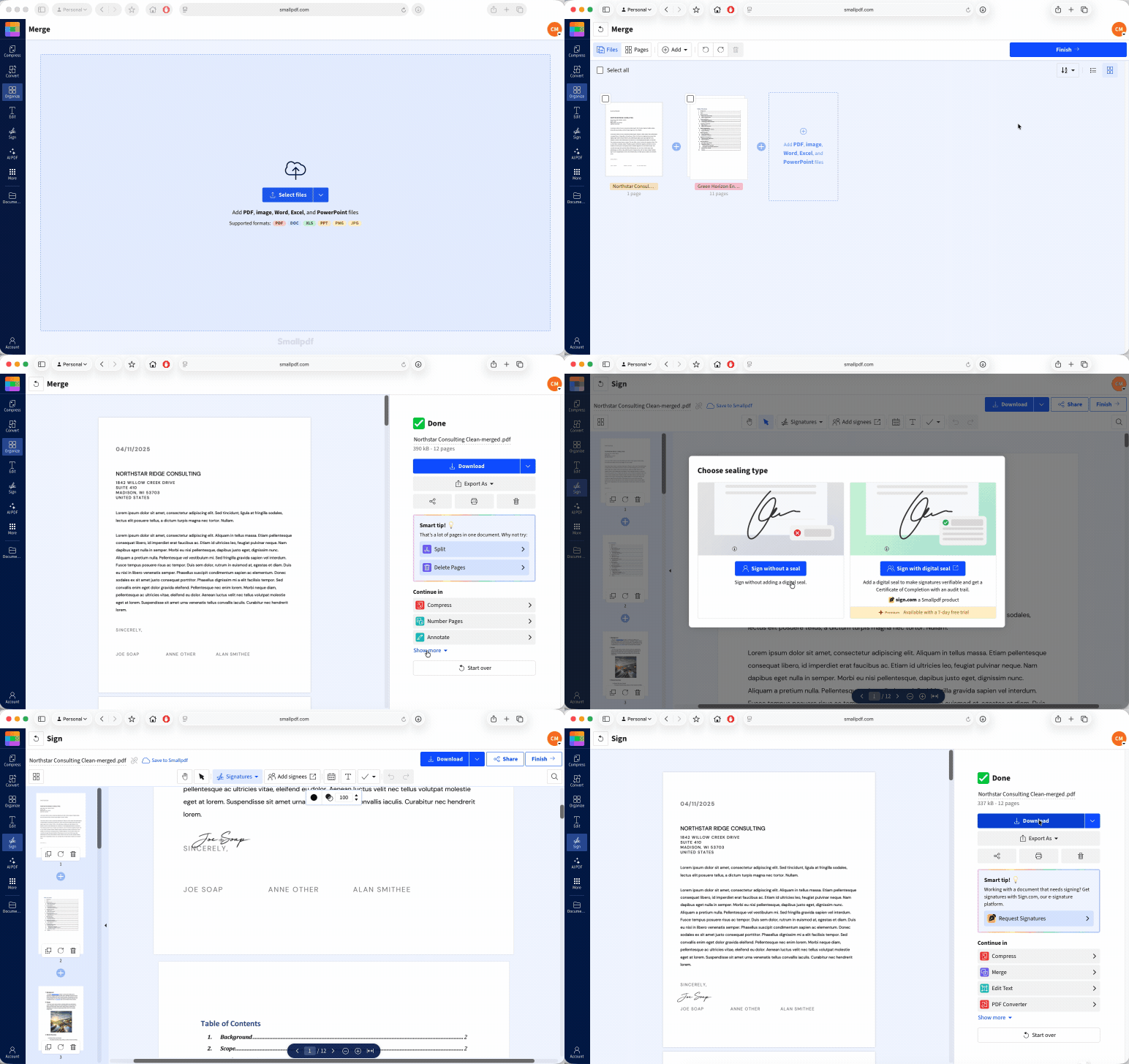
Merge PDF also lets you review the page order before you create the final file. Take a moment to check that the contract comes first, any appendices follow, and there are no blank or duplicate pages in the middle.
Step 3: Review the Combined PDF Before Signing
Open the merged PDF and look through it page by page.
Check the names, dates, page order, and signature fields. Make sure the final document contains every attachment or appendix that needs to be included. Once people begin signing, changing even one page can mean you need to start again.
This is also a good time to use Organize PDF if you need to move pages, remove a blank sheet, or add an unsigned supporting document. Make all these changes before the signing step.
Keep a copy of the unsigned merged PDF as your master file. You may need it later if a detail changes.
Step 4: Sign the New Combined PDF
When the combined PDF is ready, open Sign PDF.
Upload the final merged PDF.
Create or upload your signature.
Add your signature, initials, date, text, or checkboxes where needed.
Click “Finish”
Download the signed file.
Sign PDF lets you add an electronic signature by drawing, typing, or uploading one.
Do not copy a signature image from an earlier document and place it on the new file. A signature should show that the person approved this version, including all the pages you added.
Can’t Re-Sign? Keep the Files Separate
Sometimes you cannot get the files signed again. Perhaps the signer is unavailable, the document is already part of an audit record, or the original signature must remain verifiable.
In that case, keep the PDFs separate.
Leave each signed file unchanged, and name them in the order they should be read. For example:
‘01-Signed-Agreement.pdf’
‘02-Signed-Appendix.pdf’
‘03-Signed-Confirmation.pdf’
You can also prepare a separate cover sheet or index that lists each file, its date, and its place in the set. Keep that index separate from the signed PDFs. Do not add it to the original signed files.
When you need to send the documents, use Share PDF to create a link for each original file. This lets recipients access the signed PDFs without changing them.
Keeping files separate may be less tidy than one combined PDF. But it preserves the original signed records. For official documents, that is often the better choice.
Avoid using Merge PDF, Organize PDF, Edit PDF, Compress PDF, or Flatten PDF on a certificate-signed PDF when the original signature must remain valid. Any change to the file can affect signature validation.
Frequently Asked Questions
Can I combine signed PDF files on iPhone or Android?
Yes, you can use Merge PDF in your mobile browser to combine files. The same signature rule applies on every device: merging certificate-signed PDFs can invalidate their original digital signatures. Use unsigned files first, then sign the combined version.Is a merged and re-signed PDF still legally valid?
It may be, but the answer depends on the signing method, the document type, and the rules that apply where you live. A merged PDF should be reviewed and signed as a new final version. For contracts, financial records, or regulated documents, follow the requirements set by the recipient or a legal professional.Can I add pages to a signed PDF instead of merging two files?
Adding pages also changes the PDF. If it has a certificate-based digital signature, that signature may become invalid. Use Organize PDF to add pages before signing, then have the completed document signed again.How do I check if a digital signature is still valid after merging?
Open the merged PDF in a reader that supports digital signature validation. Look for the signature status, signer details, timestamp, and any notice that the document changed after signing. If the reader says the signature is invalid or the file was modified, treat the original signature as no longer valid.Merge signed PDF files without disrupting your workflow using Pro