How to Copy a Signature from a PDF
Need to know how to copy a signature from a PDF so you can reuse your own handwriting in another document? You can turn the signature into an image, crop it, and place it in a new PDF.
Quick Takeaways
You can copy a visible signature from most PDFs by converting the signed page to an image and cropping around it.
A scanned or flattened signature usually cannot be selected as a separate object, but the page-to-image method still works.
PNG is usually the cleanest format for a reusable signature, especially when it has a transparent background.
Use Edit PDF to add the saved signature image to another PDF, or Sign PDF when you want to upload it as your electronic signature.
A copied signature image does not include the certificate, timestamp, or tamper checks attached to a certificate-based digital signature.
Keep the image private. Anyone who obtains the file may be able to place it on another document.
The cleanest route is to convert the signed page to an image with Smallpdf, save a tight crop of the signature, then add that image to the new file.
Only copy a signature that belongs to you. Pasting someone else’s signature onto a document can falsely suggest that they approved it. For contracts, official forms, or anything with legal consequences, ask the signer to sign the new document themselves.
Can You Copy a Signature from a PDF?
Yes, in many cases. The method depends on how the signature was added.
A typed, drawn, or image-based signature may sit on top of the page as a separate object. If it is flattened into the PDF, or the whole page is a scan, you usually cannot click and copy the signature by itself. Converting the page to a JPG and cropping around the signature works in both situations.
There is one major exception: a certificate-based digital signature. The visible signature block may look like an ordinary image, but the real digital signature includes cryptographic data tied to the document. Copying the visible mark does not copy the certificate, identity checks, or tamper detection. Our guidance here is for ordinary electronic signatures (such as typed, drawn, or uploaded images), not digital signatures that use certificates and cryptography.
Before you start, check that you have the right to reuse the signature. Copying your own signature to complete a form is very different from lifting another person’s signature from an agreement.
How to Copy a Signature from a PDF With Smallpdf
The most reliable method is to turn the page containing the signature into an image, then crop the image on your phone or computer.
Step 1: Find the Clearest Version of the Signature
Use the PDF with the sharpest, largest signature you have. A clean black signature on a plain white background is easiest to reuse.
Zoom in and check for blur, compression marks, nearby text, or a line running through the signature. You can crop away empty space later, but you cannot restore detail that is missing from the source.
Step 2: Convert the PDF Page to an Image
Open PDF to JPG in your browser, then:
Upload the PDF containing your signature.
Choose to convert full pages to JPG.
Download the image for the page that contains the signature.
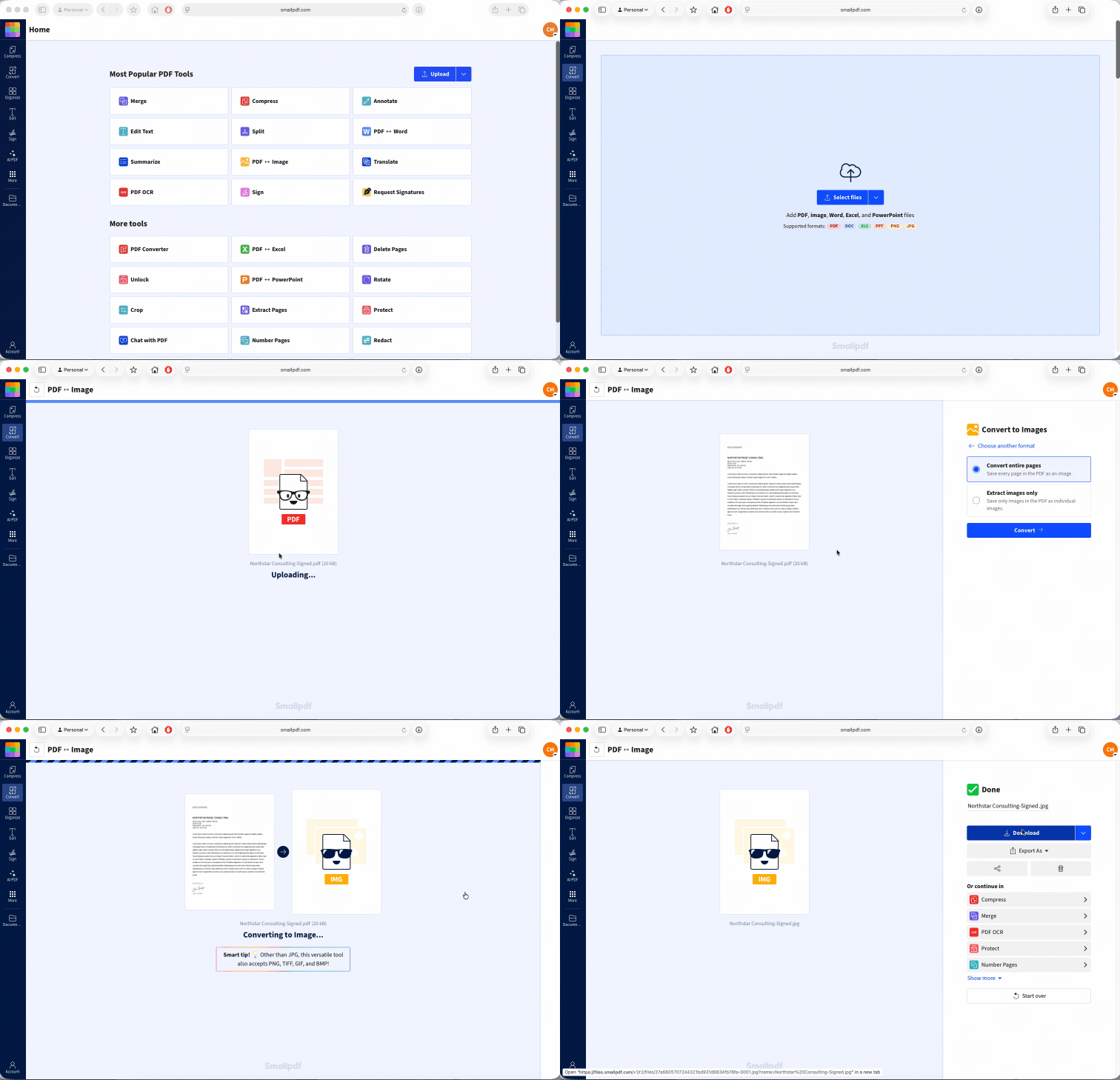
If the PDF has many pages, use Extract PDF Pages first to save only the signed page. This keeps the conversion simple and avoids downloading images you do not need. Smallpdf converts full PDF pages to high-resolution JPG files for free, but usage limits apply. Switching to Pro removes all limits, and comes with a free, 7-day trial.
Step 3: Crop Around the Signature
Open the JPG in your device’s photo editor and crop closely around the handwriting. Leave a small margin so you do not cut off long strokes.
Try to remove:
Printed text above or below the signature
Form lines that are not part of the signature
Large areas of white space
Page edges, shadows, or scan marks
Save the cropped image as a new file so you still have the full-page version if you need to try again.
These same steps apply if all you have is a scanned copy of your signature.
Step 4: Save a Clean Copy
JPG works for a signature on a white page. PNG is usually better when you can remove the background, since it can preserve transparency and sit more naturally over a signature line.
Give the file a neutral name that does not advertise what it contains, and store it somewhere private. A signature image should be handled like other sensitive personal information.
How to Paste a Signature Into Another PDF
Once you’ve saved the signature as a PNG or JPG, you can upload it directly with Sign PDF and place it on another document.
Open Sign PDF or upload the PDF you need to sign from the drop box below
Select “Add signature.”
Choose the option to upload an image.
Select your saved PNG or JPG signature.
Click the document where the signature should appear.
Drag it into position and resize it from a corner.
Select “Finish & Sign,” then download the completed PDF.
Sign PDF is built specifically for adding signatures, so it’s a better fit here than using a general editing tool. You can upload an image of your signature, place it on the correct line, and change its size without stretching it out of proportion. If you have a Smallpdf account, the image file is also save securely, ready for you when you need to sign another document later.
Zoom in before finishing the document. Check that the signature is sharp, properly positioned, and does not cover nearby text, dates, initials, or form fields. A transparent PNG usually gives the cleanest result because it doesn’t leave a white rectangle around the handwriting.
Is It Legal to Copy a Signature from a PDF?
Copying and reusing your own signature can be acceptable when you intend to sign the new document and the recipient allows that signing method. Electronic-signature rules differ by country, document type, and transaction, so some forms may require a specific platform, witness, certificate, or handwritten signature.
Never copy another person’s signature to make it appear that they signed, approved, or witnessed something. Ask them to sign the document directly or use the signing process requested by the organization receiving it.
A pasted signature image also gives the recipient less evidence than a managed e-signing process. It normally has no identity verification, certificate, trusted timestamp, or record showing who placed it. For employment, financial, property, government, or other high-stakes documents, follow the recipient’s required process.
Frequently Asked Questions
Why can’t I select or click the signature in my PDF?
The signature may be flattened into the page, included in a scan, or saved as part of one larger image. Convert the signed page to JPG and crop around it instead of trying to select the signature object.Will copying a signature reduce its image quality?
It can. Screenshots, low-resolution scans, repeated conversions, and enlarging a small crop can make the signature blurry. Start with the clearest source, export the page at high quality, and avoid making the pasted signature larger than the original.Can I copy a signature from a scanned PDF?
Yes. Convert the scanned page to an image, then crop around the signature. Because the signature is part of the scan, image extraction may not isolate it as a separate file.What file format should I save a copied signature in?
Use PNG when you have a transparent background or want cleaner edges. JPG is fine for a signature placed on a white page, but it usually keeps a solid rectangular background.Does copying a digital signature invalidate the original document?
Simply viewing, exporting, or taking an image from a copy should not change the original file. But the copied picture does not carry the original digital certificate or validation data. Editing and saving the digitally signed PDF itself can invalidate its digital signature, so work from a duplicate and leave the signed original untouched.How do I resize a pasted signature without making it blurry?
Resize from a corner so the height and width stay in proportion. Start with a high-resolution image and make it smaller rather than larger whenever possible.Is it safe to copy a signature using an online tool?
Use a service that explains how it protects and deletes uploaded files. Smallpdf uses 256-bit TLS encryption for file transfers and automatically deletes processed files after one hour unless you choose to save them to your account. Keep the downloaded signature image in a protected folder, delete spare copies, and do not send it through an unprotected message unless necessary.