Can You Send a PDF via Text
Can you send a PDF via text? Yes, most modern phones let you attach a PDF to a message or share it straight from the Files app. The exact process depends on your phone, messaging app, carrier, and the type of message being used.
Quick Takeaways
You can text a PDF from an iPhone or Android phone by sharing it from your Files app or attaching it inside your messaging app.
The recipient's phone and messaging setup affect whether the PDF travels through iMessage, RCS, or MMS.
There is no single PDF size limit for every text conversation.
If the file is too large, use Compress PDF or send a document link.
For private information, add a password with Protect PDF and send the password separately.
That last detail is the reason for most failed attachments. A PDF may send through iMessage or Rich Communication Services (RCS) without trouble, then fail in a conversation that uses Multimedia Messaging Service (MMS). This guide explains how to send a PDF through text on iPhone and Android, what to try when it won't go through, and how to handle private files with more care.
Can You Really Text a PDF?
Yes. But the word “text” covers several types of message. A basic SMS carries text, while attachments normally travel through iMessage, RCS, or MMS.
On an iPhone, you can open a PDF in the Files app, tap “Share,” and choose Messages. On Android, Google Messages supports file attachments, and Files by Google lets you share a PDF through another app.
Whether it sends depends on the connection between both phones. RCS can share files over mobile data or Wi-Fi, but support varies by carrier, country, app, and device. When iMessage or RCS isn't available, the conversation may use MMS, which often has a lower attachment limit.
The PDF doesn't need a special conversion. If it is saved on your phone and the messaging route accepts document attachments, you can send it as a file.
| Sending Method | How It Works | Common Limitation | Useful For |
|---|---|---|---|
| iMessage | Uses Apple's messaging service | Requires compatible Apple messaging | PDFs sent between Apple users |
| RCS | Sends files over mobile data or Wi-Fi | Support varies by carrier and device | Modern cross-device messaging |
| MMS | Sends an attachment through your carrier | Often has a smaller file limit | Small PDFs when richer messaging isn't available |
| Document link | Sends a URL in the message | Recipient needs internet access | Large PDFs or repeated sharing |
How to Send a PDF via Text on Mobile
The steps differ slightly between iPhone and Android. In both cases, download cloud-only files first so the whole PDF is stored on your phone.
How to Send a PDF via Text on iPhone
The most reliable route starts in the Files app:
Open “Files.”
Find the PDF in “Recents,” “Downloads,” iCloud, or another folder.
Touch and hold the PDF, then tap “Share.”
Choose “Messages.”
Enter the recipient's name or phone number.
Add a short note, then tap the send arrow.
You can also open a conversation and use its attachment controls, but starting in Files is often easier when the PDF is stored in a specific folder.
How to Send a PDF via Text on Android
Button names vary between Android phones, but this route works on many devices:
Open “Files,” “My Files,” or your phone's file manager.
Find and open the PDF.
Tap “Share.”
Choose “Messages” or your usual text app.
Select the recipient.
Add a short note, then tap “Send.”
Files by Google includes a Share option for PDFs. Google Messages also supports sending files, although the attachment button and file picker may look different on your phone.
You can also start inside Google Messages. Open a conversation, tap the attachment button, choose the file option, select the PDF, and send it. If you only see photos and videos, return to your file manager and use “Share.”
How to Send a Large PDF Through Text
Large scans, brochures, and photo-heavy reports may exceed the attachment limit. Start by reducing the file size with Compress PDF:
Open Compress PDF in your mobile browser.
Upload the PDF from your phone.
Choose Basic or Strong compression.
Download the smaller copy.
Attach it to your text.
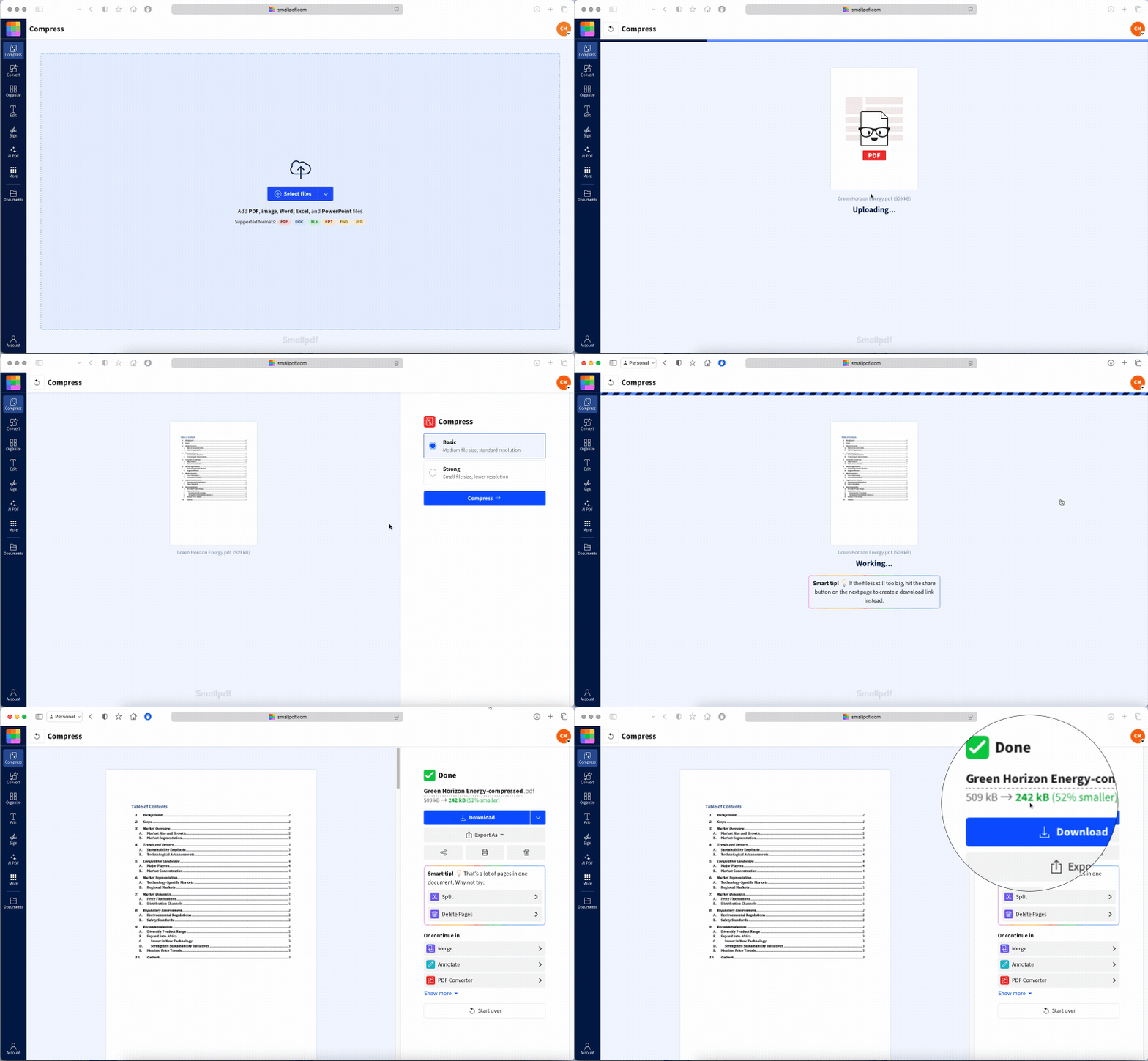
Smallpdf's PDF compressor runs in a browser and provides Basic and Strong compression choices. The final size depends on the document's images, scans, fonts, and page count.
If the smaller PDF still won't send, use Share Document. Upload the file, tap “Share” in the preview, sign in or create an account, copy the document link, and paste it into your message. The text carries a URL instead of the full attachment, and the recipient can click on the URL to download the PDF.
Why Your PDF Won't Send as a Text
A failed attachment doesn't always mean the PDF is damaged. Try these checks in order.
The PDF Is Too Large
There is no universal text attachment limit. The same PDF may send in one conversation and fail in another. Compress it, split it, or send a link.
The Conversation Is Using MMS
One conversation may use RCS or iMessage while another falls back to MMS. Because MMS runs through your carrier, it may accept a smaller attachment. RCS availability also varies by carrier, country, app, and device.
Connect to Wi-Fi or mobile data, check that iMessage or RCS is active, and try again.
The File Hasn't Fully Downloaded
A PDF can appear in your Files app while part of it remains in cloud storage. Open it, wait for every page to load, and then share it again.
Your Messaging App Can't Access Files
Check the app permissions in your phone settings. You can also avoid the in-app attachment button by opening the PDF in your file manager, tapping “Share,” and choosing your messaging app.
The Connection Is Weak
Attachments need a stable connection. Move to stronger Wi-Fi or mobile reception, cancel the stuck message, and resend it. Canceling first helps prevent duplicate copies from arriving later.
The PDF Won't Open Properly
Open the file and check several pages. If it won't load, download it again or ask the sender for a fresh copy. You can also use Split PDF to divide a working but very long document into smaller parts.
Is It Safe to Send a Sensitive PDF by Text?
It depends on the message type and the document. It is possible that SMS and MMS messages can be read by third parties while they travel between devices. Protection for other message types depends on the apps, devices, and carriers involved.
Delivery is only one concern. A PDF may appear in lock-screen previews, remain in backups, be forwarded, or stay on the recipient's phone for years. A mistyped number can also send it to the wrong person.
Before texting a contract, bank statement, identity document, medical record, or another private PDF:
Confirm the number and recipient before attaching the file.
Remove information they don't need with Redact PDF.
Add a password with Protect PDF.
Send the password through another channel, such as a phone call.
Use an approved secure portal for regulated or highly private documents.
Protect PDF works in a mobile browser. Upload the document, enter and confirm a strong password, then download the protected copy before sending it.
A password reduces the chance of an unintended person opening the attachment. The recipient can still share the document after entering it, so send private files only to people you trust.
Frequently Asked Questions
What's the maximum PDF size I can send by text?
There is no single maximum. The limit depends on whether the conversation uses iMessage, RCS, or MMS, as well as your carrier, app, phone, and recipient. Compress the PDF or share a link when it fails.Why did my PDF send to one person but fail to another?
The conversations may use different messaging routes. One recipient may support iMessage or RCS, while the other message falls back to MMS with a smaller limit.Can I send multiple PDFs in one text message?
Yes, if your messaging app supports several attachments and their combined size stays below its limit. You can also use Merge PDF to combine them into one file.Will the PDF lose quality when sent through a text?
A PDF sent as a document attachment should keep its original pages and quality. Quality changes only if you compress, convert, or recreate it before sending.Does sending a PDF by text keep its formatting and links?
Usually, yes. Sending the original PDF as a file keeps its layout, fonts, images, and embedded links. Whether a link opens when tapped depends on the recipient's PDF reader and device settings.Can I send a password-protected PDF through text?
Yes. Attach it like any other PDF, then send the password through a separate channel. The recipient will need the password to open the file.