Convert PDF to JPG
Convert PDF to JPG online for free. Turn PDF pages into high-resolution JPG images or extract images from your PDF in seconds. No signup required, no watermarks.
✅ Trusted by 1.7 billion users since 2013
✅ Free PDF to JPG converter—no installation needed
✅ Convert PDF to JPEG on Mac, Windows, iOS, Android, and Linux

Conversion Without the Hassle
No software to download or install, no signup required. Just drop your file into the box above and convert PDF to JPEG free in seconds.
Intuitive Interface
Smallpdf is designed to be simple for everyone. Converting PDF to JPEG shouldn’t require technical knowledge. Just upload, convert, download. Done.
High-Quality Output
Our PDF to JPG converter delivers high-resolution images that look great and are easy to read. If you’re looking for how to convert PDF to JPG without losing quality, you’ve found the right tool.
Works on Any Platform and Device
This PDF to JPG converter is fully browser-based. Convert files on Mac, Windows, Linux, iOS, or Android. Whether you’re on desktop or mobile, you can turn PDF to JPG online free.
Convert More Than Just PDFs
Need to convert other file types? Smallpdf also lets you convert between PDF, Word, Excel, PPT, and other image formats. With over 30 tools, you can manage your full document workflow in one place.
Safe & Secure at Every Step
We’re GDPR compliant and ISO/IEC 27001 certified. Advanced TLS encryption protects your files during transfer. All documents are automatically deleted an hour after processing to keep your data private.
How To Convert PDF to JPG Online for Free
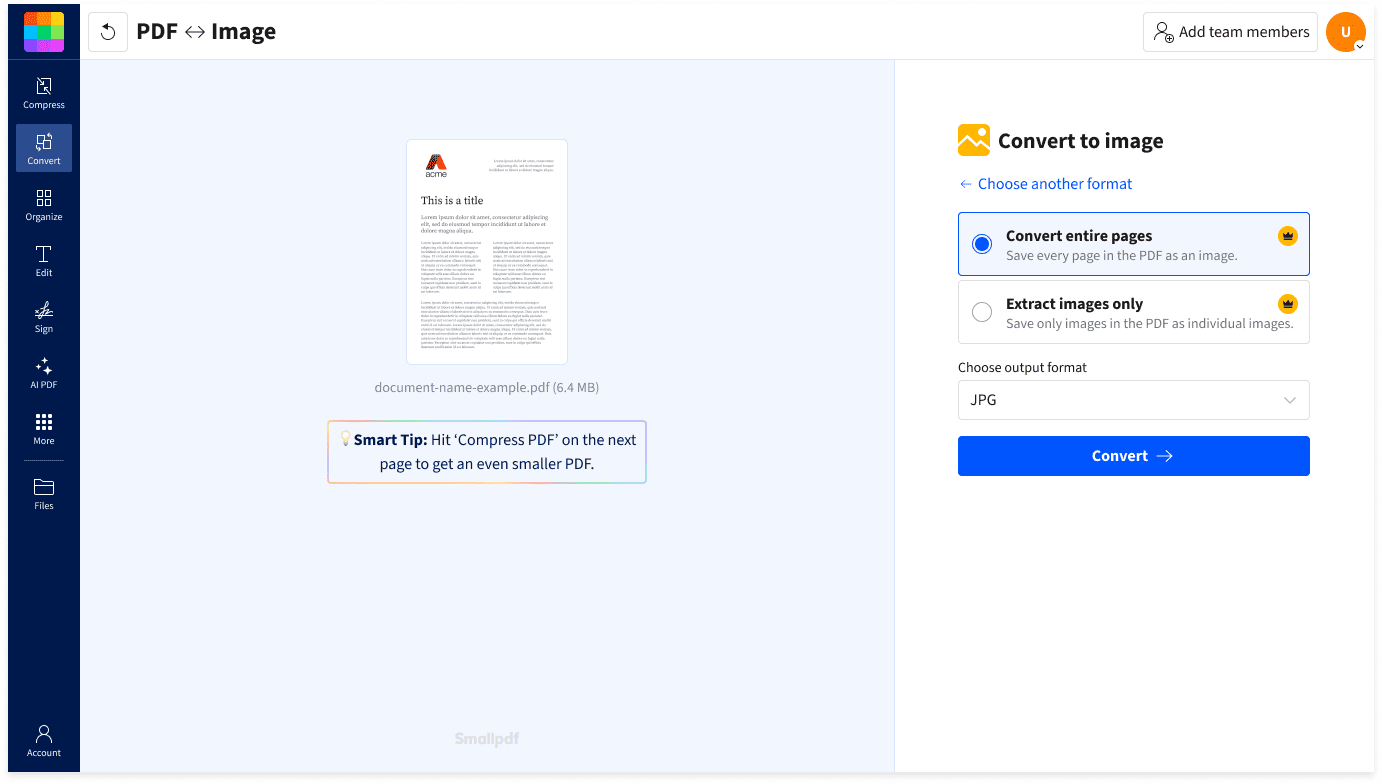
- Drag & drop your file into the PDF to JPG converter at the top of this page.
- Choose to convert full pages (Free) or extract images (Pro).
- Click “Convert” and wait just a moment.
- Download or share your JPG files with a click.
FAQs About Smallpdf’s PDF to JPG Converter
How do I convert PDF to JPG free with no signup?
At the top of this page, you can convert full PDF pages to JPG online free without creating an account. Simply upload your file to the PDF to JPG converter above and click “convert.” Your JPG images will be ready to download in seconds.
Can I extract individual images from a PDF?
Yes. Our PDF to JPG tool lets you extract individual images from your PDF and download them as separate files. This feature is available with our free 7-day Pro trial. The free plan allows you to convert full PDF pages to high-quality JPGs.
Will my image quality be affected when converting from PDF?
The Smallpdf PDF to JPG converter provides high-resolution output, so your images stay crisp, clear, and professional.
How do I convert a PDF to JPG on Mac, Windows, or a mobile device?
Just upload your document from any device or browser into the converter at the top of this page. You don’t even need to sign up to try it. You can also try our free Smallpdf mobile app for iOS and Android.
How can I convert PDF to JPG offline?
With the Smallpdf Windows app, you can convert PDF to JPG and other formats without an internet connection.
PDF to JPG Blog Articles

How To Convert PDF to JPG
Compress PNG Images Online
Need to compress PNG images? Smallpdf lets you shrink file size in seconds while keeping clear, sharp quality—no installs or sign-ups required.
Read article
How To Convert PDF to JPG
How to Check the DPI of a PDF?
Learn how to check DPI of PDF files for print or design use. Follow easy methods to find, inspect, or adjust DPI—even if the metadata isn’t visible.
Read article
How To Convert PDF to JPG
Convert PDF to PNG Images for Free
The easiest way to convert PDF to PNG within seconds, while maintaining the highest of image quality. No registration is required to use.
Read article