- Home
- ›
- ›How to Verify If a PDF Document Is AI-Generated
How to Verify If a PDF Document Is AI-Generated
You can check whether a PDF was written by AI by extracting its text, analyzing the writing style, and checking it using AI-detection tools.
AI Tools & Guides
More on Edit PDF
More on PDF OCR
You can verify a PDF for AI-generated content, but you’ll need readable text first. Once the text is extracted, you can run it through an AI checker and scan for writing patterns that often appear in AI-written work.
As AI use becomes more common, teachers, recruiters, and editors need simple ways to confirm a document’s source. This guide walks you through the quickest methods to check for AI and shows how Smallpdf helps you review PDFs safely.
Why Detect AI-Generated Content in PDF Documents
Detecting AI-generated content in PDFs isn’t just about curiosity—it’s about maintaining content integrity, academic honesty, and professional trust. Whether you’re reviewing student submissions, business proposals, or published content, knowing if a document was created by AI helps you make informed decisions.
Here are the key reasons why AI detection matters:
Academic integrity: Universities and educators need to verify original student work.
Business trust: Companies want authentic content from employees and contractors.
Content verification: Publishers and editors need to ensure human-authored material.
Quality assurance: AI content may lack the nuance and accuracy of human writing.
Modern AI detectors can identify patterns from popular models like ChatGPT, Gemini, and Claude, giving you confidence in your document verification process.
How AI PDF Detection Works (In Plain Language)
AI detection tools analyze text patterns to determine if content was likely generated by artificial intelligence. The process sounds complex, but it’s actually quite straightforward once you understand the basics.
Here’s what AI detectors look for:
Perplexity: How predictable the text is (AI writing tends to be more predictable than human writing)
Burstiness: Variation in sentence length and structure (humans naturally vary their writing style more)
Stylometric patterns: Consistent word choices, phrase structures, and grammatical patterns typical of AI models
Statistical modeling: Frequency analysis of parts of speech and syntactic patterns
The detector runs your text through algorithms that compare these patterns against known AI and human writing samples. While not perfect, these tools provide valuable insights when used properly.
How to Detect AI-Generated PDF Documents with Smallpdf
Ready to check if your PDF contains AI-generated content? Follow this step-by-step process using Smallpdf’s tools and trusted AI detection methods.
Step 1: Prepare Your PDF (Scan/OCR, Extract Text)
Before you can analyze content, you need readable text. If your PDF is scanned or image-based, you’ll need to extract the text first.
Use Smallpdf’s PDF to Word converter to extract text from your document.
2. For scanned documents, our OCR technology will convert images to editable text.
3. Ensure the text extraction quality is good. Poor OCR can affect detection accuracy.
Step 2: Run an AI Content Check on the Text
Once you have clean text, use a dedicated AI detection tool to analyze the content patterns.
Copy the extracted text into an AI detector like Quillbot’s AI detector.
Look for confidence scores and probability indicators.
Pay attention to sentence-level highlights that show potential AI-generated sections.
Step 3: Cross-Check with Smallpdf AI Tools (Summarize, Chat, Questions)
Use Smallpdf’s AI-powered tools to verify your findings and look for additional patterns
Upload your PDF to the AI PDF Summarizer and examine the summary for repetitive
Try Chat with PDF to ask specific questions about the document’s content and context.
Use the AI Question Generator to create queries that might reveal generic or overly vague responses.
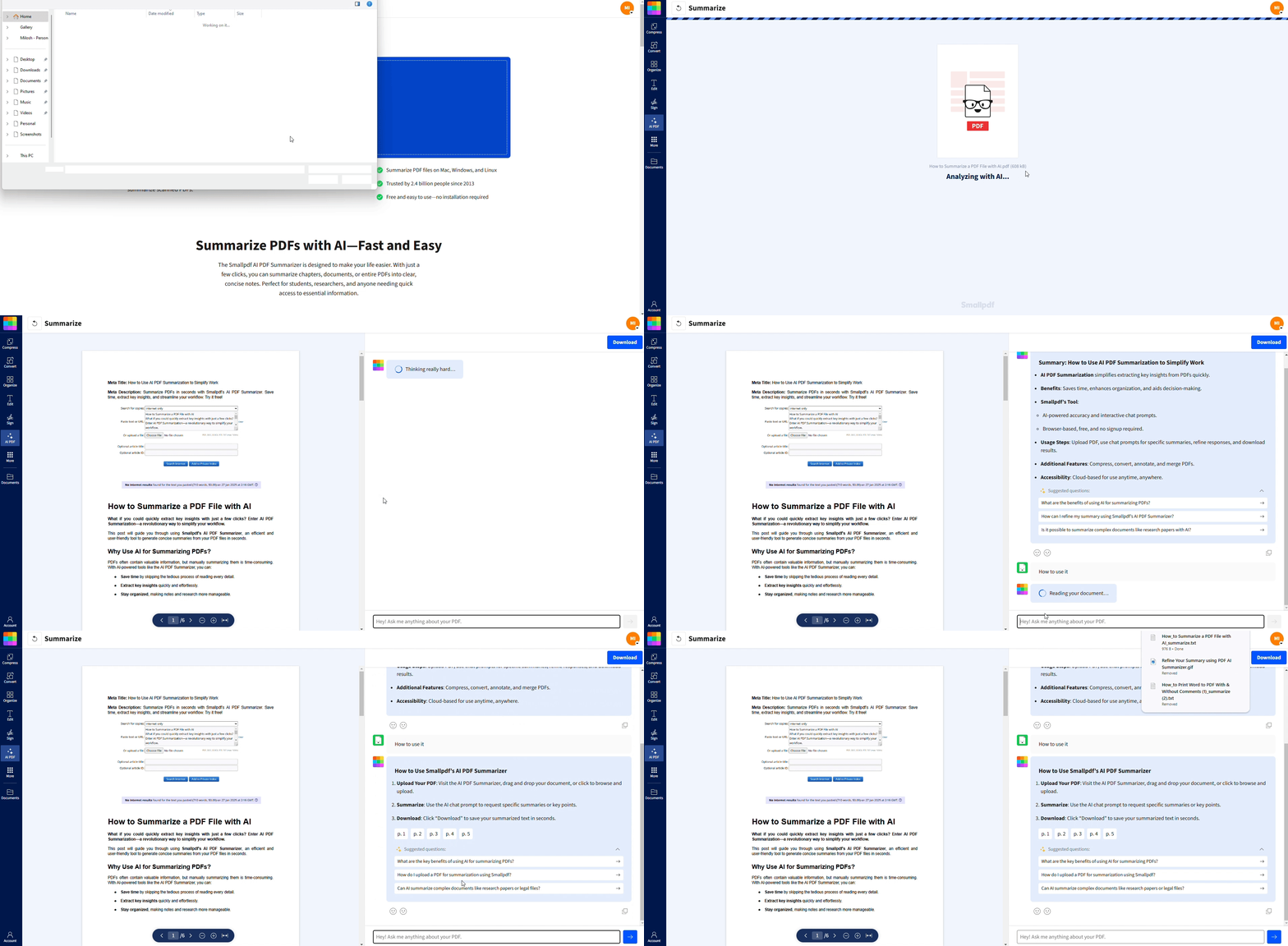
Smallpdf doesn’t detect AI by itself, but it gives you the tools to double-check what an AI detector tells you.
External detectors can flag patterns, but Smallpdf lets you extract clean text, summarize long sections, ask questions about the content, and spot writing that feels generic or inconsistent. Using both together gives you a clearer, more reliable picture than relying on an AI detector alone.
Step 4: Review Metadata and Formatting Cues
Sometimes non-text indicators can provide additional clues about AI generation.
Check document metadata for creation software or unusual timestamps.
Look for formatting inconsistencies or oddly structured layouts.
Notice if the document lacks personal touches or specific details.
Step 5: Document Your Findings
Keep a record of your detection process and results.
Note which sections showed high AI probability scores.
Save screenshots of detection results for your records.
Document any cross-verification findings from multiple tools.
Accuracy and Limitations of AI PDF Detection
AI detection tools are helpful, but they’re not perfect. Understanding their limitations helps you use them more effectively and avoid false conclusions.
Why False Positives Happen (ESL, Short Text)
Several factors can trigger false positive results:
ESL writing: Non-native English speakers may write in patterns that seem AI-like.
Short text samples: Brief passages don’t provide enough data for accurate analysis.
Technical writing: Formal or structured content can appear more “predictable.”
Edited content: Heavily revised human writing might lose natural variation.
Recommended Text Length for Reliable Checks
For the most accurate results, AI detectors work best with:
Minimum 250-500 words for basic detection
1,000+ words for higher confidence scores
Multiple paragraphs rather than single sentences
Remember: Shorter texts increase the chance of false positives or inconclusive results.
Who Benefits from AI PDF Detection
AI detection serves different needs across various industries and use cases. Here are some of the people who find these tools most valuable.
Educators
A teacher receives a PDF assignment that doesn’t match a learner’s earlier writing. After extracting the text with Smallpdf, they run it through an AI checker and compare highlighted sections to previous work.
Businesses and recruiters
A recruiter notices that a PDF CV has oddly structured paragraphs. They extract the text, check it with an AI detector, and use Smallpdf’s AI tools to ask targeted questions about the document’s content.
Editors and publishers
An editor reviewing a submitted PDF chapter finds the style unusually uniform. They analyze the extracted text and discover AI-pattern signals, prompting a follow-up with the writer before publication.
AI Detection vs. Plagiarism Checking for PDFs
Many people confuse AI detection with plagiarism checking, but they serve different purposes and use different methods.
AI Detection:
Analyzes writing patterns and stylometric markers
Looks for predictability and statistical patterns
Doesn’t compare against existing sources
Focuses on how the content was created
Plagiarism Checking:
Compares text against databases of existing content
Uses string matching and semantic overlap detection
Identifies copied or paraphrased material
Focuses on source attribution and originality
You might need both tools: Plagiarism checkers find copied content, while AI detectors identify artificially generated text.
Keep Your Data Private With Smallpdf Security and File Handling
When detecting AI content in sensitive documents, data privacy matters. Smallpdf takes your document security seriously.
File Deletion Policy and Encryption
Your documents are protected throughout the detection process:
All files are automatically deleted from our servers after one hour processing
Data is encrypted both in transit and at rest
No human access to your document during processing
Compliance and Certifications
Smallpdf maintains industry-standard security practices:
GDPR compliant for European users
SOC 2 and SOC 3 certified for data handling
Regular security audits and access controls
Start Your Free Trial to Access All Smallpdf Tools
Ready to verify your PDF documents with confidence? Access our complete suite of AI-powered tools and document management features.
Start your free trial and get unlimited access to PDF conversion, AI detection support tools, and secure document processing.
Check whether a PDF is AI-generated using Smallpdf Pro
