Smallpdf Reviewed by FinancesOnline
Smallpdf earns an 8.3/10 score and 96% user satisfaction on FinancesOnline, plus ‘Rising Star’ and ‘Excellent User Experience’ awards.
Document Workflow Guides
More on Smallpdf Extensions
PDF Sharing Tool & Guides
FinancesOnline recently rated our platform 8.3/10 and 96% satisfaction, recognizing Smallpdf with ‘Rising Star’ and ‘Excellent UX’ awards.
This page is a short overview of their review, not a deep breakdown of every detail. If you’re deciding if Smallpdf fits your workflow, we’ll explain what the score and awards mean for you, and where they show up in real PDF work.

Quick Takeaways From the FinancesOnline Recognition
FinancesOnline’s listing highlights a few signals that matter if you use PDFs often.
Overall rating: 8.3/10
User satisfaction: 96%
Awards mentioned: ‘Rising Star’ and ‘Excellent User Experience’
Theme: Simple, browser-based PDF work with drag-and-drop and cloud-friendly workflows.
What the Score and Awards Mean for Your Day-to-Day PDFs
Ratings can feel abstract, so here’s the practical translation.
You Spend Less Time Setting up and More Time Finishing the Task
A lot of PDF frustration comes from friction, installing software, hunting settings, or working around file limits. The review emphasis on usability lines up with how people use Smallpdf: Quick, focused tasks that you can finish in one sitting.
Smallpdf handles the Workflows Most People Run Weekly
Most users don’t need a full publishing suite. They need reliable PDF chores done fast, like converting a file for a client, compressing for email, or combining documents into one clean attachment. That’s the workflow mix we keep optimizing.
It Also Reflects Scale, Not Just Features
Our pricing page notes we’ve been trusted by 1.7 billion people since 2013, which lines up with the idea that the product has been stress-tested by a huge range of real-world documents.
The Workflows the Review Mentions Most Often
FinancesOnline’s write-up and comparisons repeatedly refer to a few core capabilities. Here’s how they map to common done-now moments.
Converting Files to and From PDF
If you receive a Word file and need a clean PDF, or you get a PDF and need an editable version, conversion is usually step one. Smallpdf is built around that convert, fix, send loop, without forcing you into a heavy editing interface for simple jobs.
Compressing for Email, Portals, and Upload Limits
When a PDF is too large to share, compression is the quickest unblock. It’s also one of the most common reasons people search for a PDF platform in the first place.
Merging Documents Into One Deliverable
Contracts, exhibits, reports, scanned pages, and appendices often arrive as separate files. Merge lets you turn that stack into one PDF that’s easier to review and store.
Signing PDFs Without Derailing Your Workflow
Signing is often the final step before you send a document out the door. Smallpdf includes Sign PDF, and our plans also reference Request Signatures through Sign.com for more structured signing requests.
Try a Full PDF Workflow in Under a Minute
If you want to see what a smooth PDF workflow feels like, this is the fastest way to test it.
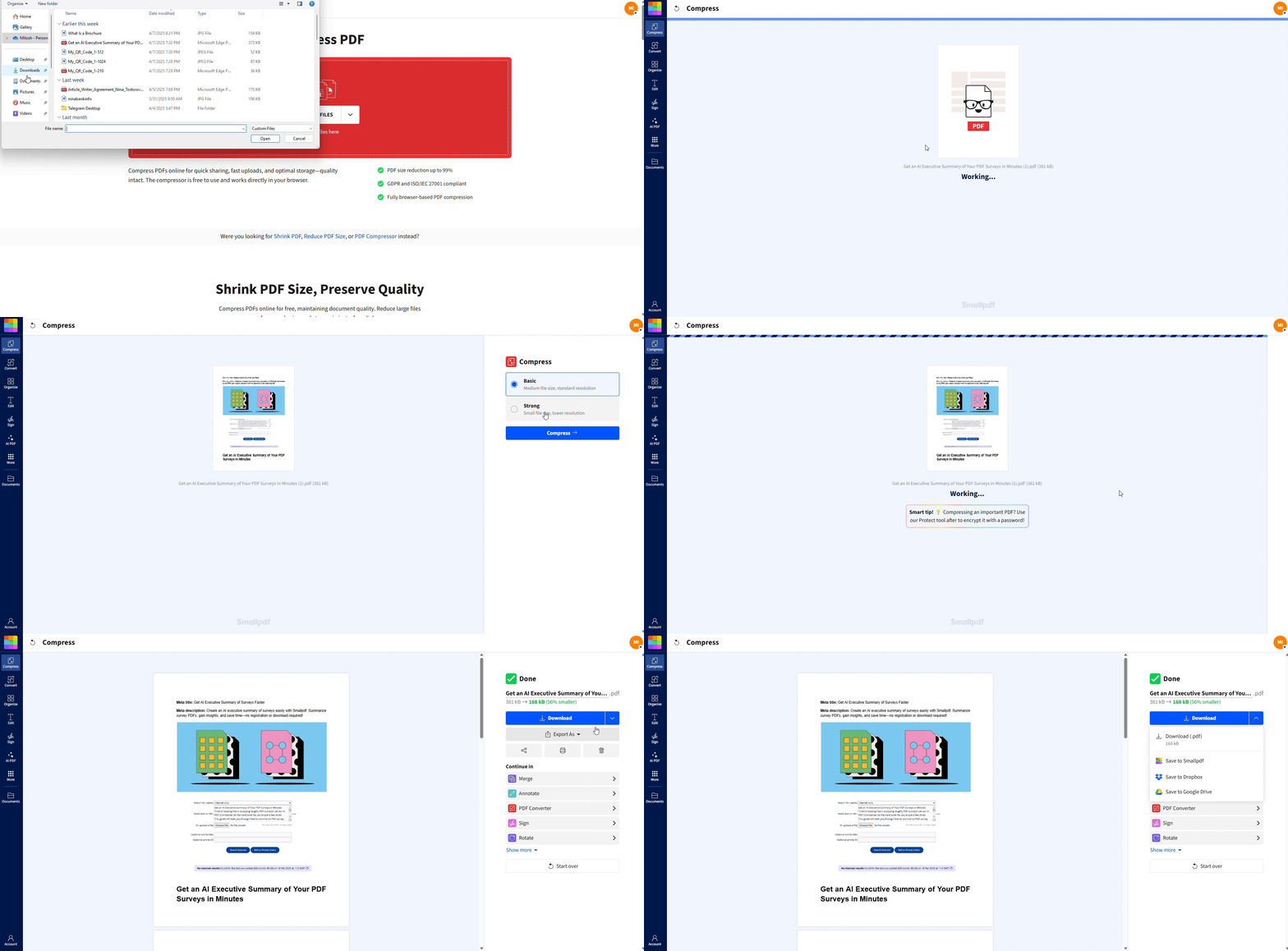
Step 1: Upload Your File
Open the tool you need (like Compress PDF or Merge PDF), then drag and drop your document into the upload area.
Step 2: Choose the settings that matters
Select what you actually need for this task. That might be a compression level, the order of merged files, where signatures go, or the format you want to export to. You don’t have to configure anything else.
Step 3: Download and Share
Download the finished file right away, or keep working with another feature if your workflow needs a second step.
Security and Privacy Behind the Recognition
A score only matters if you can trust the workflow, especially with sensitive documents.
We protect document transfers with 256-bit TLS encryption, we’re ISO 27001 certified, and fully compliant with GDPR and CCPA.
Your files are removed from our servers automatically after an hour of processing for most tasks.
Read the Full FinancesOnline Review
If you want a full breakdown across every category, you can view the complete FinancesOnline review.
For a more practical next step, run a real document through the same workflow you use every week—convert, compress, merge, or sign—and see how much time you save.
Frequently Asked Questions
What does an 8.3 score on FinancesOnline actually mean?
It’s FinancesOnline’s overall rating for Smallpdf on their review and comparison pages. It’s meant as a high-level signal, not a guarantee for every edge case.Is Smallpdf safe for contracts and sensitive PDFs?
We use TLS encryption for transfers, maintain ISO 27001 certification, and automatically delete your files from our servers after an hour of processing for most tasks.Can I use Smallpdf without paying?
Yes. We offer a free plan and paid plans. You can do quite a lot with the free plan, with some daily limits. The Pro plan gives you unlimited access to all Smallpdf tools.What’s the simplest way to see the ‘Excellent UX’ claim for myself?
Pick one task you do often, like compressing or editing PDFs, run it once, and judge the flow from upload to download. That’s the experience the review text points to most directly.Upgrade PDF workflows with Smallpdf Pro
